

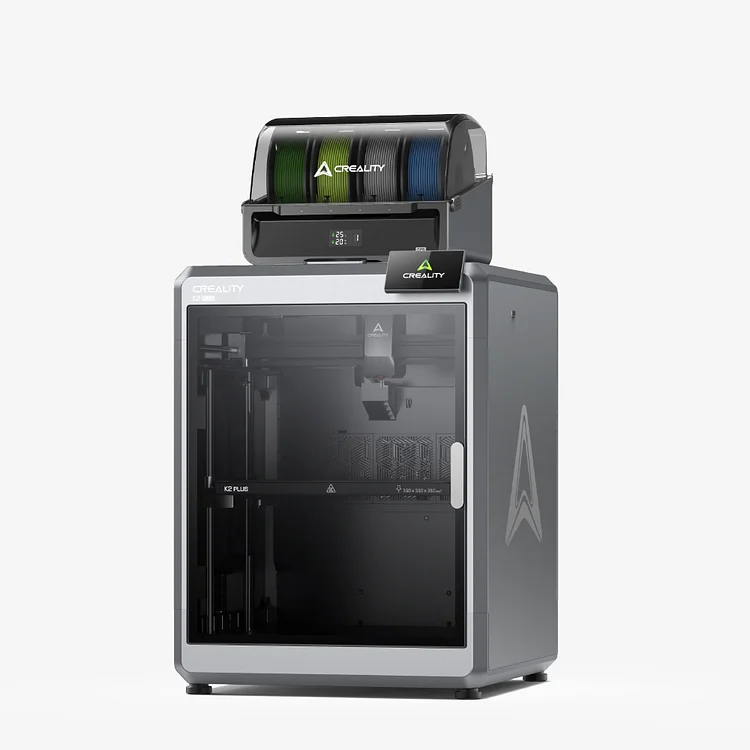
K2 Plus Combo 3D Printer: A$2,569.00
【CFS: Multi-Color Printing, Up to 16 Colors Using 4 CFS】
【Next-gen Direct Drive Extruder】
【FOC Closed-Loop Motors】
【350*350*350mm Build Volume】
【Active Chamber Heater】
Creality K2 Plus and CFS FAQs: Troubleshooting Guide
all
2024-12-23 20:08:31
We’ve compiled the most frequently asked questions about the Creality K2 Plus and Creality Filament System (CFS). This guide aims to help you understand these advanced tools better.
K2 Plus Combo 3D Printer
Creality K2 Plus FAQs
1. What makes K2 Plus different from the K1 series?
K2 Plus is the flagship of Creality’s 2nd-gen K series, featuring a 350×350×350mm build volume, APUS extruder, closed-loop motor, and multi-color printing via the intelligent CFS.
2. What are the key specifications of K2 Plus?
- Build Volume: 350×350×350mm
- Max Speed: 600mm/s, Acceleration: 30000mm/s²
- Nozzle Temp: 350°C, Heatbed Temp: 120°C, Chamber Temp: 60°C
3. Is K2 Plus open-source?
Yes, the K2 Plus runs on a Klipper-based Creality OS, which adheres to open-source principles. It includes built-in Moonraker and Fluidd services, with ports 4408 and 8000 respectively. More details can be found on Creality's GitHub page.
4. Advantages of closed-loop servo motors?
Unlike traditional open-loop step motors, the closed-loop servo motors on the K2 Plus offer 32,768 micro-steps per revolution, ensuring high torque, precise motion, and smooth response. They operate quietly (under 50 dB) and use Field-Oriented Control (FOC) to regulate voltage, minimizing overheating risks and preventing print clogs.
5. How does auto-leveling work?
The K2 Plus features dual optical Z-axis sensors for tilt adjustment and a strain gauge in the printhead for auto-leveling. This setup ensures accurate, hands-free leveling. The 5mm aluminum heatbed resists deformation, maintaining consistent leveling accuracy.
6. Is the large K2 Plus heatbed safe and efficient?
Yes, the K2 Plus uses an 800W AC-powered heatbed with dual safety features:
- An overheating fuse under the heatbed.
- An additional fuse inside the printer body.
Both safeguards automatically disconnect the system if overheating occurs, ensuring reliable and safe operation.
7. How many AI cameras are on the K2 Plus?
The K2 Plus features two AI cameras:
- One near the nozzle, used for flow rate calibration and Pressure Advance (PA) adjustments.
- The other on the front frame, designed for video monitoring and print failure detection.
8. How can I print 16 colors?
The K2 Plus Combo currently supports up to four colors with one Creality Filament System (CFS) unit. To print 16 colors, you'll need to connect four CFS units. Creality plans to offer stand-alone CFS units for this purpose in the future.
9. Why does the K2 Plus have dual Z-axis instead of three like the K1 series?
The K1 series uses a one-to-three Z-axis design: while it appears to have three lead screws, only one is motorized. It includes one Z-motor with three guide rails.
In contrast, the K2 Plus has a dual Z-axis setup with two independent servo motors. This improves stability, providing:
- Two lead screws
- Four thicker optical axes
- Greater Z-axis force for more accurate and reliable movement.
10. What advantages does the K2 Plus' nozzle strain gauge offer for leveling?
Unlike the K1 series with strain gauges on the hotbed corners, the K2 Plus features a high-sensitivity strain gauge directly on the nozzle. Advantages include:
- Higher sensitivity: Ensures precise leveling data.
- Lower trigger force: Reduces errors compared to the K1 series.
This design improves leveling accuracy and reliability.
11. Does the K2 Plus support LAN and internet file transfer?
Yes, the K2 Plus supports both LAN and cloud-based file transfers. Features include:
- LAN Control: Use CrealityPrint5 for direct file transfer and control
- Cloud Integration: Connect to Creation Cloud to monitor cameras, start prints, or receive notifications.
- K2 Plus wifi specifications: 2.4GHz and 5GHz IEEE 802.11 a/b/g/n/ac, 802.11ac supports up to 433.3Mbps transmission speed
12. Why is the print size limited to 350mm?
The 350mm build volume was chosen to balance user needs and cost efficiency. Larger sizes would increase the printer’s size, shipping costs, and overall price significantly. Market research shows that 350mm meets most users’ requirements for professional and home use, ensuring a cost-effective solution.
Creality CFS FAQs
1. Is the CFS useful beyond multi-color 3D printing?
The CFS primarily enhances multi-color printing, but it also provides reliable automatic filament management, reducing print failures and improving efficiency. Its compatibility with Creality OS (based on Klipper) ensures open-source flexibility. For more details, refer to Creality’s GitHub page.
2. Is the CFS compatible with the K1 or Ender-3 V3 series?
Not yet. To use CFS with the K1 or Ender-3 V3 series, an extruder upgrade is necessary. Creality is developing a multi-color upgrade kit, which will include:
- CFS unit
- Power adapter
- New extruder with a cutter
- Nozzle wiping module
- Updated firmware
This comprehensive upgrade kit is a significant project and won’t be available in the near future.
3. What filaments does CFS support?
CFS can use any flament spools with a diameter of 197-202mm. Creality paper spools are compatible. CFS supports most filaments such as PLA, PETG, ABS, ASA, PA-CF, but not with flexible filaments such as TPU and damp PVA, BVOH.
4. Does CFS support TPU?
No, the CFS does not support TPU. If you need to print with TPU, use the standard spool holder on the K2 Plus.
5. What is the 24V power socket on the CFS for?
In most cases, the CFS receives power directly from the printer via the 485 cable. However, for printers without a dedicated 485 port (like the K1 and Ender-3 V3 series), a USB adapter is required. In this scenario:
- The 485 port handles data transmission only.
- The 24V power supply provides the necessary power to the CFS unit.
Recent News

all
2026-10-15
8 Halloween 3D Prints for Australian Spring Parties
Halloween is coming, and the lolly stash has already suffered a few unexplained disappearances. W...

all
2026-06-11
Creality EOFY Sale 2026: Save Up to 60% on 3D Printers, Scanners & Accessories
The End of Financial Year (EOFY) is one of the biggest shopping events in Australia, and it's the...

all
2025-10-30
Black Friday 2025: Creality AU Sale – Save $1200 AUD Now
This Black Friday, Creality invites all Makers to land on the “Maker Planet”—a galactic hub where...

all
2025-10-16
Halloween Party Sale: Best Discounts for the Spooky Season
The leaves are falling, the nights are getting longer, and Halloween is just around the corner! C...