

Creality K2 Plus Filament Parameter Guide: Temperature, Speed & Retraction
The Creality K2 Plus stands out as a heavy-duty high-speed 3D printer, boasting a generous 350 x 350 x 350 mm build volume tailored for professional engineering and small-batch production. Its integrated support for multi-color printing further expands the creative possibilities for large-scale, complex models.
Top-tier print results depend heavily on fine-tuning filament variables—including nozzle and bed temperatures, as well as cooling profiles. Because every material has its own unique thermal properties, specific configurations are necessary to unlock the printer's full potential. This guide provides the essential settings for the K2 Plus, helping you master various filaments for flawless execution.
| Parameter | Hyper PLA | ENDER FAST PLA | Hyper ABS | Hyper PLA-CF | HP ASA | Hyper PETG | HP-TPU | CR-TPU | CR-PETG | CR-ABS | CR-PLA | CR-Silk |
|---|---|---|---|---|---|---|---|---|---|---|---|---|
| Nozzle Temp (℃) | 220 | 220 | 260 | 220 | 260 | 240 | 220 | 220 | 240 | 260 | 220 | 220 |
| Hotbed Temp (℃) | 50 | 50 | 80 | 50 | 90 | 70 | 40 | 40 | 70 | 100 | 50 | 50 |
| Cavity Temp (℃) | 35 | 35 | 50 | 35 | 50 | 35 | 35 | 35 | 35 | 60 | 35 | 35 |
| Pressure Advance | 0.04 | 0.04 | 0.03 | 0.04 | 0.04 | 0.05 | 0.4 | 0.34 | 0.07 | 0.04 | 0.04 | 0.04 |
| Maximum Volume Velocity (mm³/s) | 23 | 23 | 23 | 23 | 14 | 23 | 3 | 2 | 12 | 18 | 18 | 10 |
| Flow Ratio | 0.95 | 0.95 | 0.95 | 0.95 | 0.95 | 0.98 | 1 | 1.02 | 0.95 | 0.95 | 0.95 | 0.95 |
| Cooling Fan (Min/Max) % | 100/100 | 100/100 | 10/60 | 100/100 | 10/40 | 40/80 | 100/100 | 100/100 | 40/80 | 10/60 | 100/100 | 100/100 |
| (Min/Max) Layer Time (s) | 100/4 | 100/6 | 30/12 | 100/8 | 40/10 | 30/8 | 100/8 | 100/8 | 30/8 | 30/12 | 100/4 | 100/4 |
| Cooling Overhang Threshold Value (%) | 50 | 50 | 25 | 50 | 25 | 25 | 95 | 95 | 25 | 25 | 50 | 50 |
| Overhang Fan Speed (%) | 100 | 100 | 80 | 100 | 100 | 100 | 100 | 100 | 100 | 80 | 100 | 100 |
| Parameter | CR-PLA Matte | CR-PLA Fluo | EN PLA+ | Generic PLA | Generic ABS | Generic TPU | Generic PETG | Generic Silk | Generic HIPS | Generic PC | Generic ASA |
|---|---|---|---|---|---|---|---|---|---|---|---|
| Nozzle Temp (℃) | 220 | 220 | 220 | 220 | 260 | 220 | 240 | 220 | 240 | 260 | 260 |
| Hotbed Temp (℃) | 50 | 50 | 50 | 50 | 100 | 40 | 70 | 50 | 100 | 110 | 90 |
| Cavity Temp (℃) | 35 | 35 | 35 | 35 | 50 | 35 | 35 | 35 | 50 | 50 | 50 |
| Pressure Advance | 0.04 | 0.04 | 0.04 | 0.04 | 0.06 | 0.3 | 0.1 | 0.04 | 0.05 | 0.03 | 0.04 |
| Maximum Volume Velocity (mm³/s) | 18 | 18 | 14 | 14 | 16 | 2 | 9 | 8 | 10 | 18 | 14 |
| Flow Ratio | 0.95 | 0.95 | 0.95 | 0.95 | 0.95 | 1 | 0.95 | 0.98 | 0.95 | 0.95 | 0.95 |
| Cooling Fan (Min/Max) % | 100/100 | 100/100 | 100/100 | 100/100 | 10/60 | 100/100 | 40/80 | 100/100 | 30/80 | 10/60 | 10/70 |
| (Min/Max) Layer Time (s) | 100/4 | 100/4 | 100/4 | 100/6 | 30/12 | 100/8 | 30/8 | 80/8 | 30/10 | 30/12 | 40/8 |
| Cooling Overhang Threshold Value (%) | 50 | 50 | 50 | 50 | 25 | 95 | 25 | 50 | 10 | 25 | 25 |
| Overhang Fan Speed (%) | 100 | 100 | 100 | 100 | 80 | 100 | 90 | 100 | 80 | 80 | 80 |
Best Practices & Precautions
1. Moisture Control and Drying
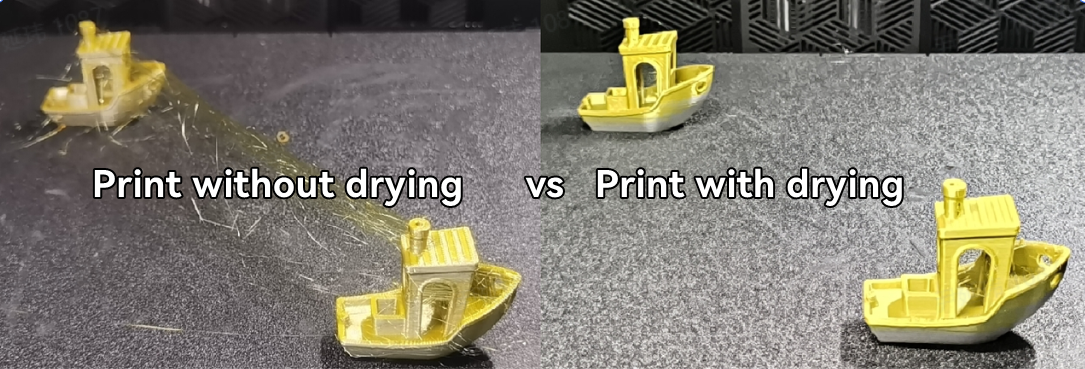
To maintain structural integrity and surface finish, filaments must be kept dry. This is particularly critical for moisture-sensitive materials like PETG, TPU, CR-Silk, and Nylon. We recommend drying your spools before use and using an active dryer during longer prints. For a deep dive into specific temperatures and times, check out Creality's filament drying guide to prevent stringing and bubbling.
2. Managing Thermal Shrinkage (Warping)
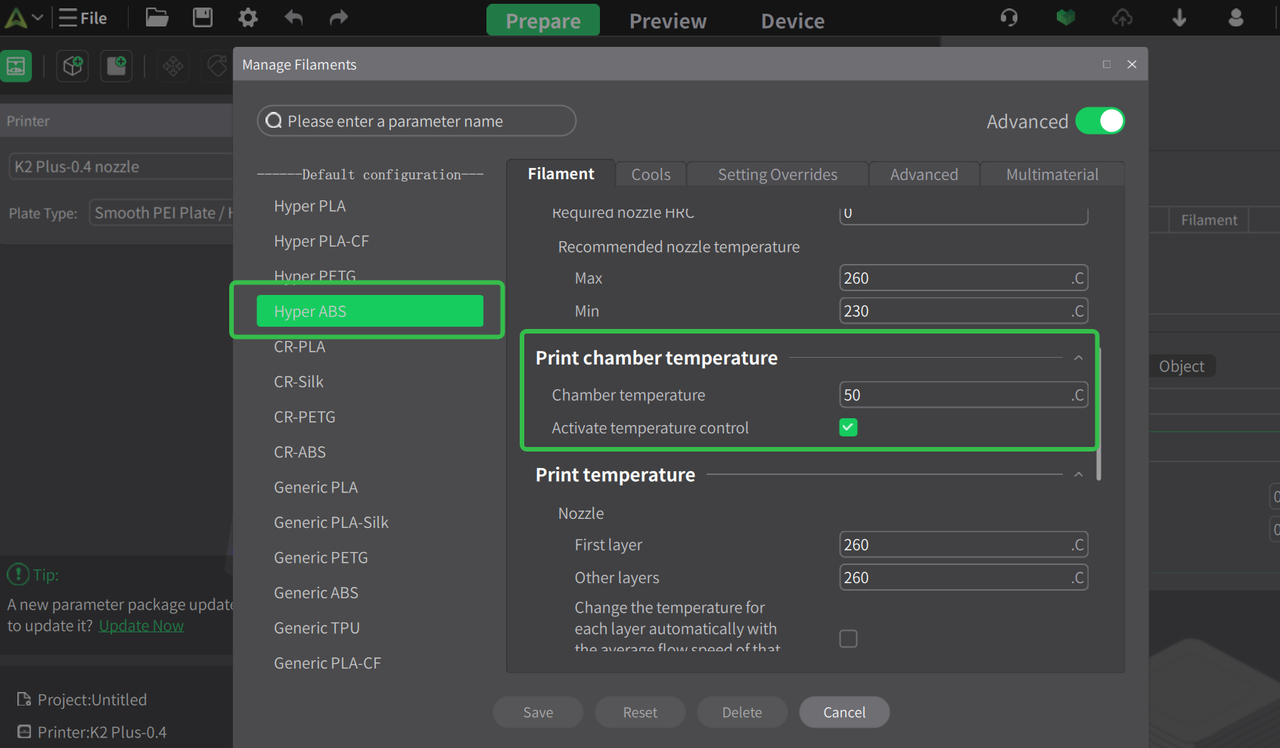
Engineering materials like ABS, ASA, and PC are prone to warping or layer cracking if cooled too quickly. To ensure success, print with an active chamber temperature between 50-60°C and keep the machine fully enclosed (door and lid closed). The default profiles in Creality Print are pre-optimized to activate the chamber heater for these specific materials.
3. TPU Printing Requirements
Flex filaments require special handling: Do not use the Creality CFS system for TPU, as the flexible strand can buckle in the internal paths.
Ensure your TPU has a Shore hardness of at least 85A; softer variations (75A/80A) may jam the extruder. For the best stability and lowest resistance, bypass long PTFE tubes and feed TPU as directly as possible into the extruder.
4. Working with Abrasive CF Materials
When printing with Carbon Fiber (CF) composites like PA-CF or PET-CF:
Use a 0.6mm nozzle to significantly reduce the risk of clogs. If using smaller nozzles, never go below 0.2mm.
Target a nozzle temperature of 280-300°C. It is vital to perform a "cold pull" or use a cleaning needle when transitioning between CF materials and standard plastics to clear out any residual fibers.
5. Leveraging Slicer Defaults
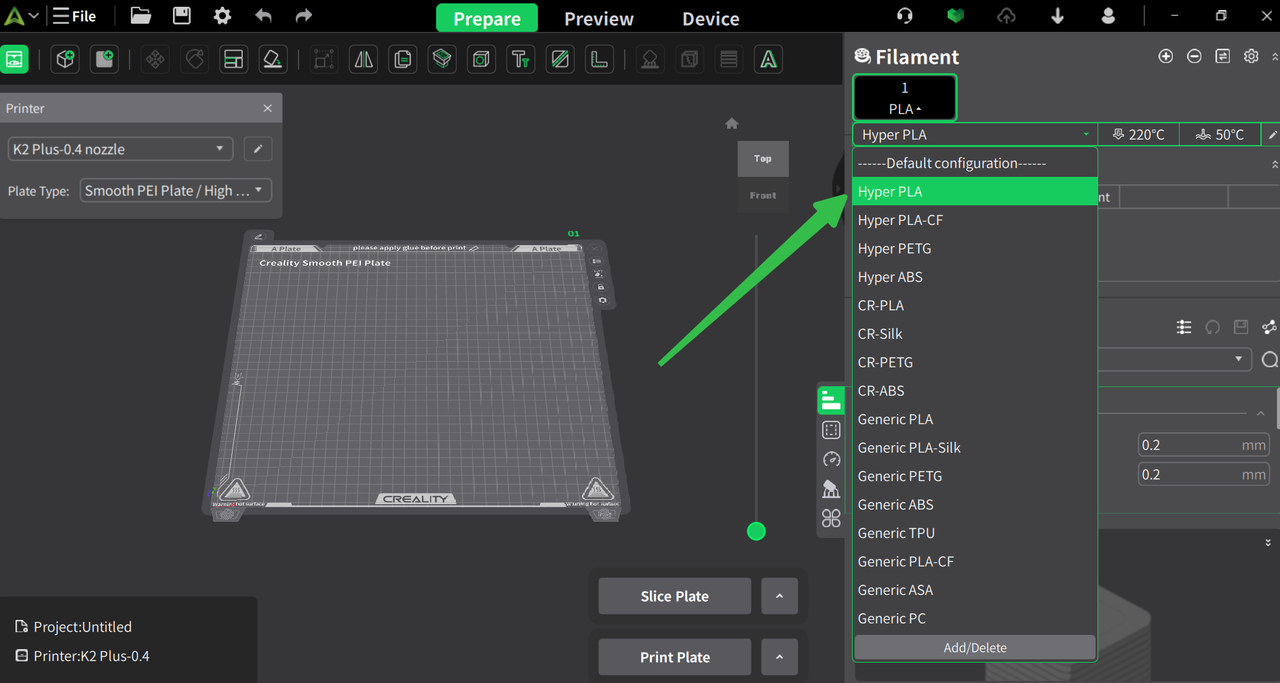
For the most reliable experience, start with the official CrealityPrint profiles. With over 40 professionally tested filament types already pre-loaded, you can simply select your material and hit print. If using a third-party brand, choose the closest generic equivalent as your baseline.
Print Profile Overview:
Standard (0.20mm): The versatile "sweet spot" for most projects, balancing speed and detail.
High Detail (0.08 - 0.16mm): Best for intricate miniatures or functional parts needing tight tolerances. Note: Print times will increase significantly.
Draft/Fast (0.24 - 0.28mm): Ideal for rapid prototyping where aesthetic finish and invisible layer lines are secondary to speed.
Recent News

Creality Ferret Series: The Beginner’s Roadmap to Success

Creality Sermoon P1: A 0.02mm Accuracy Professional 3D Scanner for Engineering Workflows
