



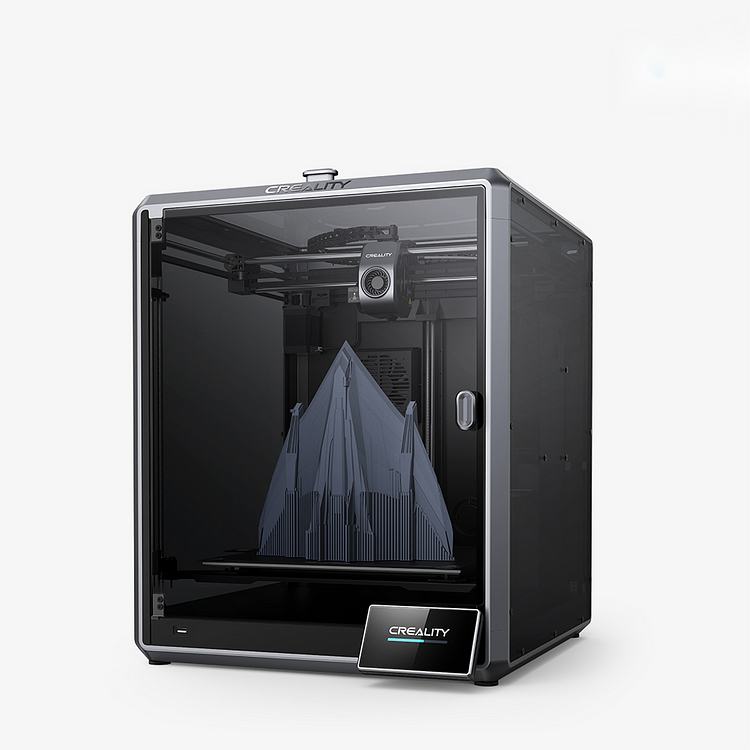
Creality K1 Speed Rules All: An Epic Leap Forward CA$709.00 Online
【Rapid Printing: 600mm/s Speed 20000mm/s² Acceleration】
【Effortless Auto-Leveling】
【Solid Unibody Frame】
【Auxiliary Cooling Fan in Chamber】
【Intelligent Control: Remote Control and Self-Tests】
【User-Friendly Design: Suits Beginners and Experts】
Creality K1 vs. K1 Max vs. K1C: An In-depth Comparison
all
2024-12-23 05:17:39
In April 2023, Creality launched its flagship 3D printers, the K1 and K1 Max, marking a significant transition from the budget-conscious Ender 3 series toward high-performance fully enclosed, high-speed 3D printing with the integration of advanced AI technology. These innovations not only improved speed and function but also quickly garnered widespread acclaim and popularity.
The K1 series will soon welcome a new addition, the K1C, slated for release in 2024 with pre-sales kicking off on January 25. Marketed as the "Champion of Speed and Skill," the K1C is tailored for carbon fiber 3D printing, sharing key elements with its predecessors, the K1 and K1 Max, whilst introducing several noteworthy enhancements.
This article aims to offer a detailed comparative analysis of the K1, K1 Max, and K1C models to help you identify the 3D printer that best matches your requirements. For more specific information about the K1C model, please click here.

Part1: K1 Series Key Features
Let's dive into the technical specs of the K1, K1 Max, and K1C, covering key machine details, printing parameters, print speed, filament compatibility, printer features, and more.
| Type | Model | K1 | K1 Max | K1C |
|
Device Information |
Product Dimensions | 355*355*480mm | 435*462*526mm | 355*355*482mm |
| Package Dimensions | 415*415*550mm | 508*508*608mm | 428*428*567mm | |
| Net Weight | 12.5kg | 18kg | 12.4kg | |
| Gross Weight | 16kg | 23kg | 16kg | |
| Display Screen | 4.3" color touch screen | 4.3" color touch screen | 4.3" color touch screen | |
| Electronic | Rated Input Voltage | 100-120V~/200-240V~ | 100-240V~ | 100-240V~, 50/60Hz |
| Output Voltage | 24V DC | 24V DC | 24V DC | |
| Rated Power | 350W | 1000W | 350W | |
|
Printing Parameters |
Printing Technology | FDM | FDM | FDM |
| Build Volume | 220*220*250mm | 300*300*300mm | 220*220*250mm | |
| Printing Accuracy | 100±0.1mm | 100mm±0.1 | 100±0.1mm | |
| Layer Height | 0.1-0.35mm | 0.1-0.35mm | 0.1-0.35mm | |
|
Sprinting Speed |
Typical Printing Speed | 300mm/s | 300mm/s | 300mm/s |
| Max. Printing Speed | ≤600mm/s | ≤600mm/s | ≤600mm/s | |
| Acceleration | ≤20000mm/s² | ≤20000mm/s² | ≤20000mm/s² | |
|
Supported Filament |
Filament Diameter | 1.75mm | 1.75mm | 1.75mm |
| High speed | ABS/Hyper PLA | ABS/Hyper PLA | ABS/Hyper PLA | |
| Regular | PLA/PETG/PET | PLA/PETG/PET | PLA/PETG/PET | |
| Flexible | TPU | TPU | TPU | |
| Strength | PA/ABS/ASA/PC | PA/ABS/ASA/PC | PA/ABS/ASA/PC | |
| Wear-resistant | / | / | PLA-CF/PA-CF/PET-CF | |
|
Nozzle Components |
Extruder Count | 1 | 1 | 1 |
| Extruder | Dual-gear direct drive extruder | All-metal direct drive extruder | ||
| Nozzle Material | Copper Alloy | Hardened Steel | Tri-metal Nozzle Integrated | |
| Nozzle Diameter | 0.4mm (Standard) | 0.4mm (Standard) | 0.4mm (Standard) | |
| Nozzle Optional | 0.6mm, 0.8mm | 0.6mm, 0.8mm | 0.6mm, 0.8mm | |
| Nozzle Temperature | 300℃ | 300℃ | 300℃ | |
|
Printing Platform |
Build Surface | PEI Flexible build plate | PEI Flexible build plate | PEI Flexible build plate |
| Heatbed Temperature | 100℃ | 100℃ | 100℃ | |
| Heating time | 30℃-300℃ ( ≤ 6min. ) | 30℃-300℃ ( ≤ 3min. ) | 30℃-300℃ ( ≤ 6min. ) | |
|
Machine Features |
Silent Mainboard | Yes | Yes | Yes |
| Power Loss Recovery | √ | √ | √ | |
| Filament Runout Sensor | √ | √ | √ | |
| Dual Z-axis | 3 Z-axis | 3 Z-axis | 3 Z-axis | |
| Leveling Mode | Hands-free auto leveling | Dual hands-free auto leveling | Hands-free auto leveling | |
| Remote Printing | Yes | Yes | Yes | |
| Enclosure | Yes | Yes | Yes | |
| Air Purifier | / | √ | √ | |
| Sleep Mode | / | / | √ | |
| Software | File Transfer | USB drive, WiFi | USB drive, WiFi | USB drive, WiFi |
| Printable File Format | G-Code | G-Code | G-Code | |
| File Formats for Slicing | STL, OBJ, AMF | STL, OBJ, AMF | STL, OBJ, 3MF | |
| Slicing Software | Creality Print; Cura, Simplify3D, PrusaSlicer | |||
| UI Languages | 10 Languages | 10 Languages | 10 Languages | |
| Smart AI | AI Camera | Optional | √ | √ |
| AI LiDAR | / | √ | / | |
Part2: Overview of Similarities in the K1 Series

Let's kick off by highlighting what the Creality K1, K1 Max, and K1C printers have in common. First off, all three printers arrive almost fully assembled, making setup a breeze—expect to get them up and running in just about 20 minutes. Once assembled, the touchscreen guides you through automatic calibration and a self-test to ensure the hardware is in tip-top shape. If all checks out, you're all set for your first print.
1. Printing Speed
A standout feature they have in common is the CoreXY configuration, which offers enhanced motor precision, a more compact design, and remarkable print speeds up to 600 mm/s, with acceleration hitting 20,000 mm/s².
2. Build Plate
The K1 series printers come equipped with a heated aluminum alloy bed for quick and uniform heating. The build platform uses a flexible smooth PEI sheet, ensuring robust adhesion for both minuscule and sizable prints. Sometimes, a dab of glue might further boost adhesion. Its enclosed architecture facilitates effortless printing with high-temperature materials like ABS and ASA.
3. UI Design
Each printer boasts a user-friendly 4.3-inch color touchscreen, making it easy to preview your models before printing. They run on a Creality-optimized version of Klipper, upgraded by Creality to let users leverage the advantages of Klipper, including tailored optimization profiles and access to an open-source community eager to dive into more advanced functionalities.
4. Software
The Creality K1, K1 Max, and K1C models are supported by the official Creality Print slicing software and are compatible with widely used 3D printing software like Cura, Simplify3D, PrusaSlicer, etc. This versatility gives users the freedom to pick the slicing software that fits their preferences and production style best.
Part3: Comprehensive Comparison of Differences in the K1 Series
While all models share some core features, there are distinctive differences between the K1, K1 Max, and K1C worth highlighting:
1. Build Volume
The K1 Max truly lives up to its "Max" moniker, boasting an expansive build volume of 300 x 300 x 300 mm. This space allows for printing larger models in one piece, eliminating the need for post-print assembly. On the other hand, the K1 and K1C both offer a build volume of 220 x 220 x 250 mm, akin to the standard Ender 3 size.
2. Rated Power & Mainboard
With a staggering 1000W power rating, the K1 Max stands head and shoulders above the rest, compared to the 350W of the K1 and K1C. This power advantage enables quick temperature ramps—reaching 60℃ in just 90 seconds—consistent heating at varying voltages (220V and 110V), and the capability to directly power upgrades from the motherboard, including the upcoming Creality multi-material system.
3. Filament Support

Both the K1 and K1 Max are versatile in their filament compatibility, supporting materials like PLA, Hyper PLA, PETG, ABS, TPU, and PA. The K1C, distinguished by the "C" for "Carbon," expands upon this palette to include wear-resistant filaments such as PLA-CF, PA-CF, and PET-CF.
With an all-metal integrated nozzle and throat, the K1C ensures smooth filament flow, extended durability, and simple upkeep. Its advanced all-metal proximal extruder offers consistent extrusion and precise control, promoting exceptional print quality.
4. Enhanced AI Support
The K1, K1 Max, and K1C models each boast innovative AI capabilities, albeit with varying configurations. For instance, the K1 offers a Smart AI camera as an optional enhancement, while the K1C comes standard with the AI camera included. The K1 Max, meanwhile, stands apart by featuring both "AI LiDAR" and an "AI Camera," positioning it at the forefront in terms of functionality.
Specifically, the K1 Max benefits from AI-driven features that improve print quality and minimize the risk of failed prints, ultimately saving on filament costs. Its LiDAR sensors expertly map the initial layer, ensuring optimal adhesion and flow calibration from the get-go. Moreover, its AI camera continuously oversees the printing process, identifies any issues, and records time-lapse videos.
5. Pricing
The entry-level K1 is priced at CA$709, with the K1C available for pre-order at $750 (enjoying a 5% discount off its standard price of $789). The K1 Max, with its advanced features, commands an approximate CA$460 premium. While these upgrades mainly offer convenience, they significantly boost print quality and safety. Diving deeper into the enhancements:
The K1 features a ventilation fan, but the K1 Max goes a step further by incorporating a carbon air filter. Additionally, the K1 Max boasts a more substantial build volume of 300 x 300 x 300 mm and is equipped with superior AI-assisted functions like "AI LiDAR" and "AI Camera," enhancing print success rates. That said, for those looking to upgrade the K1 affordably, opting for the AI camera accessory is a cost-effective alternative to purchasing the K1 Max outright.
Part4: Finding Your Fit: Choosing Between K1, K1 Max, or K1C
K1 Speedy 3D Printer
K1 Max 3D Printer
Creality K1 Max 3D Printer: Speedy. Smart. Super CA$1249.00 Online
【Rapid Printing: 600mm/s Speed 20000mm/s² Acceleration】
【Core XY Nimble Setup for Speed: Agile and Swift】
【Ceramic Heater Encircles the Hotend: Max. 32mm³/s Flow】
【Model Cooling by Dual Fans】
【Max Capacity 300x300x300mm, Efficient Use of Space】
【AI-assisted Carefree Printing】
【Rapid Printing: 600mm/s Speed 20000mm/s² Acceleration】
【Core XY Nimble Setup for Speed: Agile and Swift】
【Ceramic Heater Encircles the Hotend: Max. 32mm³/s Flow】
【Model Cooling by Dual Fans】
【Max Capacity 300x300x300mm, Efficient Use of Space】
【AI-assisted Carefree Printing】
K1C 3D Printer

Determining the best value among the K1, K1 Max, and K1C really boils down to what you value most.
If you're budget-conscious, the K1 offers incredible speed and quality at the most affordable price point.
Those looking to tackle large-scale models and want the latest AI features for seamless printing will find the K1 Max to be perfect. It builds on the K1’s strengths and includes premium upgrades, though it's priced a bit higher.
For enthusiasts interested in working with carbon fiber filaments or who prioritize a quiet printing environment, the K1C is your go-to. It features enhancements in the nozzle and extruder for quiet operation.
In essence, while the K1, K1 Max, and K1C share many core qualities, the distinctions between them introduce significant upgrades that can be seen as high-end features.
Conclusion
To wrap up, the Creality K1, K1 Max, and K1C are standout 3D printers offering superb printing speed and top-notch quality. Take the step today and choose the 3D printer that best meets your needs and preferences.
Recent News

all
2026-10-19
6 Halloween 3D Prints for a Cosy Canadian October
A pumpkin by the door, a ghost on the bookshelf and a candy bowl that needs refilling suspiciousl...

all
2025-10-16
Trick or Treat! Creality's Halloween Party Sale Extravaganza – A Haunting Deal is Coming!
The leaves are falling, the nights are getting longer, and Halloween is just around the corner! C...

all
2024-12-23
Advantages of laser engraving (low investment high return)
In the era of entrepreneurship, many people will look for entrepreneurial opportunities. How abou...

all
2024-12-23
Why do my printed 3D models have layers that crack or break?
3D printed models are built by printing layer by layer. If the two layers do not adhere well to e...