



Classic DIY 3D Printer For Beginner | Best Value £139.00
【DIY Assembly: Entry Level for Beginners】
【Integrated Structure】
【High Precision Print】
【Stable Power Supply】
【Quality Extruder】
【Rapid Heating Up】
Ender-3 3D Printer Clogged Nozzle Cleaning & Replacing Tutorial
Tutorial
2024-12-23 09:48:52
Everything is ready, and we can start our 3D printing journey. But what happens when the extruder won't dispense the material? For those new to 3D printing, this is a familiar problem. Fortunately, it's a fairly simple problem to solve. This article will outline and explain possible reasons why your extruder isn't extruding material, and provide solutions. We will use the Ender-3 as an example:
Ender-3 3D Printer
1. The Material are not Filled in Place Before Printing
1.1 Phenomenon description
Before printing, if no filament comes out, it's likely not loaded. Once successfully loaded, filament will extrude from the nozzle.
1.2 Troubleshooting and solution
Stop printing, then feed the machine until the filament comes out of the nozzle. Most Creality printers have two feed methods, manual and automatic. The procedures are generally the same, please refer to the details:
K1 Max Filament Guide: How to Load & Unload & Change Filament
How to Change Filament on a Creality K1: Step-by-Step Guide
How to load filament Ender 3 Guide
2. The Printer nozzle clogged
1.1 Phenomenon description
The printer's extrusion gear retracts and no filament flows out from the nozzle, causing the printer to be unable to print. Printer clogging is an unavoidable problem for FDM printers. When this problem occurs, we need to clean the nozzle manually.
1.2 Cause Analysis: why does my nozzle keep clogging
-
The filament diameter is oversized, causing increased resistance as it passes through the extrusion clamp and throat tube, resulting in uneven extrusion and nozzle clogging.
-
The filament contains large-diameter, high-melting materials (high-temperature plastics, iron particles, sand, coarse fibers, coarse wood chips, etc.) with diameters exceeding the die diameter, resulting in material clogs.
-
The filament contains low-melting polymers, so prolonged printing causes low-melting materials to gel and carbonize, resulting in clogging.
-
Mechanical loosening of the extrusion clamp, motor failure in the extrusion clamp, and insufficient push force.
-
Nozzle heater module malfunction resulting in temperature drop.
-
The environment in which the printer is used is dusty. Dust in the air sticks to the filament. As the printer operates, it enters the nozzle with the filament. The dust layer will accumulate and cause the nozzle to clog.
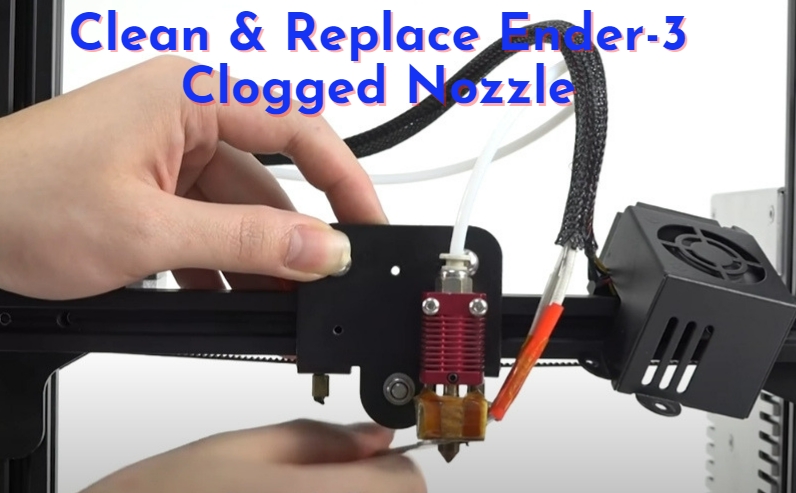
1.3 Troubleshooting & solution: How to Clean & Replace Ender-3 Clogged Nozzle
Method 1: Use a needle to clean Ender-3 Clogged nozzle
1. Heat the nozzle temperature to between 230 and 250 degrees, pull out the filament when the temperature reaches the set value;
2. Use the equipped needle to clean the nozzle repeatedly from the bottom to the top, until the cleaning is completed.
3. Feed the machine manually. Insert the filament until the filament flows normally out of the nozzle.
Method 2: Replace Ender-3 Clogged Nozzle (when blockage is serious)
1. Heat the nozzle temperature to between 230 and 250 degrees, waiting for the temperature to rise the value and completing the retraction, if not pull out the material, can cut it directly;
2. Cut the tap or tap off the Teflon tube, unscrew two screws to fix nozzle fan cover, use the small open wrench in the tool box to unscrew the nozzle;
3. Unscrew the large quick joint and pull out the Teflon tube; press the spring pad of the yellow joint, pull out the Teflon tube; if cant pull out, cut off it then replace the new yellow joint, insert the new one to the nozzle throat and clean up the impurities;
4. Installation of new nozzle, screw the nozzle in by hand first, then pre-lock the nozzle with a tool, finally, use plier to assist in fixing the nozzle and tighten the nozzle;
5. Install the large and fast joint, and measure the length of the Teflon pipe outside the nozzle, insert the tube again and make sure it inserted to the end, and then insert the tube into the small joint;
6. Install the fan cover and tighten the screws, and then use ties or tape to secure the Teflon pipe and wires;
7. Load the filament and the nozzle will run normally.
Video Tutorial: Creality Ender-3 Cleaning Out The Clogged Nozzle!
Click to know more about FDM 3D Printer Troubleshooting, from issues like nozzle clogging, stringing, warping, and poor accuracy to concerns such as weak interlayer adhesion and brittle filament.
 Related Guides:
Ender-3 Printing Speed Settings
Recent News

Tutorial
2026-09-20
Creality Ender 3D Printers Compared: Which Printer Is Better for You?
The Creality Ender Series has changed considerably since the first Ender-3 became a familiar choi...

Tutorial
2026-08-24
3D Printer Nozzle Blocked? Causes and Safe Fixes
Weak or missing extrusion does not always mean the nozzle is fully blocked. Check the spool, fila...

Tutorial
2026-08-18
10 Best Back-to-School 3D Prints for Students in 2026
Back-to-school season is a great time to put your 3D printer to practical use. From desk organise...

Tutorial
2026-07-13
Creality Top 5 Beginner 3D Printers: 2026 Full Guide
Choosing your first 3D printer should be simple. The best beginner 3D printer is not always the m...