


20 Simple Arduino Projects for Beginners
Arduino is a versatile and beginner-friendly platform for exploring electronics and programming. Designed to make prototyping accessible, it has become a global standard for makers, students, and engineers. According to Arduino, its open-source ecosystem allows anyone to build interactive projects with minimal setup and cost.
With just a few basic components and a bit of creativity, you can create a wide range of fun and functional projects—from simple LED circuits to interactive devices.
In this article, we’ll walk you through 20 easy Arduino projects for beginners, helping you build practical skills step by step while gaining confidence in both hardware and coding.
1. Smart Fan
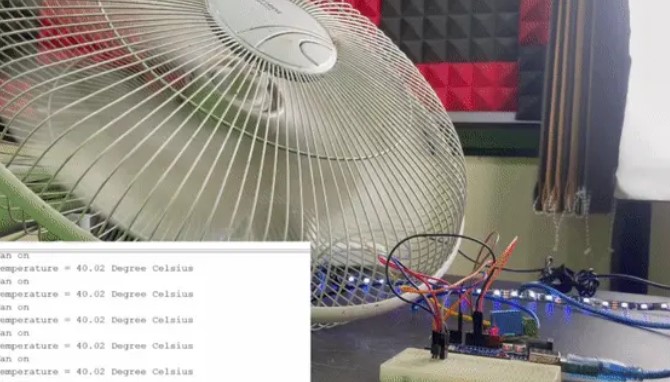
Are you feeling the heat of summer? Let's build a smart fan using an Arduino! This project involves using a temperature sensor and a relay to control a fan based on the room's temperature. It's a cool way to automate your fan.
Components Needed:
- Arduino Uno
- LM35 temperature sensor
- Relay module
- DC fan
- Jumper wires
- Breadboard
How It Works::
The LM35 temperature sensor measures the room temperature and sends the data to the Arduino. When the temperature exceeds a set value, the Arduino activates the relay, turning on the fan. Once the temperature drops to the desired level, the fan turns off. This project helps you learn about using sensors and relays in a practical application.
Designer: Prathamesh Barik
Project page: Circuit Digest
2. Accurate Clock
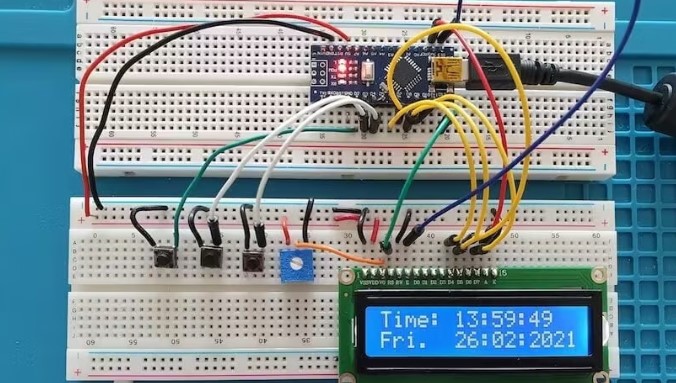
Do you need a reliable clock to keep track of time? With an Arduino, you can build an accurate clock that uses a real-time clock (RTC) module. This project is simple yet effective in teaching timekeeping with Arduino.
Components Needed:
- Arduino Nano or Uno
- RTC module (DS3231 or DS1307)
- Jumper wires
- Breadboard
- Display module (optional)
How It Works::
The RTC module keeps track of time and communicates with the Arduino via I2C protocol. You can display the time on a screen or monitor it through the serial monitor. This project is budget-friendly and introduces you to working with RTC modules and I2C communication.
Designer: paulsb
Project pages: Arduino Project Hub, Hackster .
3. Room Thermometer and Humidity Meter
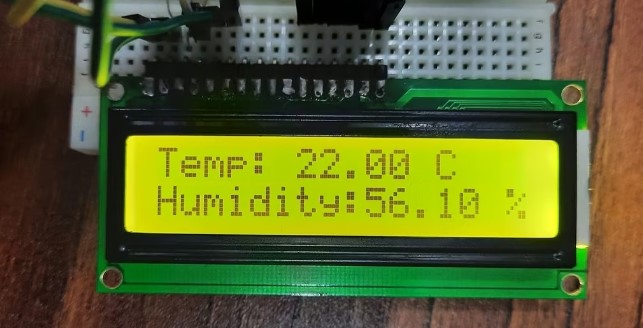
Monitoring temperature and humidity levels is important for maintaining a comfortable environment. With an Arduino, you can build a room thermometer and humidity meter to keep an eye on these conditions.
Components Needed:
- Arduino Uno
- DHT11 or DHT22 sensor
- LCD
- Jumper wires
- Breadboard
How It Works::
The DHT sensor measures temperature and humidity, sending the data to the Arduino. You can display the readings on an LCD screen, providing real-time information about your room's conditions. This project is low-cost and teaches you about using sensors and displays.
Designer: Ummara Mushtaq
Project page: Make Use Of
4. RFID Door Lock
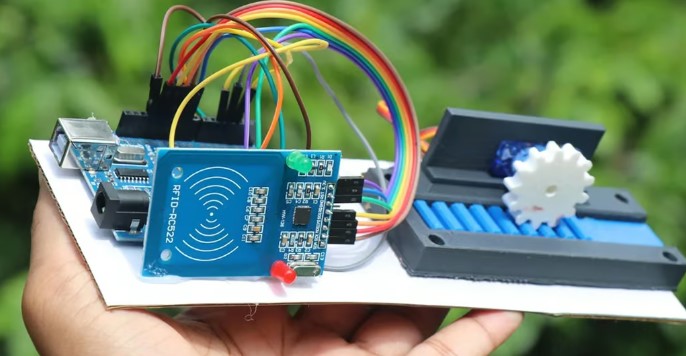
Enhance your home security with an RFID door lock using Arduino. This project allows you to unlock a door using an RFID tag, providing a modern twist to traditional locks.
Components Needed:
- Arduino Uno
- RFID module
- Servo motor
- Jumper wires
- Breadboard
How It Works::
The RFID module reads the unique ID of the RFID tag. If the ID matches the one programmed in the Arduino, it sends a signal to the servo motor to unlock the door. This project is a great introduction to RFID technology and servo motor control.
Designer: Robo Hub
Project page: Instructables
5. Cleaning Robot
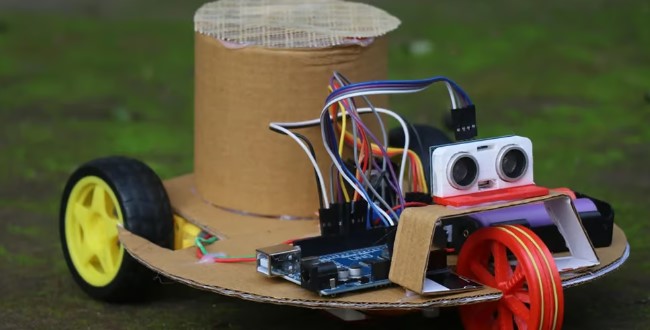
Tired of cleaning the floor? Build a cleaning robot with Arduino! This project involves creating a robot that autonomously cleans the floor using a simple mechanism.
Components Needed:
- Arduino Uno
- Ultrasonic sensor
- DC motors
- Motor driver module
- Jumper wires
- Breadboard
- Cardboard or 3D-printed chassis
How It Works::
The ultrasonic sensor detects obstacles, allowing the robot to navigate and clean the floor. The DC motors drive the robot, while a fan collects dust and dirt. This project combines robotics and automation, making it both fun and educational.
Designer: CrazyScience
Project page: Instructables
6. BlindSight
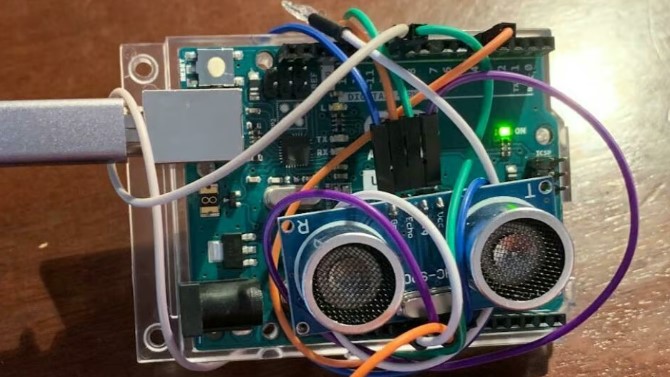
BlindSight is a wearable device that assists the sight-impaired by providing vibrations to avoid obstacles. This project demonstrates how technology can be used to enhance accessibility.
Components Needed:
- Arduino Uno
- Ultrasonic sensor
- Vibration motor
- Jumper wires
- Breadboard
- Wearable accessories (e.g., wristband)
How It Works::
The ultrasonic sensor detects obstacles and sends signals to the Arduino. The Arduino then activates the vibration motor to alert the wearer. This project is easy to assemble and showcases the potential of assistive technology.
Designer: Daniel Ramsgard
Project page: Hackster
7. Lightning Monitoring System
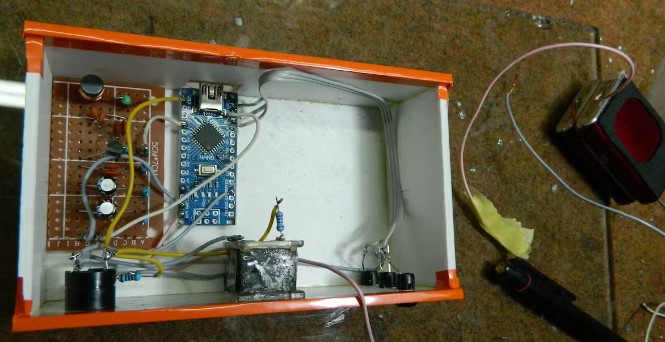
Monitor nearby lightning strikes with this clever Arduino project. By detecting electromagnetic radiation, this system provides an early warning for lightning activity.
Components Needed:
- Arduino Uno
- Electromagnetic sensor
- Jumper wires
- Breadboard
How It Works::
The electromagnetic sensor detects lightning-induced signals and sends them to the Arduino. You can visualize the data on a display or monitor it through the serial monitor. This project is both intriguing and practical for those interested in weather monitoring.
Designer: Mirko Pavleski
Project pages: Hackster , Instructables
8. OLED Eyes
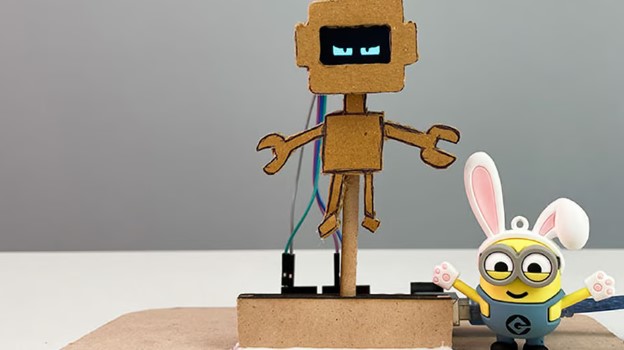
Create expressive OLED eyes for your robotic projects! This simple project involves animating eyes using an OLED display and Arduino.
Components Needed:
- Arduino Uno
- OLED display
- Jumper wires
- Breadboard
How It Works::
The Arduino controls the OLED display to show different eye animations. You can choose from various designs or create your own. This project is perfect for adding personality to your robots and learning about display control.
Designer: Rithik Krisna
Project pages: Circuit Digest , Arduino Project Hub
9. Lie Detector
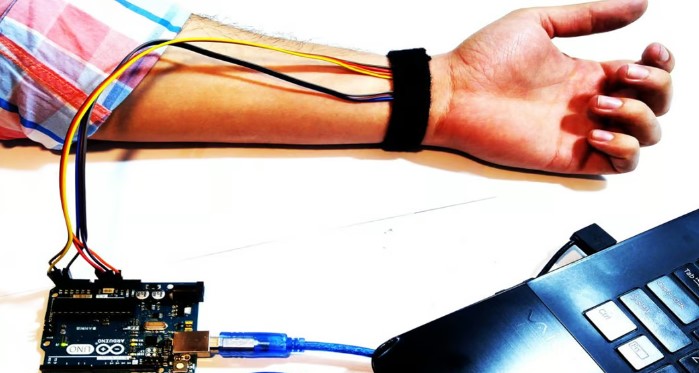
Ever wanted your lie detector? With Arduino, you can build a polygraph that measures physiological responses to determine truthfulness.
Components Needed:
- Arduino Uno
- Heart rate sensor
- Temperature and humidity sensor
- Jumper wires
- Breadboard
How It Works::
The sensors monitor heart rate and temperature changes, sending data to the Arduino. The data is displayed on the serial plotter, allowing you to analyze responses. This project introduces you to data visualization and sensor integration.
Designer: Saeed Olfat
Project page: ElectroPeak
10. Minimalist LED Lamp
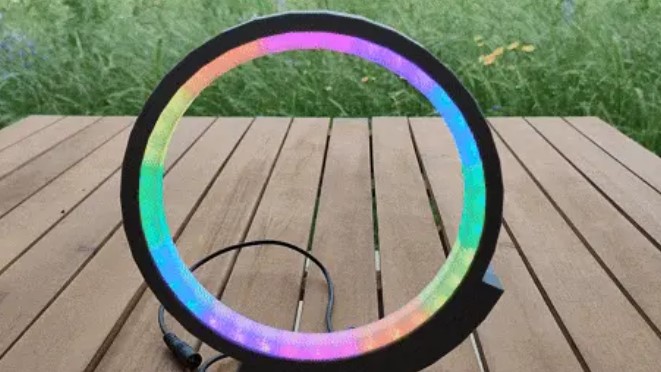
Brighten up your space with a minimalist LED lamp. This project is simple to build and adds a touch of elegance to any room.
Components Needed:
- Arduino Uno
- RGB LED strip
- Jumper wires
- Breadboard
- ● 3D-printed or crafted lamp structure
How It Works::
The Arduino controls the LED strip to produce various lighting effects, such as rainbow glitter or ripple effects. This project is budget-friendly and teaches you about controlling LEDs and creating visually appealing designs.
Designer: andrei.erdei
Project page: Instructables
11. Nano Piano
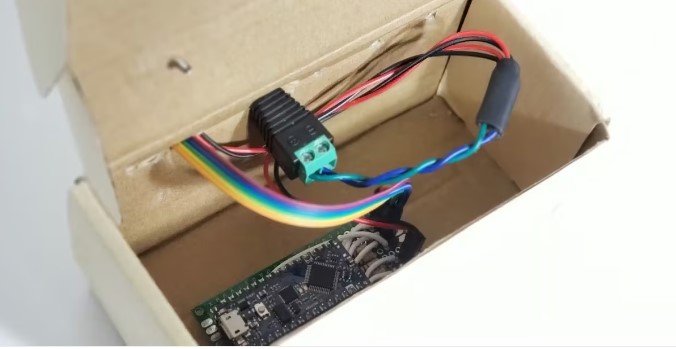
Play a tiny piano with an Arduino Nano! This project involves creating a four-key piano that produces sound using a piezo buzzer.
Components Needed:
- Arduino Uno
- Piezo buzzer
- Push buttons
- Jumper wires
- Breadboard
How It Works::
Each button corresponds to a different note, and when pressed, the Arduino sends a signal to the piezo buzzer to play the note. This project is compact and introduces you to sound generation with Arduino.
Designer: Christian Madlansacay
Project pages: Hackster , GitHub
12. Traffic Light
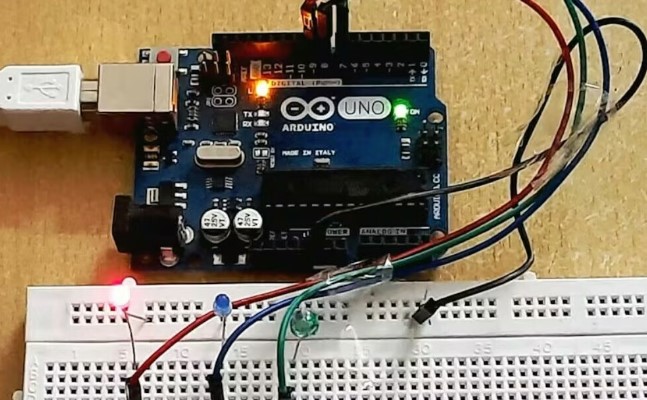
Simulate a traffic light system with Arduino. This project is perfect for beginners looking to learn about controlling LEDs and timing sequences.
Components Needed:
- Arduino Uno
- Red, yellow, and green LEDs
- Resistors
- Jumper wires
- Breadboard
How It Works::
The Arduino controls the LEDs to simulate a traffic light sequence, with each light turning on and off in a timed manner. This project is straightforward and helps you understand basic electronics and coding.
Designer: DIY Inventor
Project page: Hackster
13. Snake Game
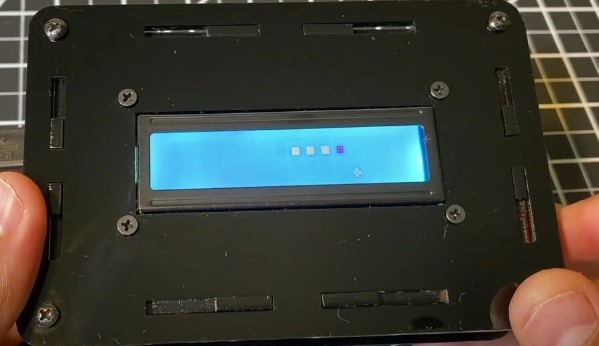
Relive the classic Snake game with Arduino! This project involves creating a simple version of the game using a 16x2 character LCD screen and buttons.
Components Needed:
- Arduino Uno
- 16x2 character LCD
- Push buttons
- Jumper wires
- Breadboard
How It Works::
The Arduino controls the LCD to display the game, and buttons are used to control the snake's movement. As the snake eats apples, it grows longer, and the game becomes more challenging. This project is fun and educational, teaching you about game development and display control.
Designer: Sridhar Rajagopal
Project page: Hackster
14. Sequence Memory Game
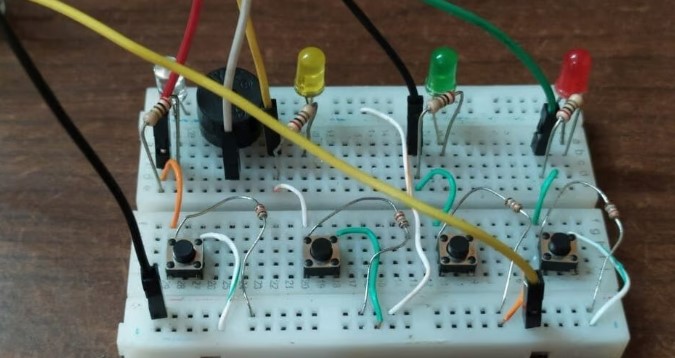
Test your memory with a sequence-based game using Arduino. This project is inspired by the classic memory game Simon and helps improve memory skills.
Components Needed:
- Arduino Uno
- LEDs (four different colors)
- Push buttons
- Jumper wires
- Breadboard
How It Works::
The Arduino generates a random sequence of LED flashes, and the player must repeat the sequence using the buttons. The sequence becomes longer with each round, challenging the player's memory. This project is engaging and educational, teaching you about sequence generation and user input handling.
Designer: Techatronic
Project page: Hackster
15. Bluetooth-Controlled Car
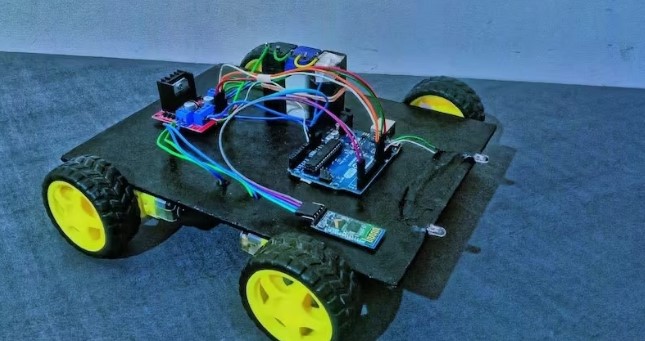
Control a car remotely using Bluetooth and Arduino. This project combines electronics and wireless communication for a fun and interactive experience.
Components Needed:
- Arduino Uno
- Bluetooth module
- DC motors
- Motor driver module
- Jumper wires
- Breadboard
- Car chassis
How It Works::
The Bluetooth module receives commands from a smartphone, sending them to the Arduino. The Arduino controls the motor driver to move the car accordingly. This project is a great way to learn about Bluetooth communication and motor control.
Designer: angadiameya007
Project page: Hackster
16. FarmAid: Plant Disease Detection Robot
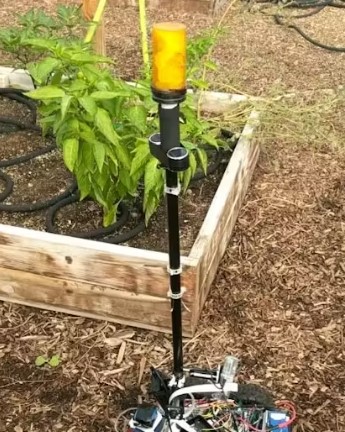
Imagine a robot that can roam around your farm and identify unhealthy plants. Using the DonkeyCar platform, you can build an autonomous robot that moves through your garden without harming plants or soil. It can detect diseased crops and mark them with eco-friendly colors.
Components Needed:
- Arduino Uno
- Raspberry Pi 3 Model B
- IBT-2 HBridge
- Raspberry Pi Camera Module
How It Works::
This project combines Arduino and Raspberry Pi, making it a bit more advanced but very rewarding. You’ll learn about object detection and robot movement.
Designer: hackster.io
Project page: Sohaib Arif , Alex Polonsky , Juanito Yu-Co , David W
17. Arduino Clock with Islamic Prayer Times

This project allows you to create a clock that displays both the Gregorian date and Islamic prayer times. It’s a practical project that uses an Arduino board, a real-time clock module, and a simple display.
Components Needed:
- Arduino Uno
- RTC DS1307
- Nokia 5110 display
How It Works::
By building this clock, you’ll learn how to manage time in Arduino projects and display information on a screen.
Designer: hackster.io
Project page: Hatem Zehir
18. Door Lock System with Arduino
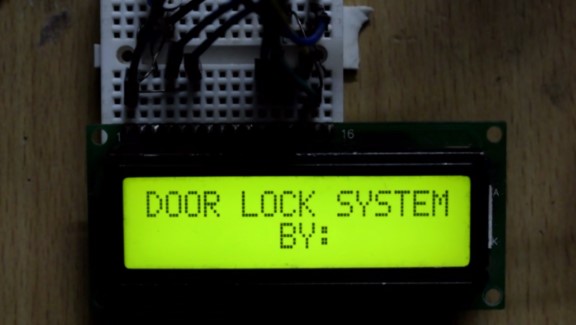
Create a password-based door lock system where you enter the password via a keypad. This is a fun project that requires basic programming skills and simple connections.
Components Needed:
- Servos
- Arduino Mega 2560
- Buzzer
- Standard LCD – 16×2 white on blue
- LED (generic)
- Jumper Wires (generic)
How It Works::
This project helps you learn about using input devices like keypads and output devices like servos and buzzers.
Project page: hackster.io
Designer: jayesh_nawani
19. Arduino Nano BLE 33 Sense Game Controller
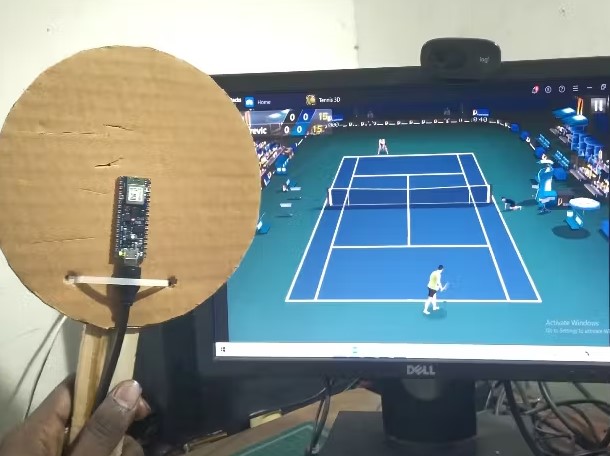
Transform your Arduino Nano BLE 33 Sense into a game controller! This board has an onboard proximity sensor, making it a perfect candidate for a simple and interactive game controller project.
Components Needed:
- Arduino Nano BLE 33 Sense or XIAO nRF52840 Sense
- USB Cable Assembly (USB Type A Plug to Micro USB Type B Plug)
How It Works::
This project introduces you to wireless communication and sensing capabilities.
Project page: hackster.io
Designer: PRABEEN RAJ
20. Arduino Weather Station
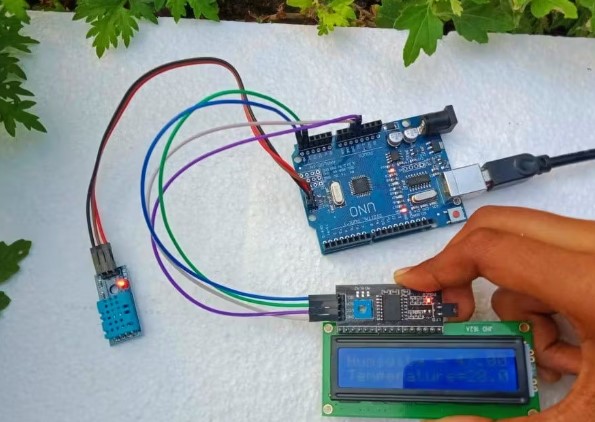
Build a weather station to monitor your garden’s temperature and humidity. This project helps you make decisions about watering plants and lawns.
Components Needed:
- Arduino Uno
- 16X2 LCD RGB Backlight –Full-Color Display
- Temperature and Humidity Sensor (DHT11)
- Female/Female Jumper Wires
- Male/Female Jumper Wires
How It Works::
Learn to connect sensors and displays to create useful data output for your gardening needs.
Project page: hackster.io
Designer: narmathanandhu
Read more if you are interested in:
58 Cool Stuff to 3D Print - Fun and Useful 3D Print Ideas
Top 22 Best Selling 3D Printed Items to Make and Sell Online
Conclusion
These 20 simple Arduino projects offer a fantastic starting point for beginners. You'll gain valuable experience with Arduino programming, electronics, and problem-solving by working on these projects. Remember, these projects are just the beginning. Feel free to customize and expand upon them to suit your interests and needs.
As you continue your journey in electronics, consider exploring 3D printing with Creality's 3D printers. They can help you create custom enclosures and components for your Arduino projects, adding a professional touch to your creations. Happy tinkering!
Recent News

QuarTeks™ vs KliTek™: Two Paths to Next-Generation Multicolor 3D Printing

Latest 3D Printing Technology in 2026: 8 Practical Innovations

24 Cool Stuff to 3D Print - Fun & Useful 3D Print Ideas
