


8 Must-Have Upgrades for Ender-3 Max Neo
If you're immersed in the world of 3D printing, you've likely come across the Ender-3 Max Neo. This isn't just another 3D printer; it's a real powerhouse in the realm of 3D printing. With its impressive dimensions of 300*300*320 mm, the Ender-3 Max Neo offers ample space for bringing your ideas to life.
What truly sets it apart is its ability to achieve printing speeds of up to 200mm/s when paired with the Sonic Pad. The user experience it provides is truly satisfying. It's a value-packed machine from Creality, renowned for delivering exceptional 3D printing solutions.
Let's get started.
Ender-3 Max Neo Build an Ambitious Printing World £259 Only
【More Creative with Larger Build Volume: 300*300*320 mm】
【Ultra-stable and High-precision with Dual Z-axes】
【CR Touch Frees You From Leveling】
【3 Steps Assembly, Start Printing Now】
【4.3-inch Color Knob to Experience Something New】
【Smooth Feeding with Full-metal Extruder】

The Importance of Ender-3 Max Neo Upgrades
Now, let's delve into the importance of upgrades for your Ender-3 Max Neo. Upgrades are the secret ingredient that can elevate your 3D printing experience from good to outstanding. They are the key to unlocking the full potential of your printer, bringing about enhancements in print quality, reliability, and user-friendliness.
Moreover, upgrades can open up new possibilities, broaden your material choices, and alleviate the necessity for continuous maintenance.
8 Must-have Upgrades for Ender-3 Max Neo
In this article, we're going to explore the realm of Ender-3 Max Neo upgrades. We've carefully selected 8 essential upgrades that can markedly improve your 3D printing journey. Whether you're a novice aiming to maximize your printer's capabilities or a seasoned professional wanting to refine your setup, these upgrades have got you covered.
So, buckle up as we embark on this transformative journey, one upgrade at a time.
1. Creality Sonic Pad Control Screen
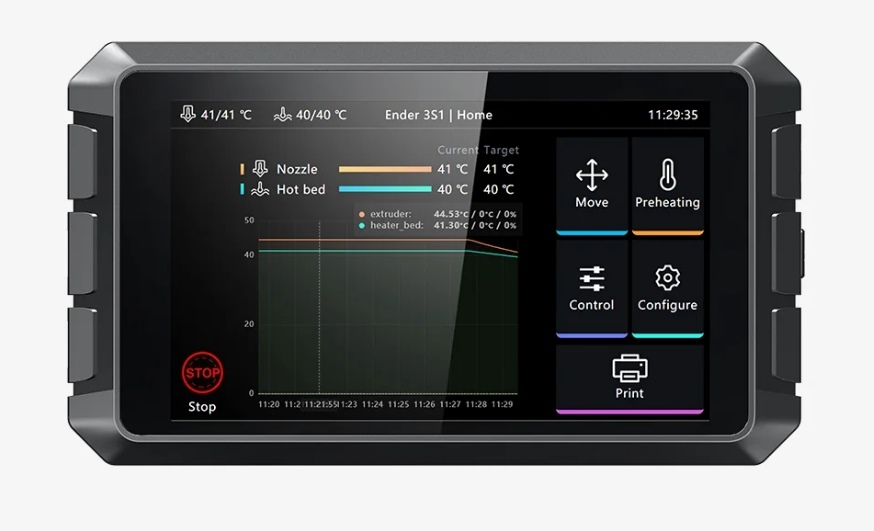
The Creality Sonic Pad transforms your 3D printing experience, elevating it to new heights. It's not just a pad; it's a technological marvel that revolutionizes your printing process. This state-of-the-art pad seamlessly integrates precision algorithms to control motors, resulting in increased printing speed without compromising quality. Picture your 3D printer moving swiftly, yet with pinpoint accuracy, bringing your designs to life faster than ever.
This upgrade significantly enhances the capabilities of the Ender-3 Max Neo. Whether you're printing intricate designs or larger models, the Sonic Pad ensures fast and exceptionally precise prints, eliminating frustrating delays. With a robust 64-bit computing platform and Klipper firmware, the Sonic Pad achieves seamless software-hardware synergy, displayed on a spacious 7-inch touch control screen. It easily connects to any Ender 3D printer via USB, offering versatility and user-friendly operation. Tailor your printing experience with user-defined macros, streamlining your workflow for efficient and empowered creativity.
2. Creality Gates Timing Belt Length 2M
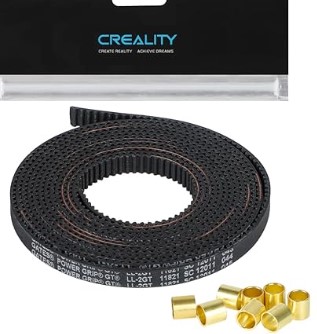
The Creality Gates Timing Belt Length 2M is a must-have upgrade for your Ender-3 Max Neo. Crafted from premium PU material, this timing belt is a testament to superior quality and durability. Its unique blend of softness and strength ensures a prolonged lifespan, capable of withstanding the rigors of 3D printing.
What sets this timing belt apart is its ideal balance between strength and flexibility. When combined with the GT2 pulley, this duo delivers flawless and precise linear functions. Your printer's movements become smoother, more reliable, and incredibly accurate. Whether you're printing small, intricate details or larger models, this upgrade ensures that every layer aligns perfectly, resulting in impeccable print quality.
Installation and maintenance are a breeze, thanks to the cleverly designed chain joints that allow for easy opening and length adjustment. Say goodbye to the hassle of dealing with belt tension issues; the Creality Gates Timing Belt Length 2M has you covered, ensuring your prints turn out flawlessly every time.
3. Creality Laser Module 10W/5W/1.6W
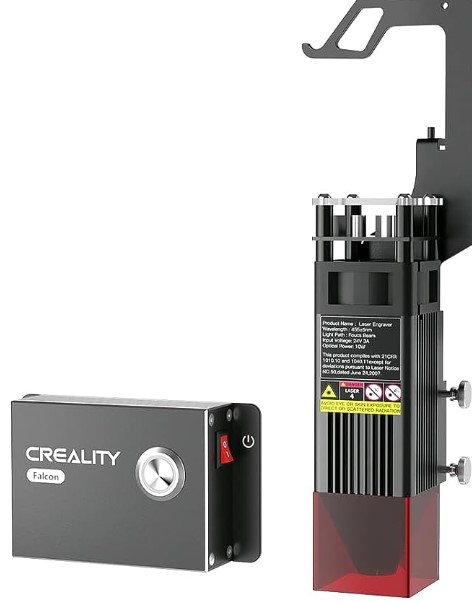
The Laser Engraver Module is a precision marvel that captivates with Multi-Lens Technology, elevating 3D printing projects to new intricacy. Picture a spot size compressed to 0.06mm – finer than ever. This precision reveals minute details, making creations stand out.
Precision aside, this module offers versatility, empowering creativity to cut materials up to 12mm thick, handling complex projects with ease. Adapting seamlessly to various printer models like CR-10, CR-10 Mini, Ender-2 Pro, it enhances printing experiences across the board.
Safety is paramount, and the module excels, complying with F·D·A Class 4 safety standards. It protects eyes and skin from potential laser hazards. The inbuilt air filter cotton absorbs smoke and odors, promoting a healthy indoor environment by reducing air pollution.
Unleash creativity, explore design possibilities, and achieve unrivaled precision with the Laser Engraver Module.
An in-depth guide on the Creality Laser Module.
4. Creality New Upgrade E3 Free-runs Silent Motherboard+ Fan 2.0
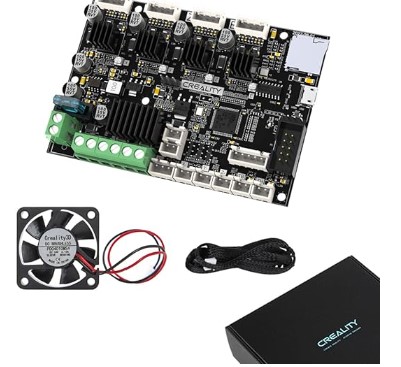
Introducing the Creality New Upgrade E3 Free-runs Silent Motherboard+ Fan 2.0, an upgrade that redefines silence in 3D printing. If you've been bothered by the operational noise of your stepper motors, this motherboard is here to change the game. It features original TMC2209 Trinamic stepper drivers, engineered with meticulous care to significantly reduce noise levels.
This upgraded motherboard not only hushes the operational noise but also offers thermal runaway protection, ensuring a robust solution to heating issues. Your printing process remains smooth, worry-free, and now, pleasantly quiet. Say goodbye to the constant hum and hello to a more serene printing environment.
The package includes a 4010 Axial Cooling Fan operating at 24V and 7000 r/min. This fan is designed to fit seamlessly with all Ender series models, maintaining optimal temperatures for consistent, high-quality results. It's a thoughtful addition to the package, ensuring your printer stays cool under pressure.
Please note that this Silent Motherboard is open-source and comes with the base version of Ender-3 marlin firmware. Customization is at your fingertips, but it may require some programming skills. The freedom to customize your printing experience is yours, making the Creality New Upgrade E3 Free-runs Silent Motherboard+ Fan 2.0 a worthy addition to your Ender-3 Max Neo.
5. Creality Sprite Extruder Kit for Neo Series

For users of Creality Ender-3 V2 Neo, Ender-3 Neo, Ender-3 Max Neo, or Ender-2 Pro, a 3D printing revolution awaits. The Creality Sprite Extruder Kit for Neo Series promises to elevate your printing capabilities.
This extruder kit, tailored for Neo Series, boasts two gears working seamlessly to guide filament flawlessly, ensuring precise and robust prints. Crafted from durable metal, it excels in handling heat while maintaining a lightweight design at just 215g.
With a 3.5:1 reduction ratio, your filament flow becomes smoother and more powerful, especially when crafting detailed models. Creality's Sprite extruder is precision incarnate, perfect for those intricate designs you hold dear. It doesn't come with a Hotend, but it seamlessly fits Creality's own hotends and opens doors to various DIY options.
6. High-end Hardened Steel Nozzle Kit

The High-end Hardened Steel Nozzle Kit, crafted for exceptional 3D printing performance. This premium kit boasts hardened steel construction with high hardness and wear resistance, ensuring durability and longevity. The smooth inner wall facilitates seamless filament feeding for an uninterrupted printing experience.
Designed for wide compatibility, this nozzle kit is suitable for most FDM materials like PLA, ABS, PETG, TPE, TPU, PC, and composite filaments with grinding additives such as carbon fiber, glass fiber, steel, wood, boron carbide, tungsten, phosphorescent pigments, and more. It brings versatility to your printing projects.
Compatible with various Creality models, including CR-10 series, Ender-3 series, and Ender-5 series, this High-end Hardened Steel Nozzle Kit offers a reliable and adaptable solution to elevate your 3D printing endeavors. Upgrade your nozzle for enhanced precision and compatibility with a broad range of materials, expanding the possibilities of your creations.
7. 3D Printer Multifunction Enclosure

The 3D Printer Multifunction Enclosure enables printing at a constant temperature, perfect for colder weather. It guarantees a high success rate for prints by offering a stable, controlled environment. Additionally, the case is flame retardant for secure printing and waterproof and dustproof, safeguarding your printer.
For individuals in a bustling home or workshop, this ensures the integrity of your print is shielded from unforeseen bumps or inquisitive pets. It also minimizes print noise, creating a more pleasant working environment. Its robust support and straightforward installation make it an essential accessory.
8. Sprite Extruder Pro Kit 300℃ Printing
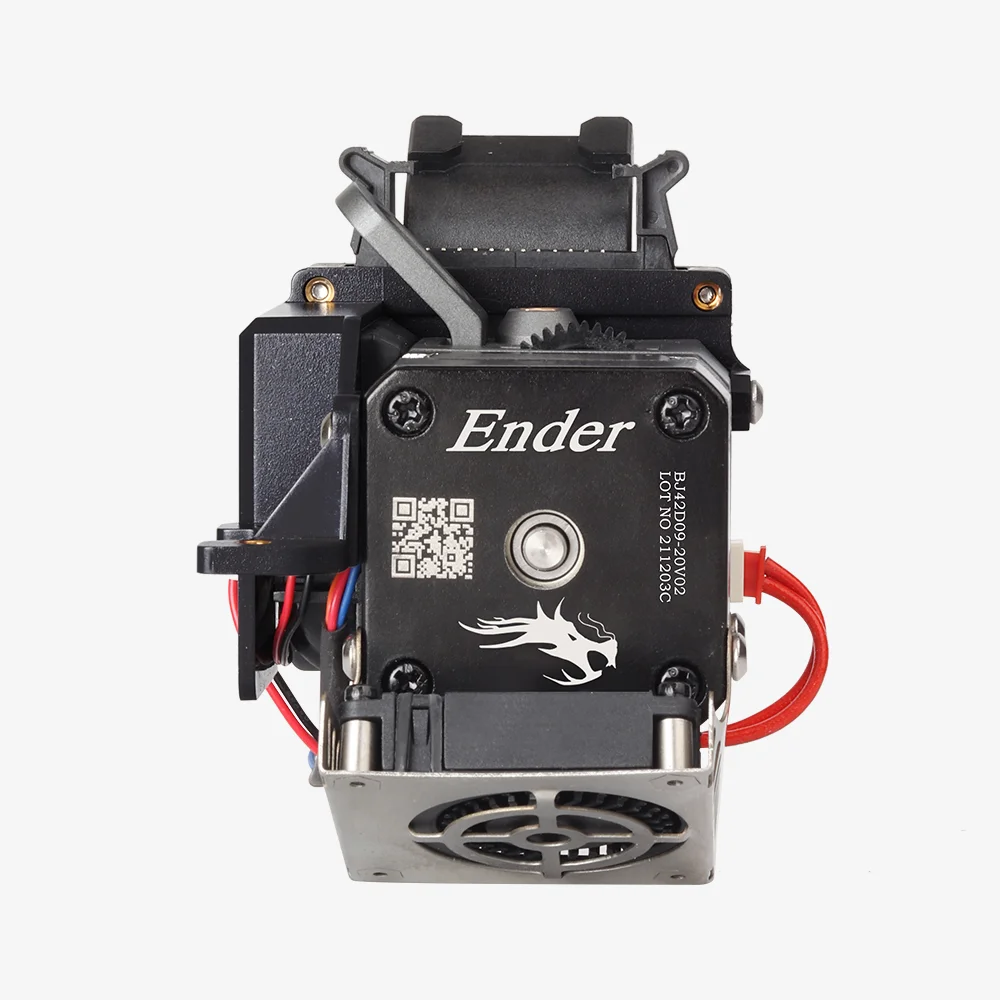
The Sprite Extruder Pro Kit is a modular solution for convenient 3D printing modifications. Designed for temperatures up to 300℃, this kit brings small but powerful sprites to your printing endeavors. With substantial torque and an impressive extrusion force of up to 80N, it ensures stable and precise printing.
Equipped with dual gear feeding, the Sprite Extruder Pro Kit enhances printing stability. It accommodates high-temperature printing, supporting materials like PLA, ABS, PA, PC, and TPU. Compatible with popular models such as Ender-3, Ender-3 Max Neo, and Ender-3 V2, this kit offers versatility to enhance your printing experience. Upgrade your setup with the Sprite Extruder Pro Kit for a seamless and reliable 3D printing journey, pushing the boundaries of what you can create.
FAQs about Ender-3 Max Neo Upgrades
1. Will the Ender-3 Max Neo Upgrades improve my print quality?
Yes, the Ender-3 Max Neo Upgrades are designed to significantly improve your print quality. The new hotbed provides better adhesion which greatly reduces the chances of print failure.
2. What do I do if my Ender-3 Max Neo gets stuck on the Creality interface and can't enter the operating interface when I turn it on?
The problem may be caused by the motherboard mistakenly flashing the TXT file in the random data, causing a screen freeze and preventing the device from turning on. This issue only appears on the V4.2.2 motherboard GD chip machines.
If you're experiencing this problem, you can try the following steps:
- 1.You can watch our video guide here.
- 2. If the problem is resolved by flashing the firmware, remind:
a. Avoid storing other files like TXT, PNG formats on the card, apart from gcode.
b. Don't insert the card while the device is turning on. Wait until it's fully on before inserting the card. The exception is when you're flashing the firmware, then you need to insert the card before turning on the device. - 3. If the screen still freezes after flashing the firmware, then you may need to replace the motherboard kit. The Ender-3 Max Neo motherboard kit is 4002020053. And remember to follow the same precautions as mentioned above.
Related Articles:
Best Ender 3 Print Speed Settings >>
The Ultimate Guide to Creality Ender 3 Upgrades >>
8 Essential Upgrades for Your Creality Ender-3 V3 SE >>
Conclusion
The Ender-3 Max Neo is an impressive 3D printer, but with these 8 essential upgrades, it becomes extraordinary.
It's time to choose the upgrades that align with your goals, and watch your Ender-3 Max Neo evolve into a 3D printing masterpiece. Elevate your creations, explore new possibilities, and embrace the extraordinary world of 3D printing. Your journey starts now.
Recent News

Creality Ender 3D Printers Compared: Which Printer Is Better for You?

3D Printer Nozzle Blocked? Causes and Safe Fixes

10 Best Back-to-School 3D Prints for Students in 2026
