


Top 15 Websites for Free Laser Cut Files
Laser cutting is a popular method for creating intricate designs and functional objects, utilised by hobbyists, educators, and professionals alike. The key to a successful laser cutting project lies in the quality of the laser cut files used. These files guide the laser cutter, dictating every precise cut and etch.
But where can you find high-quality laser-cut files without breaking the bank? The internet is full of resources, but not all of them are free. In this article, we will guide you through the basic information about laser cut files, including their definition, benefits and selection criteria. Finally, we will recommend some top websites for free laser cut files to help you find the perfect files for your next project.
Laser Cut Files Quick Look
What is Laser Cut File
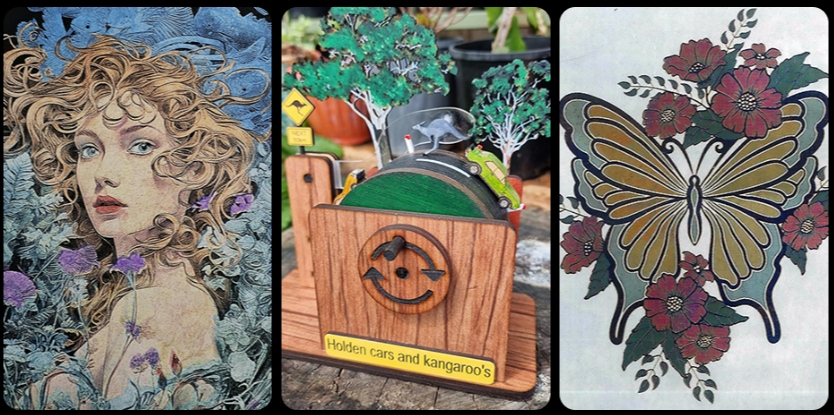
Laser cut files are digital blueprints that guide laser cutting machines, dictating the path the laser will follow to ensure precision and accuracy. Common file formats include DXF and SVG, which are compatible with most laser cutting software and machines. Each file contains vector graphics, made up of paths rather than pixels, allowing for clean, sharp cuts. Understanding these files and their formats is crucial, ensuring you choose the right files for your machine and project.
Pre-made Laser Cut Files Benefits
Pre-made laser cut files offer several advantages. Here show the details:
- Firstly, they save time as there is no need to create a design from scratch.
- Then, these files are often crafted by experienced designers, meaning they are optimised for laser cutting and reduce the risk of errors.
- Thirdly, Many websites offer a wide variety of designs, allowing you to find the perfect file for your project, whether it's a decorative item or a functional object.
- Lastly, using pre-made files can be a great way to learn, as you can study the designs to improve your own skills.
Criteria for Choosing the Best Free Laser Cut File Websites
When choosing a website for free laser cut files, some factors you need to consider:
- Quality of designs: High-quality files will result in better final products.
- Variety of files: The best websites offer a wide range of designs, from simple shapes to complex 3D models.
- Ease of use: The website should be easy to navigate, with clear download instructions.
- Licensing terms: Some websites allow you to use their designs for personal projects only, while others permit commercial use.
Top Websites for Free General Laser Cut Files
The internet is a treasure trove of free laser cut files. These digital designs can be used to create a wide range of items, from decorative pieces to functional objects.
Here are some of the top websites where you can find free general laser cut files:
1. 3axis.co

Ready for a vast selection of designs to choose from? That’s what 3axis.co offers. It’s a giant library with more than 21,000 laser cut files. It’s like exploring a giant library where every turn brings you something new and exciting.
It might be the most organized libraries of designs on the web. It’s like looking through books on a shelf, waiting for the right person to pick them up. Anyone who loves crafting and making things will love the endless options at 3axis.co.
2. DXF Downloads

First off the bat, DXF Downloads is the Robin Hood of design sites. It's where the generous spirits of the crafting world unite. You share a design, you get a design—it’s as simple and beautiful as that. Picture a treasure chest, only instead of gold, it’s brimming with over 1,400 DXF files.
And here’s the kicker. There's a premium section where the magic happens. You upload your masterpiece, earn some points, and bam! You’re downloading designs faster than you can say “laser beam.”
3. Ponoko

Next up is Ponoko, a place where you can find all kinds of designs for any project you can think of. Whether you need something useful or just for fun, they've got it. Their designs are ready to jump off your screen and into your hands. Using Ponoko is super easy and it has a huge variety of designs. It’s a place where you can find both practical and playful designs, and your laser cutter is what brings them to life.
4. Trotec

Trotec is like the expert artist of laser cut files. Every file they have comes with easy-to-follow instructions. This means whatever you're making, whether it’s a first try or a special piece, Trotec has designs that are just right.
They give you more than just files to load into a cutter. Their designs are quite extensive and vibrant, making your products come to life. With Trotec, your ideas come out exactly how you want them, no less than perfect.
5. Craftsman Space

The Craftsman Space is an amazing place for some really cool designs on the web. Their art is unique, waiting to live like art. Whether you cut wood, metal, or anything else, their designs are polished and look awesome.
They are perfect for any creator, whether you are just starting out or have been at it for a while. Craftsman Space has all kinds of ideas to really make your business stand out, making your products go viral!
6. Laser Ready Templates

Every week is like Christmas at Laser Ready Templates. They change their designs all the time, like a chameleon changing colors. It's a constant stream of new inspiration. It's like having a design market every week, where you can pick up loads of free, high-quality designs.
They have everything from puzzles to pretty decorations. Furthermore, they offer really good quality, the kind you'd usually have to pay for.
7. Cnc File

Cnc File is like a friendly expert’s workshop. It combines easy-to-use with really good quality. The designs they have cover everything you might want to make, from simple stuff to fancy things.
The website is super easy to use. It’s a great place for both beginners and people who have been making things for a while. With Cnc File, making great stuff is easy and straightforward.
8. Vectors Art

Now, let's look at Vectors Art. It's a huge place with over 32,000 files. That's right. Every time you scroll, you see different styles – as many as there are types of snowflakes. They have everything from fancy Taekwondo medal hangers to cute dog-silhouette wall clocks. If you're looking for variety, this is the place. In Vectors Art's digital halls, the only limit is your imagination.
9. Design Bundles

But hold on, there's more. Welcome to Design Bundles. Think of it as a place where it's always Christmas. Imagine Santa’s sleigh, but it's filled with SVGs, PDFs, and more. They have everything from sparkling ornaments to handy gadgets. They offer a whole range of stuff. And the best part? Their files are free and they're really good quality – the best of the best.
10. Free Patterns Area

Free Patterns Area is a place where you can really let your creativity loose. They have files in all sorts of formats, hosting formats like SVG and STL as well. All this so you can make whatever you imagine. The designs are unique, made by hand, and have a personal touch to them, something not all sites can offer.
Whether you're making something for yourself or to share with others, these designs are like starting with a blank canvas. They’re ready for you to shape them into something amazing with your Creality cutter.
11. DXF for CNC

DXF for CNC is like a special gallery full of cool and sleek designs. They have all kinds of styles, from really classy to modern, and everything in between. They have a knack for making just the right kind of designs for your projects, and they have a huge selection to choose from. They focus on keeping things simple but really good, so you can find just what you need.
12. Master Bundles

Let's hop over to Master Bundles. It's like a sweet shop, but for laser cut files. Imagine shelves stacked with over 2,800 free SVG files. And it's not just about how many there are. It’s like stepping into an art show where everything's free. You can dive into their collection and find designs that will really make your projects stand out and shine with creativity.
13. Boss Laser

Boss Laser is for people who really want to do big things. They have all kinds of designs for different materials like wood, metal, and plastic. Whatever your project is, Boss Laser has something to make it even cooler. Your Creality cutter turns into a powerful tool here. It’s like having a magic wand to make all your big ideas come to life.
14. Vecteezy

Vecteezy is like a giant shopping mall, but for designs. Imagine walking into a busy place where artists show off their cool work. Here, looking for the right design is like going on a treasure hunt. They have so many options, you might find just what you need for your next project. Vecteezy is the spot to go when you need a little inspiration or a great design for whatever you're making.
15. Thingiverse
Thingiverse is a popular online platform that hosts a vast collection of user-uploaded designs, including 3D printing and laser cut files. It's a go-to resource for hobbyists, educators, and professionals seeking free, high-quality digital blueprints. The website fosters a community of creators who share innovative and diverse projects.
FAQs About Laser Cut Files
1. What are the steps to design and create my own laser cut files?
To design and create your own laser cut files, follow the steps below:
- Choose Your Design Software: Many options are available, including Adobe Illustrator, Inkscape, AutoCAD, and CorelDRAW. The choice depends on your specific needs and familiarity with the software.
- Create Your Design: Start with a simple design, then gradually move to more complex designs as your skills improve. Use shape, pen, or brush tools to create your design elements.
- Set the Correct Colors and Line Widths: It's vital to understand the way laser cutting interprets colors and line widths. For example, red lines often represent cut lines and have the lowest possible stroke weight (generally 0.001 pt). Black lines heavier than that are typically treated as engraving, and color fills indicate areas to be engraved.
- Save Your Design in Vector Format: Once your design is complete and all lines are singular, save it in a supported vector format like .SVG, .AI, .DWG or .DXF. Remove any overlapping or extraneous lines that could complicate your design or its cutting.
2. Can I change the format of a design file?
Indeed, with the appropriate graphic editing software, you can convert one design format to another. For example, Adobe Illustrator can be used to convert an SVG file to DXF.
Conclusion
In conclusion, these sites provide an abundance of free laser cut files, unlocking endless creative possibilities. With Creality laser engravers and cutters, you're equipped to turn these designs into reality, crafting a legacy one project at a time.
For optimal results, consider using Creality laser engravers, such as the Falcon2 Pro Enclosed Laser Cutter Machine. These machines offer precision and reliability, making them ideal companions for all your creative endeavours.

Recent News

Creality Ender 3D Printers Compared: Which Printer Is Better for You?

3D Printer Nozzle Blocked? Causes and Safe Fixes

10 Best Back-to-School 3D Prints for Students in 2026
