


Creality Falcon2 vs Falcon2 Pro Encloed Laser Engraver & Cutter
In recent years, the desktop laser industry has seen a revolution. Compact, powerful machines have emerged, enabling more people to create intricate designs and cut various materials precisely. This has empowered hobbyists, artists, small business owners, and educators alike.
As the market evolves, users' demands for laser engraving machines have expanded beyond just power and accuracy. Safety, ease of use, and versatility are now key factors influencing user preferences. Manufacturers are continually improving product quality and performance to meet these evolving needs.
The Creality Falcon2 Pro enclosed laser engraver & cutter as the latest Creality engraving machine, represents the cutting edge of laser engraving and cutting technology, marking a significant leap over its predecessors, especially compared to the standard Falcon2 22W model.
In this article, we'll explore the similarities and differences between the Falcon2 22W and Falcon2 Pro 22W Enclosed, including their design, upgrades and overall user experience.
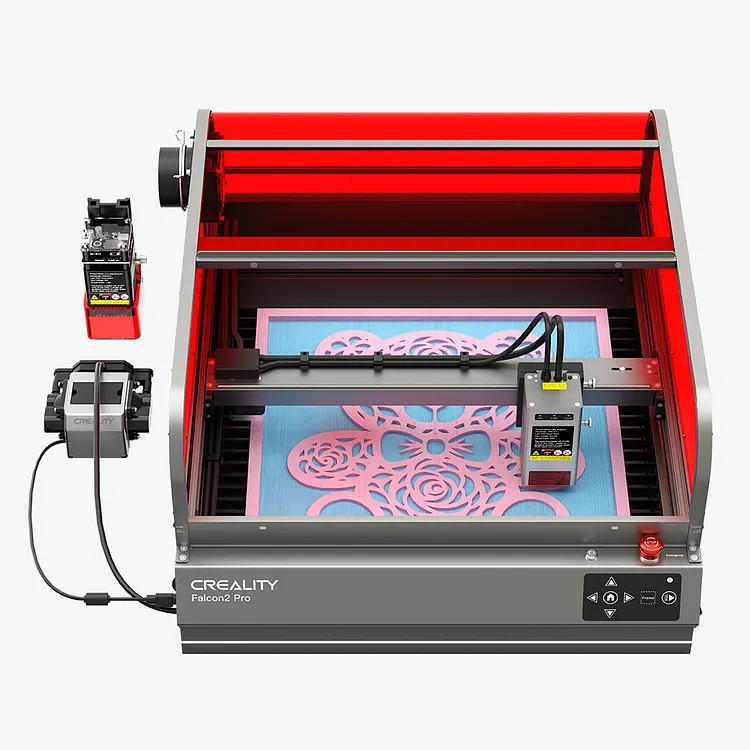
Creality Falcon2 Pro
Substantial & Secure, Exclusive & Reflective. £1,249.00
【Safe & Visible: FDA Class 1 Safety Certification】
【Multiple Security Monitoring, Worry-free Creation】
【360° Visual Design, Combines Aesthetics with Versatility】
【Full-field Protection, Unleash Unlimited Creative Space】
【Super Cutting Power: 10mm Basswood Board in 1 pass】
【Drawer Design, Good Helper for Desktop Organization】

Creality Falcon2 22W
Mighty but Precise Pro-tech for Pro-work £669.00
【Output Power of up to 22W & Machine Power of 120W】
【Fast Cutting Speed of 25000mm/min: Improving Productivity】
【Ultra-fine Carving & Cutting: higher precision, more durable】
【Five Safety Protections: Ensure Safety and Reliability】
【Convenient Offline Operation: TF Card Option】
【Control Software: LightBurn, LaserGRBL】
The Similarities Between Falcon2 and Falcon2 Pro Enclosed
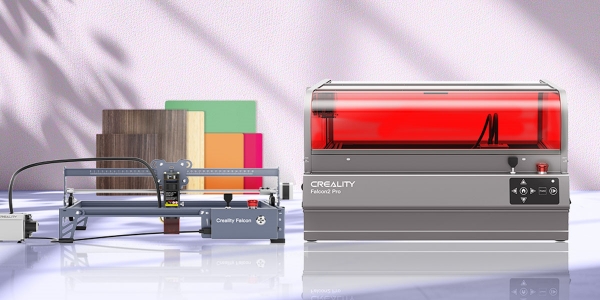
Both the Falcon2 and Falcon2 Pro Enclosed share several common features.
They both utilize a diode laser source and boast a powerful 22W laser output. With this capability, they can effortlessly cut materials such as 15mm wood and 0.05mm stainless steel sheet in a one pass. Additionally, they can directly engrave coloured patterns onto mirror stainless steel, ceramics, and opaque glass. Click here to know Falcon2 (Falcon2 Pro) more engraving and cutting parameter settings.
In terms of their engraving area, both machines offer a spacious 400*415mm (15.75*16.34 inches), enabling users to achieve big results despite their compact size. This ample working area breaks free from constraints, allowing for convenient placement and providing more space to work with.
Moreover, both models feature an ultra-fast cutting speed of 25000mm/min, significantly enhancing productivity. They also come equipped with automatic integrated air assist as a standard feature, greatly improving cutting ability and quality while streamlining the overall process.
Safety is paramount, and both machines are equipped with advanced Five Safety Protections. These include a flame detector, bidirectional limit switch, safety lock, emergency stop button, and laser detection cover, all working together to minimize accidental operation and guarantee safety and reliability.
The Differences Between Falcon2 and Falcon2 Pro Enclosed
Now let’s take a look at the differences between Falcon2 and Falcon2 Pro. What upgrades set the Falcon2 Pro apart from its predecessor?
Design - Safe and Visible: FDA Class 1 Safety Certification
Lasers present certain hazards to users. At the same time, and the smoke and dust produced by engraving machines during operation can also pose health risks. With the development of the market, the demand for safety protection in laser engraving creations has grown significantly, emerging as one of the top three considerations when deciding whether to invest in a machine.

Compared to the standard Falcon2, the Falcon2 Pro blends safety and aesthetics merge in its design, It features a fully transparent cover and an internal exhaust system, upgrading from an open frame structure to a closed one.
Crafted with an all-metal frame, the Falcon2 Pro boasts robust lines and a refined texture. Its gunmetal gray body, coupled with a striking red cover, accentuates a sense of heavy industrial technology. The curved sliding window above facilitates easy access to works and materials.
With its fully enclosed structure, smoke, dust, and noise are contained within the cover and expelled through a side-mounted fan. The fan's operation can be controlled via a switch on the side panel. Additionally, if the cover isn't tightly sealed, the machine automatically halts operation, minimizing potential safety risks. Two prominent indicator lights on the front of the machine clearly signal whether the cover is securely closed, simplifying troubleshooting in case of interruptions.
The transparent design offers 360° visibility of work creation without compromising detail, achieving a harmonious balance between aesthetics and functionality. Opting for a red cover effectively shields against blue light without hindering the visibility of built-in red warning lights.
Build in Top Camera, Visual Assistance for Precise Positioning

A built-in top camera in the center of the protective cover represents a leap in efficiency and precision, enabling users to easily capture every step of your work, improving work accuracy.
After connecting to your computer via USB, the positioning function can be implemented on the software to visually preview your images, greatly improving the success rate of creation. At the same time, for previous batch creation scenarios, users no longer need to manually measure the distance between different works, but can do it with one click in the software. Now, users can easily do this with just one click in the software.
Warm reminder, the camera operation tutorial materials have also been added to the shipping order now.
Drawer Design to Enhance Usability - A Good Helper for Desktop Organization

Users always hope that the engraving machine can provide perfect and thoughtful service, such as facilitating the cleaning of debris generated during the creative process. The Falcon2 Pro adopts a metal drawer-style design at the bottom, which can store the debris generated during the creation process. After the creation is completed, simply pull out the drawer and dispose of the debris. Cleaning is very convenient, and the frequency is greatly reduced, reducing users' unnecessary effort in creation.
Fence-Type Protection Strip: Heat & Smoke Dissipation
The Falcon2 Pro utilizes a fence-style protective strip aimed at further enhancing the safety and efficiency of the machine by aiding in heat dissipation and smoke exhaust, ensuring a cleaner and safer working environment.
1.6W Laser Module for Finer Details (a Gift for Falcon2 Pro 40W Option)

Comes with a 1.6W laser module to enhance user creations with the strongest engraving experts to achieve ultra-fine engraving and impeccable details, thereby expanding the creative possibilities of designers and craftsmen.
Read More:
Creality Laser Module/Engraver Ultimate Guide
Conclusion
To sum up, the Creality Falcon 2 Pro emerges as a groundbreaking instrument in the field of laser engraving and cutting, presenting a unique fusion of safety, productivity, and artistic freedom that sets it apart. Whether for professional endeavors or personal ventures, the Falcon 2 Pro is poised to revolutionize the creative landscape, pushing boundaries and unlocking new possibilities in design.
People also read:
Creality Laser Engraver Series Buying Guide >>
Recent News

Creality Ender 3D Printers Compared: Which Printer Is Better for You?

3D Printer Nozzle Blocked? Causes and Safe Fixes

10 Best Back-to-School 3D Prints for Students in 2026
