

Best 3D Modeling Software for 3D Printing
3D modeling software has come a long way in improvements due to advancements in hardware capabilities. The range of uses for 3D modeling software has also exploded. In the video game industry, we see 3D modeling being heavily utilized next to 3D animation and 3D visualization. With increased hardware capabilities, designers can create simulations of their creations to show to clients before finalizing a product.
Know more about the available 3D modeling software in the market and what best suits your needs for your 3D modeling projects.
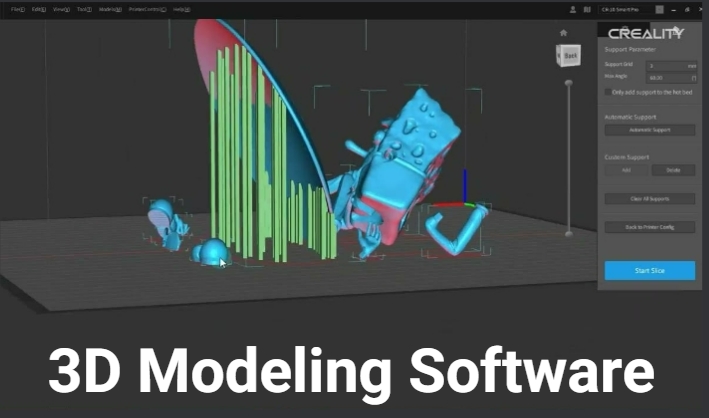
The Most Common 3D Modeling Software:
- Easiest: TinkerCAD
- Printing Packages: Blender, Creality, and TinkerCAD
- Slicing: Cura
- STL Editing: Meshmixer
What is the Best 3D Modeling Software?
Finding the best 3D modeling software depends on your nature of use. Software can now be classified into several major types: offline, online/cloud/web-based, and smartphone apps.
For most use cases, offline or desktop is the most recommended type. Cloud-based applications have advantages such as being always available and being lightweight on the system, but with reduced features compared to purely offline software.
Autodesk 3DsMax
Developed by Autodesk, it has plenty of features and is targeted for creating 3D assets for video games and animation. It can also be used to create 3D assets for 3D printing. Windows.
SolidWorks
Also, under AutoDesk, this 3D modeling software focuses on modeling objects for industrial applications, making it suitable for serious work.
AutoDesk Inventor
For 3D mechanical design, it’s not as feature-heavy as SolidWorks but is still more than enough for most 3D modeling tasks. If you plan to do some 3D printing, then this is a great choice. Runs only on Mac and Windows, the same with the latter two.
SketchUp Pro
If the AutoDesk line of software products is too heavy on users' system requirements and money-wise but still needs something that can offer professional-quality features, then this is the next best alternative. SketchUp Pro supports many industries, like architectural visualization and landscape design. Even though this software targets those in the construction industry, it still supports smaller industries. Basic modeling of 3D objects is a no-brainer and even supports 3D printing. Model the objects and export them to STL and other various 3D file formats.
ZBrush
A popular choice for many 3D modeling tasks. It supports 2D illustration and 3D modeling. It’s aimed at artists who want to do sculpting or drawing. Furthermore, it can do some basic animation for displaying poses and perspectives, but that’s about it. Is it great for 3D printing? Yes. Zbrush supports high-resolution 3D objects, making it suitable to produce 3D models for 3D printing.
Best Free 3D Modeling Software
Blender
Blender is an open-source 3D modeling software that is available to be downloaded for free from their website. The software comes with its own rendering engines, like Evee and Cycles. It supports ray tracing and is great for 3D animation. It can also do other things, like video editing. It has a moderate learning curve, but it is easy to navigate the interface once you get an idea of how to use it. The user interface is quite packed with controls and options compared to other 3D modeling software, so it can be daunting for any first-time user. Of all the software mentioned here, only Blender runs on Linux, Mac, and Windows. The rest are only supported on Windows and Mac.
FreeCAD
If you are just trying your hands on 3D modeling for the first time without the need to dabble with complex UI, then this is the software for you. It’s free and light on the system. Its features are aimed more at engineering needs than animation. It runs on Windows, Mac, and Linux.
Fusion 360 (Free Version)
The free version of Fusion 360 offers users the ability to learn and do 3D modeling. It supports CAD, CAM, and PCB design. If you are also into electronics, many people in the engineering fields use 3D printers to build samples of their inventions for prototyping.
The Easiest 3D Modeling Software
Figuring out the easiest software to use depends on what you are after as a user; it’s not that easy, and it is very subjective. Are you into animation? You can use 3DsMax, Maya, or Blender. But if you simply want to model 3D objects, your choices could be SketchUp or 3DsMax; both are paid and come with stable plugins. Blender is free but has a bit of a learning curve; if you plan to use it for professional work, everyone better be on board with it. It is not as popular in the corporate world as the Autodesk line of products.
The important feature to look for in a 3D modeling program is the intuitiveness of its camera navigation, probably next to rendering engines if you want to do some animation or create still images. Since you will be modeling, rotating, scaling, and sculpting objects in a virtual 3D space, you need a control scheme that will provide you with the most efficiency. This is, of course, subjective; most software will allow you to customize the controls anyway. When it comes to the application of textures and materials, how in-depth is it? Blender has a very complex node system for applying materials and textures, but it can be very confusing. It takes time to learn how the nodes work.
A great modeling software should also be able to provide proper scripting support. While we mainly model 3D objects, there are times when the ability to model via scripting is very handy, especially if the model being created is based on algorithms and mathematical computations. Scripting also gives users the ability to add or perform features the software does not have by default, like the automation of tasks in some workflows.
For Blender, it uses the Python programming language, MEL, and Pythong for AutoDesk Maya, Coffee, and Python for Cinema4D. Scripting is probably something the typical user would never use, but in case it's needed, it’s great to have it.
You will also want modeling software that is light on the system. Most of the big-name software requires hardware specifications that, if you don’t have them yet, will make it impossible to run the software due to lag, if at all. You probably don’t have to worry about this that much if you won’t be doing any animation or just purely modeling. But even so, some software can be bloated with features that won’t be used 90 percent of the time.
Best 3D Modeling Software for Beginners
If you are only starting your journey into 3D modeling, we would recommend going for something free but still decent. We do not want to use something so basic that you could barely stretch your modeling skills. Blender seems to fit the bill; it’s free and light on the system. This is quite liberating, specifically if you are not sure if you are going to commit to learning yet. And even if you are committed, you don’t need to spend hundreds of dollars on software with a paid subscription just to learn how to model.
We did mention earlier that it has a moderate learning curve, but that is not that big of a problem. There are plenty of tutorials on the internet to learn from; it’s not like we have to read from a book how to do things step by step. These days, we can watch experts perform a certain task and just follow along.
There’s also huge community support behind Blender, so you have a community of users you can run to for help. Major updates and new versions also come out regularly with huge improvements, so you are always on the cutting edge of the latest.
When it comes to 3D printing, models can be exported from Blender into STL, which is very handy if you are learning to model so you can make cool 3D prints.
3D Modeling Software for 3D Printing
When it comes to 3D printing, you will need something that is strictly for modeling. You can choose either Fusion 360, Inventor, Creality, or SolidWorks for the premium side, or Zbrush, MudBox, and Blender. SolidWorks and Inventor are a bit similar, with the former being more responsive and closer to industry standards. The important thing is that they are capable of producing high-resolution 3D objects and exporting them to the appropriate file format, like STL, and that they work well with your choice of slicing software.
It is also important to check which software supports 3D scanning if your workflow will involve scanning 3D objects.
Conclusion
In conclusion, we choose software based on what we need and the budget we have. Sometimes we choose because work or school has already determined what tools to use. But it is important to select based on the job being done. If a modeling software is selected solely for its 3D modeling, most software there has you covered, actually. You just need to pick which one you find best fits your workflow. Animation and rendering still images are a whole new ball game that requires selecting also based on the hardware that you have currently with you. If you have to upgrade or replace your current system because work demands it, then you have to go that route.
 People also read:
Recent News

8 Halloween 3D Print Ideas to Make Before October 31

Ender Series 3D Printers Parameter Comparison

Creality Back-to-School Sale 2026: Save Up to 50% on 3D Printers and More
