A 3D printer enclosure is usually made from clear plastic material on the front and the sides with solid framing such as metal, ABS plastic, or even wood. You can either have a pre-built 3D printer enclosure that comes with your 3D printer product or you can build one from free models.
If you are new to 3D printing, you’ll likely notice that some 3D printers have enclosures and others are open, that is, without any encasement or barrier surrounding the printing area. From fancy to sleek glass boxes, there is a wide range of 3D printer enclosures on the market. So, when do you need to have a 3D printer enclosure?
A 3D printer enclosure becomes part of a buyer’s consideration, especially if you’re using primarily resin and ALB filaments. Moreover, dust accumulation is one of the most common causes of printer damage.
In this article, we’ll learn more about the features and importance of 3D printer enclosures and what types of printers need a 3D printer enclosure.
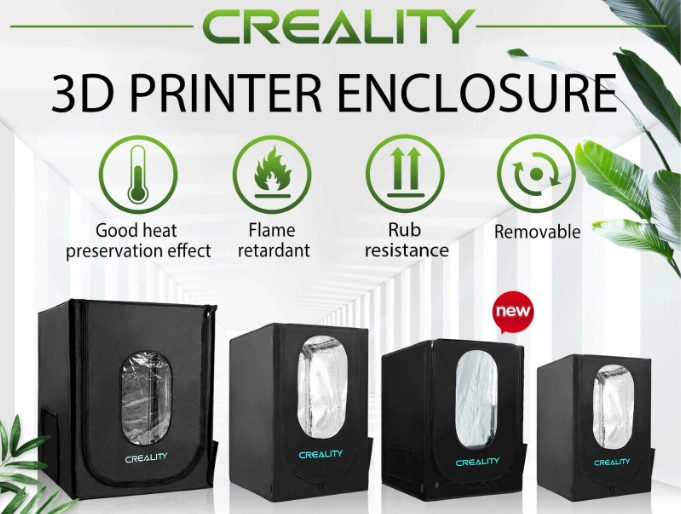
3D Printer Multifunction Enclosure

3D Printer Multifunction Enclosure: Only $95.99 ($119.99)
【Thermal Insulation Printing at Constant Temperature】
【Aluminum Foil with Flame Retardant, Safe Printing】
【Waterproof and Dustproof, Reduce Printing Noise】
【Stable Support, Easy Installation】
【Various Size: Small, Medium, Large】
【Compatible with Creality Ender Series Printer: Over 30 Models】
When and Why Do You Need an Enclosure For a 3D Printer?
Printing with ABS or Other Similar Filaments
ABS emits odors you don’t want to be breathing in and you want that out of the room as quickly as possible. But ABS, as previously mentioned, requires a constantly warm environment. Other filaments that print way can also benefit from being inside an enclosure.
Printing with nylon
Nylon filament absorbs moisture. The warm temperature inside will keep humidity low and prevent errors when it comes to the quality of the printout.
There are different kinds of printing methods, the most common is Fused Deposition Modeling (FDM), where plastic is melted and deposited layer by layer. 3D printers of this kind can either come enclosed or open.
Printing with Resin
Resin 3D printers are becoming a popular option for 3D printing enthusiasts as they provide a smoother finish and the possibility of printing more detailed objects. However, one of the disadvantages of resin is the dangerous fumes it releases, as well as UV light. That is why resin 3D printer enclosures usually have UV light-blocking capabilities.
When you are printing with resin, having an enclosure is always a good practice, specifically when dealing with chemical odors.
Creality Resin 3D Printer Enclosure

Resin Printer Enclosure Only $129.00 at Creality Store
【Filters Odors and Keeps The Air Fresh】
【Dust-proof and Pollution-free】
【Isolate Noise and Enjoy Creation Quietly】
【High-perspective Windows for Unobstructed Views】
【Quick Installation, Easy to Use 】
【Compatible with Creality Halot Series Resin Printers】
Printing Objects of Large Volume
Large models take a long time to print, and a simple draft can cause parts to shrink too quickly and cause errors. Being locked in an oven with a consistent temperature can help mitigate this issue.
When Noise Is an Issue
3D printing can be a noisy activity, especially if you have multiple machines printing at the same time. A printer with an enclosure helps lower the noise levels.
Keep Nasty Gases Off
As fun as it is to create 3D objects or just watch the thing work, melting plastics will release some smells you shouldn’t be breathing, especially if you are doing this almost every day. Toxic fumes are produced when they melt. Like laser engravers, fumes are released during the extrusion process as they go through the nozzle.
Laser Engraver Enclosure Pro

Laser Engraver Enclosure Pro Dustproof & Smokeproof: Only $98.00
【Enclosed Design to Isolate Smoke and Dust】
【Exhaust Smoke and Dust Purify the Air】
【Waterproof and Fireproof Stable and Reliable】
【Dual-view Window Design for Easy Observation】
【Folding Storage Easy to Operate】
【Larger Size Wider Compatibility: 720*720*400mm】
With an enclosure, you can manage those fumes better by limiting where the gases are and ventilating them out of the room. Just be careful of ventilating the warm air off the printer. Cooling the printer too fast defeats the purpose of the enclosure. But for best practice, you should have a dedicated room with proper ventilation in the first place.
To Keep things Clean Around the Work Area
When things go wrong during a print, you don’t want bits of plastic going everywhere. At least with an enclosure, you only need to clean the inside of your printer.
To Keep Everyone Safe
Kids might be enamored with watching 3D printers work, but remember that this is a device that works at high temperatures. If unsupervised, kids, yourself, or a cat looking to bask in the warmth of a 3D printer can accidentally touch the hot end or accidentally bump the model being printed. Yikes! So having the activity limited to an enclosed space is a good idea.
To Keep Things Out
3D printers are mechanical, where dust and debris can easily cause problems. Severe dust issues can cause misalignment issues, or they can cause moving components to get stuck or stutter, causing timing issues. Dust can also obstruct fans, which can cause temperature issues. Dust will also clog the nozzles. 3D printers without an enclosure will be exposed to the elements, so having an enclosed printer is a huge saver. A good enclosure can also keep nasty animals off, like rats, that can get in there and nibble on wires and such.
To Keep Fire In
An error in operation can cause 3D printers to go up in flames, particularly with the components that emit heat. But if enclosed, the fire is contained in a limited space (and might even kill it if it is good enough to starve it of oxygen), giving you time to put it out. Speaking of which, you should always have a fire extinguisher nearby, anyway.
Types of Enclosures
When it comes to enclosures, either it’s a part of the printer or an add-on component.
Metal Enclosure
This is what you would usually get when speaking of enclosures. The metal box will do well to keep things out while keeping the temperature constant. If it’s built well, it will keep your printer safe and will last a long time.
The disadvantage of a metal enclosure is its cost, and it also weighs a lot. Check out this free-model modular enclosure so you can build one. You’re going to need a sturdy table or print on the floor. If you are concerned with portability, you might want an open 3D printer or a small, enclosed printer. When open 3D printers are delivered, they usually come disassembled, but not with enclosed 3D printers.
While you might not be shipping printers all the time, shipping an assembled printer seems more prone to damage. This is a factor you might want to consider when transporting the printer from house to house or even inside your own house from room to room.
Zip-Up Enclosure and Other Similar Types
What if you already have an open printer and still need portability without sacrificing print volume and adding unnecessary weight? Creality has come with zip-up enclosures; this is a lightweight option for open 3D printers. You can just zip it inside, and it will keep the temperature constant.
Enclosures with Built-In Fume Extractors
Gas emissions will always be an issue when 3D printing, that’s why dealing with that gas is best done with enclosures with functional fume extractors. You can easily pump the gas out with a hose from the window or ventilation system. You could probably DIY it with one that doesn’t, but you could easily mess up the temperature management if you are not careful.
Aluminum Frame with Acrylic Wall Enclosure and HEPA Fan
There are many manufacturers out there that make HEPA filter enclosures, which means High-Efficiency Particulate Air, and similar variations. I'm not sure how the acrylic will handle temperatures, though. Maybe it is safer to look for a variation with glass instead (the same used in ovens).
Plexiglass
Plexiglass is a construction material used in buildings that helps with managing thermals. It can withstand -40 Celsius and absurdly high temperatures. On top of being able to handle the heat, it’s also very durable, that’s why it’s also used in aquariums, automobile lenses, police riot vehicles, etc. So, it’s not surprising to find them used as 3D printer enclosures.
Internal Lighting
An enclosed printer without internal lighting will make it difficult to inspect the model. You will need to get a flashlight of your own to check. Thankfully, LEDs are easy to incorporate right from the start. A good enclosure will almost always include this as a fundamental feature.
Fume ventilation and management
We’ve stressed many times in this article how important it is to get rid of those fumes, a good enclosure with a proper fume management system is a huge plus. Some encased 3D printers are sold with only an opening at the top to release fumes. That will require some additional work managing the air in the room. A ventilation system with HEPA filters is a good addition. If an enclosure is sealed with an exhaust with a HEPA filter plus a hose for redirecting the fumes, that’s a great buy.
Fireproof
Of course, it’s not enough to only have an enclosure, it must be fireproof as well. We are dealing with very high temperatures here in an enclosed space. A rogue spark or error in the software/hardware can easily start a fire. The enclosure should be made of metal or, if not, a fireproof material.
Conclusion
Having the right enclosure makes all the difference in performance and cost. Whether you are new to 3D printing or have been around for some time, invest in an enclosure. Having an enclosure determines the range of filaments you can use because each type of filament requires certain conditions to work optimally. You don’t want to skimp on this. Having a durable enclosure also gives you peace of mind, knowing your precious printer is safe from harm or being damaged by external factors.
You might also want to check Creality accessories for an add-on product to your enclosures to complete your upgrade. The list includes cool upgrades such as an LED light Bar Kit and more. Also, check out this video on how to install a 3D printer enclosure.





