


Best 3D Printing Software for 3D Printer Program
A critical factor to consider in 3D printing is the software program you choose to work with your 3D printer to ensure efficient and successful 3D production. However, as 3D printing increasingly becomes a household fixture, it becomes a challenge to choose the best 3D printing software among the numerous options to match with your 3D printer.
The following article will introduce you to which qualities to look for in a 3d printer software and what are the best 3D printer software options available in the market. This guide in 3D printing software will help you narrow down your search and will further help you get a suitable 3D printing software that’s within your budget and other preferences.
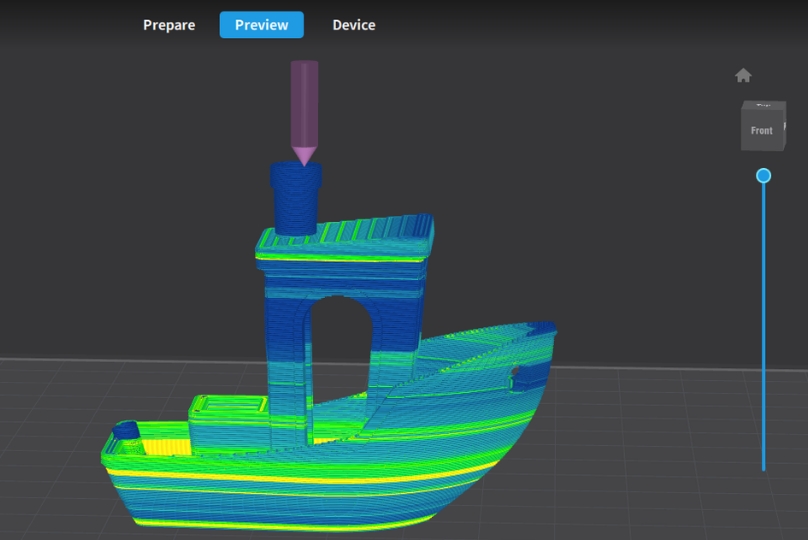
What is 3D Printing Software?
3D printing software is a computer program used to translate 3D models into data that the 3D printer can understand.
Want to know how to generate 3d models? Check out: Generate 3D Models: A Comprehensive Guide
How Does 3D Printing Software Work?
The 3D model is sliced into 2D layers along the vertical axis. Each layer is composed of multiple x, y, and z coordinates in 3D space, each being a plot point. Think of your Cartesian plane back in high school, but with a z-axis this time. The 3D printer is just a plotting machine with the capability to melt plastic and deposit it at a specified coordinate. You might have also heard of the term GCode thrown around. This is a file containing a list of these coordinates. But along with the coordinates, they also include the temperature and speed of the motors. Each item on the list is a series of numbers that the 3D printer follows.
Since the distribution of 3D printers for home use began, the number of 3D printing software programs to accommodate the needs of the 3D printing community has grown, followed by 3D printing services, new filament types, and essentially the birth of a new industry.
What Qualities Should We Look for in 3D Printer Software?
1. Intuitive Design
The design of a software interface is crucial for the ease of operation of the user. The use of familiar elements, software component layout, color schemes, and technical jargon all help to facilitate the use of the software, especially if a user is transferring from another software.
2. User-friendly Navigation
Controls and keyboard shortcuts, if done correctly, will help in establishing a speedy and efficient workflow. Navigation is especially important since dealing with 3D objects involves a lot of rotation, scaling, zooming, and orbiting. Having a proper layout concerning where software components and features are found is also important, akin to quickly finding your hammer and nails in a carpentry shop.
A software’s user interface should have a clear and concise layout. Icons should be clear and easy to deduce from what they stand for. The use of common icons for certain functions is also quite a given.
3. Compatibility
It is helpful to have 3D printing software that supports various 3D printers.
Software that supports a variety of printers is a very good indicator of good software to choose from. By having this flexibility, users don’t have to learn a new piece of slicing software for every new printer added.
4. File Format Compatibility
A slicer’s ability to read different file formats matters. This allows files from different slicers to be used interchangeably, eliminating the need to download third-party software just to convert from one file format to another. Thankfully, many slicers support reading multiple file formats.
5. Slicing Capabilities
The better the software supports the hardware, the better the results will be. Customization will be key, such as adjusting layer thickness, infill, and other settings. Customization of printer settings helps a lot, especially in testing new filament types to figure out how they will behave for your particular printer and environment. The ability to pick layer thickness, infill thickness, and wall thickness will allow you to establish the final characteristics of your 3D model, such as durability.
6. Advanced Features
Support for dual extrusion: There are many dual extrusions 3D printers on the market, and under this category, the best one to obtain is an index. This refers to a 3D printer that has extruders capable of moving independently. Regardless, having two extruders speeds up the printing process.
Multi-material printing capabilities: The 3D printer can print the same object with two different materials or the same material but in different colors. Naturally, this comes with 3D printers that support dual extrusion.
Community and support: Having an active user community behind any software is very important; it signifies that the software is supported. When there is a problem with the software, a community can come to the rescue to provide fixes or solutions to the issue faster than the official developers could.
Responsive customer support: If the software is open source, this makes it even better, since the community can add new features to the software without permission from the original developer.
Best 3D Printer Software Options
1. Ultimaker Cura
The Dutch company has been producing 3D printers since 2011, along with 3D printer software. Their products target mainly 3D printer professionals and are identifiable by their enclosed or box-type printers.
Key Features:
- Straightforward and intuitive interface that’s perfect for advanced users.
- Slicer settings can be adjusted easily with preferences.
- Material profiles are available.
- Has a buzzing community support system.
Use: Mac, Linux, Windows (cross-platform support)
Cost: Free
2. TinkerCAD
If you’re new to 3D modeling and printing, you can start with TinkerCAD with its easy-to-navigate interface, where you can start getting a feel for the 3D space. Compared to assembling Lego blocks, you’ll be printing simple forms in no time. Unfortunately, as you progress in your 3D printing skills, you might want to go with another 3D printing software that can handle advanced or complex projects.
Key Features:
- Easy Navigation of the Workspace
- Available Quick Guides and Tutorials
- It works well with ZYL.
Use: Web-based
Cost: Free
3. PrusaSlicer
With its fresh release of its latest updated version on December 14, 2023, PrusaSlicer 2.7.1 is known to have frequent updates and improvements to its program. Aside from being able to fix the program's bugs, the 3D printer software also added a new SVG emboss tool. PrusaSlicer is free to use, and you don’t need to use it with a Prusa printer. It can be used with any FDM printer.
Key Features:
- Auto-arrange Function: Provides quick buttons such as fixing overlaid models and redistributing them through the platform.
- SVG emboss tool.
- Available for non-English-speaking users, specifically in 14 languages such as Spanish, Polish, Korean, etc.
- Frequent updates.
Use: Mac, Windows, Linux
Cost: Free, Open Source
4. MatterControl
The latest MatterControl 2.0 offers customizable features for 3D printing.
Key Features:
- Built-in profiles for a plethora of different printers.
- Cloud-saving.
- Windows, Mac, or Linux support.
- Advanced users who are familiar with the 3D printing process can create custom macros. With a click of a button, you can send a series of G-code commands to your computer.
Use: Windows and Mac
Cost: Free Open Source
5. Creality Print Slicing Software
Creality Print is the official 3D printing software, or slicer, for the Creality line of printers. It borrows heavily from Cura. Arguably, both were said to be clones at the start but developed independently.
Key Features:
- Slicing capabilities. When it comes to settings, the software allows users to customize their settings by creating a new profile for their printer.
-
Compatibility with Creality 3D Printers. It should have no issues working with other Creality printers since it is made for the Creality brand of 3D printers. Just make sure to download the latest version or check for updates before using the software to reduce the chances of using buggy software.
Want to know the best Creality Product to buy? Ender-3 v3 SE 3D Printer is the perfect beginner printer only $199.00. High-end or premium K1 Speedy under $500.
- User interface. Creality Print has a new skin; many pieces of software are going for a more dark gray color, especially in the 3D modeling and printing world. It seems the darker colors help reduce eye strain from staring at the screen for too long. Layout-wise, the user interface is easy to understand, especially if you mess around with 3D modeling software; it should be familiar.
Reviews from the 3D printing community:
Creality Print/Slicer is often compared to Ultima Cura due to their similarities in features. Despite differences in UI appearance, the basics are there. A quick check into what people are saying: Creality is better if you are using a printer under the Creality brand, but if you have a variety of 3D printers from different brands, you are better off using Cura.
Pros and Cons
Pros:
- Easy to use
- Free
- Works with many kinds of 3D printers, even those outside the Creality brand.
- Users can add their own printer profiles.
- The slicer manages the print well, and stringing is reduced.
- Can produce clean prints
Cons:
- Some experience bug issues that cause the software to create extra meshes at the base of some models during preview, and this can mess up the printout.
Conclusion
Finding the right software is crucial to making your workflow as efficient as possible. You can determine this from the intuitiveness of the controls, the selection of available features, and the number of 3D printers supported. If the software is open source, even better.
Stability also matters when it comes to your selection of software. Don’t be afraid to experiment with as many 3D printing software programs as possible to find the right one. As for your modeling software, make sure it can work well with your chosen slicer.
 People also read:
Recent News

8 Halloween 3D Print Ideas to Make Before October 31

Ender Series 3D Printers Parameter Comparison

Creality Back-to-School Sale 2026: Save Up to 50% on 3D Printers and More
