


Creality CFS Periodic Maintenance Tips
To ensure consistent performance and extend the lifespan of your CFS, periodic maintenance is essential. Proper care not only prevents potential malfunctions but also ensures smooth filament feeding, accurate multi-color printing, and reliable storage of materials.
In this guide, we’ll walk you through key maintenance tips, focusing on critical components like the CFS hub Teflon tube, the filament spool shaft drive kit, and the desiccant used for filament preservation. By following these simple yet effective steps, you can keep your CFS operating at peak efficiency and achieve flawless prints every time. Let’s get started!
CFS Hub PTFE Tube
The PTFE tube is a consumable part that may wear out over time due to friction with the filament. It is recommended to regularly check the wear condition of the PTFE tube during routine maintenance. If the tube is worn and not replaced in time, it may cause abnormal feeding or filament clogging in the CFS. The PTFE tube used in the CFS has a specification of 4*2.5mm.
Under normal usage frequency, it is recommended to replace the PTFE tube every two months to ensure smooth filament feeding and retraction in various scenarios. For abrasive materials like fiber-reinforced filaments, it is advised to inspect monthly and replace the tube promptly when obvious wear is observed.
Filament Spool Shaft Drive Kit
If the filament spool shaft drive kit is obviously damaged or not securely installed, causing poor meshing between the gears of the filament intlet assembly and the black gear of the feeding/retracting device, it may lead to feeding failure.
Desiccant
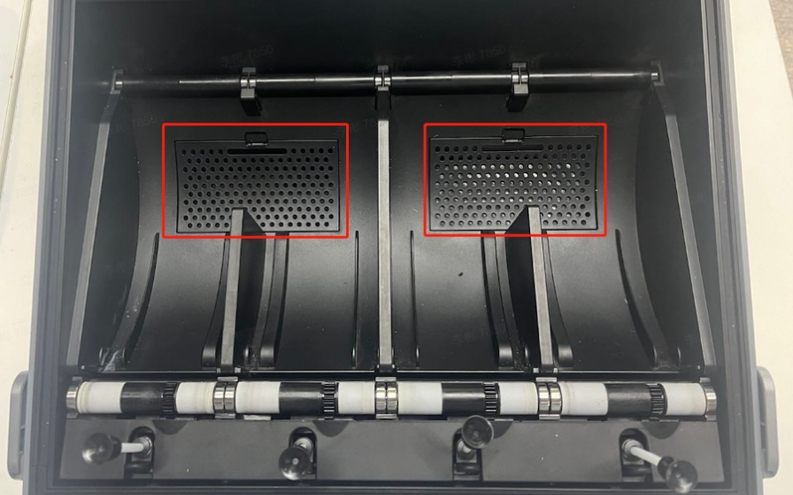
There are two locations for storing desiccant in the CFS, which can ensure long-term filament storage at an appropriate humidity level.
It is recommended to check the status of the desiccant every two weeks. If the desiccant has become ineffective, please replace it promptly. If the desiccant is not replaced for a long time, it will lose its water absorption ability and thus lose its protective capacity for dried filament. Additionally, if not replaced for over 3 months, the desiccant may leak water, causing short circuits or damage to the internal circuits or electronic components of the CFS.
Read this guide to learn more about how to replace CFS parts when you encounter problems.
For more expert tips and in-depth tutorials on maintaining your Creality devices, be sure to visit the Creality Store and Creality Aftersale. Stay informed, stay creative, and take your 3D printing to the next level!
Recent News

8 Halloween 3D Print Ideas to Make Before October 31

Ender Series 3D Printers Parameter Comparison

Creality Back-to-School Sale 2026: Save Up to 50% on 3D Printers and More
