


Creality K2 Plus Recommended Filament Parameters Settings
The Creality K2 Plus is a high-speed 3D printer with a spacious 350 x 350 x 350 mm build volume, ideal for professionals and small-scale manufacturers. Its multicolor printing support enhances versatility for larger projects.
To achieve optimal print quality, precise filament parameter settings—such as nozzle temperature, bed temperature, and cooling—are crucial. Different filaments require tailored configurations to maximize performance. This guide covers recommended K2 Plus filament settings, ensuring users can efficiently leverage various materials for superior 3D printing results.
| Parameter | Hyper PLA | ENDER FAST PLA | Hyper ABS | Hyper PLA-CF | HP ASA | Hyper PETG | HP-TPU | CR-TPU | CR-PETG | CR-ABS | CR-PLA | CR-Silk |
|---|---|---|---|---|---|---|---|---|---|---|---|---|
| Nozzle Temp (℃) | 220 | 220 | 260 | 220 | 260 | 240 | 220 | 220 | 240 | 260 | 220 | 220 |
| Hotbed Temp (℃) | 50 | 50 | 80 | 50 | 90 | 70 | 40 | 40 | 70 | 100 | 50 | 50 |
| Cavity Temp (℃) | 35 | 35 | 50 | 35 | 50 | 35 | 35 | 35 | 35 | 60 | 35 | 35 |
| Pressure Advance | 0.04 | 0.04 | 0.03 | 0.04 | 0.04 | 0.05 | 0.4 | 0.34 | 0.07 | 0.04 | 0.04 | 0.04 |
| Maximum Volume Velocity (mm³/s) | 23 | 23 | 23 | 23 | 14 | 23 | 3 | 2 | 12 | 18 | 18 | 10 |
| Flow Ratio | 0.95 | 0.95 | 0.95 | 0.95 | 0.95 | 0.98 | 1 | 1.02 | 0.95 | 0.95 | 0.95 | 0.95 |
| Cooling Fan (Min/Max) % | 100/100 | 100/100 | 10/60 | 100/100 | 10/40 | 40/80 | 100/100 | 100/100 | 40/80 | 10/60 | 100/100 | 100/100 |
| (Min/Max) Layer Time (s) | 100/4 | 100/6 | 30/12 | 100/8 | 40/10 | 30/8 | 100/8 | 100/8 | 30/8 | 30/12 | 100/4 | 100/4 |
| Cooling Overhang Threshold Value (%) | 50 | 50 | 25 | 50 | 25 | 25 | 95 | 95 | 25 | 25 | 50 | 50 |
| Overhang Fan Speed (%) | 100 | 100 | 80 | 100 | 100 | 100 | 100 | 100 | 100 | 80 | 100 | 100 |
| Parameter | CR-PLA Matte | CR-PLA Fluo | EN PLA+ | Generic PLA | Generic ABS | Generic TPU | Generic PETG | Generic Silk | Generic HIPS | Generic PC | Generic ASA |
|---|---|---|---|---|---|---|---|---|---|---|---|
| Nozzle Temp (℃) | 220 | 220 | 220 | 220 | 260 | 220 | 240 | 220 | 240 | 260 | 260 |
| Hotbed Temp (℃) | 50 | 50 | 50 | 50 | 100 | 40 | 70 | 50 | 100 | 110 | 90 |
| Cavity Temp (℃) | 35 | 35 | 35 | 35 | 50 | 35 | 35 | 35 | 50 | 50 | 50 |
| Pressure Advance | 0.04 | 0.04 | 0.04 | 0.04 | 0.06 | 0.3 | 0.1 | 0.04 | 0.05 | 0.03 | 0.04 |
| Maximum Volume Velocity (mm³/s) | 18 | 18 | 14 | 14 | 16 | 2 | 9 | 8 | 10 | 18 | 14 |
| Flow Ratio | 0.95 | 0.95 | 0.95 | 0.95 | 0.95 | 1 | 0.95 | 0.98 | 0.95 | 0.95 | 0.95 |
| Cooling Fan (Min/Max) % | 100/100 | 100/100 | 100/100 | 100/100 | 10/60 | 100/100 | 40/80 | 100/100 | 30/80 | 10/60 | 10/70 |
| (Min/Max) Layer Time (s) | 100/4 | 100/4 | 100/4 | 100/6 | 30/12 | 100/8 | 30/8 | 80/8 | 30/10 | 30/12 | 40/8 |
| Cooling Overhang Threshold Value (%) | 50 | 50 | 50 | 50 | 25 | 95 | 25 | 50 | 10 | 25 | 25 |
| Overhang Fan Speed (%) | 100 | 100 | 100 | 100 | 80 | 100 | 90 | 100 | 80 | 80 | 80 |
Precautions
1. Drying Process
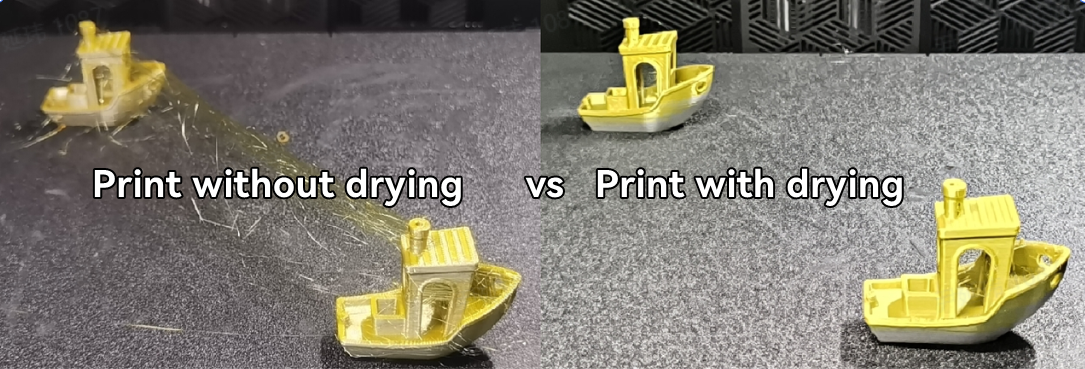
Ensure filaments are dried before and during printing to improve print quality, particularly for materials like PETG, TPU, CR-Silk, CR-PLA Matte, ENDER FAST PLA, and PA (nylon). For detailed drying procedures, refer to Creality's filament drying guide. Proper drying prevents moisture-related defects, enhancing overall print performance.
2. Preventing Warping and Cracking
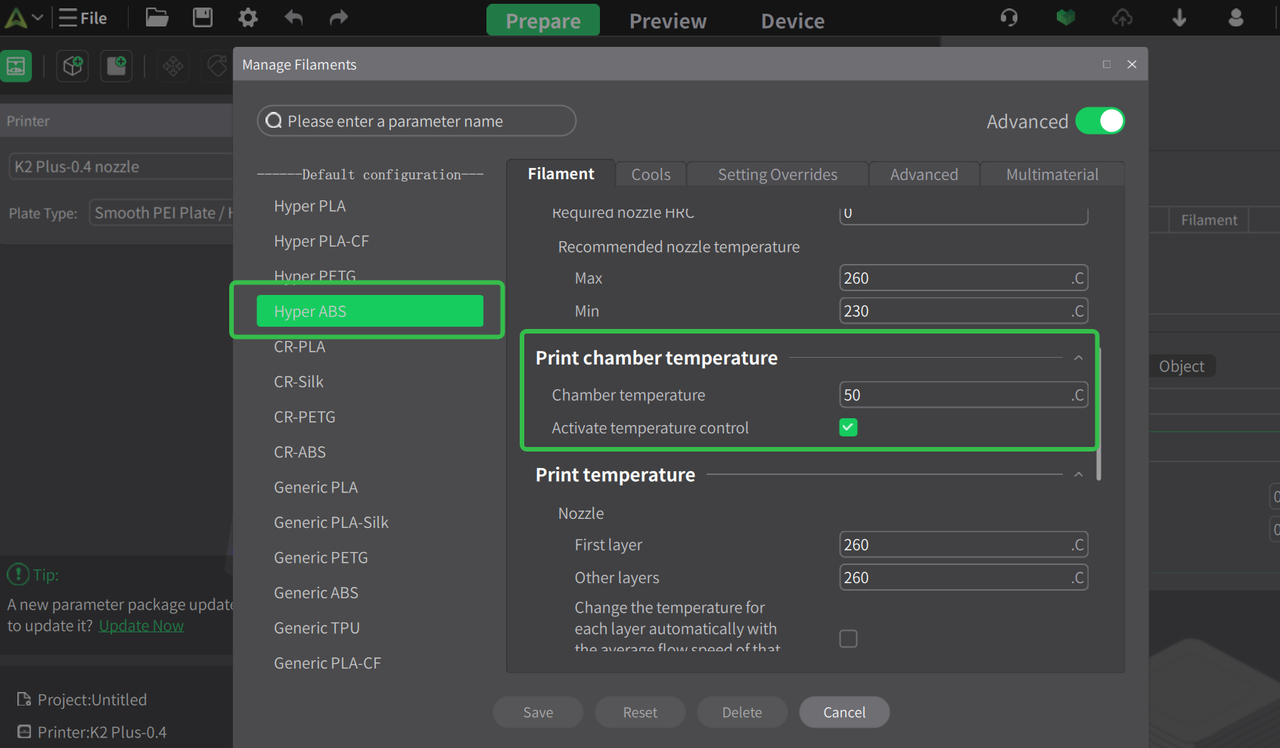
Materials such as ABS, ASA, PC, and PA are prone to warping and cracking due to their inherent properties. To mitigate these issues, use appropriate chamber heating (50-60°C) and close the top cover and front door during printing. Creality Print slicing software has default settings that include chamber heating for these materials.
3. Handling TPU Filament
Avoid using Creality CFS for TPU, as its flexibility can cause feeding issues.
Filaments with a hardness below 85A (e.g., 80A, 75A) are too soft for Creality printers and may lead to extrusion failures or nozzle clogging.
Avoid printing TPU directly through the PTFE tube to minimize resistance and improve print stability.
4. Carbon Fiber Reinforced Materials
For CF materials like PA-CF, PAHT-CF, and PET-CF:
Use a nozzle larger than 0.2mm to prevent clogging. A 0.6mm nozzle is recommended for a balance between precision and reliability.
Set the nozzle temperature between 280-300°C and clean it with a needle before and after use.
Regular maintenance prevents clogs when switching between CF and standard filaments.
5. Default Filament Settings
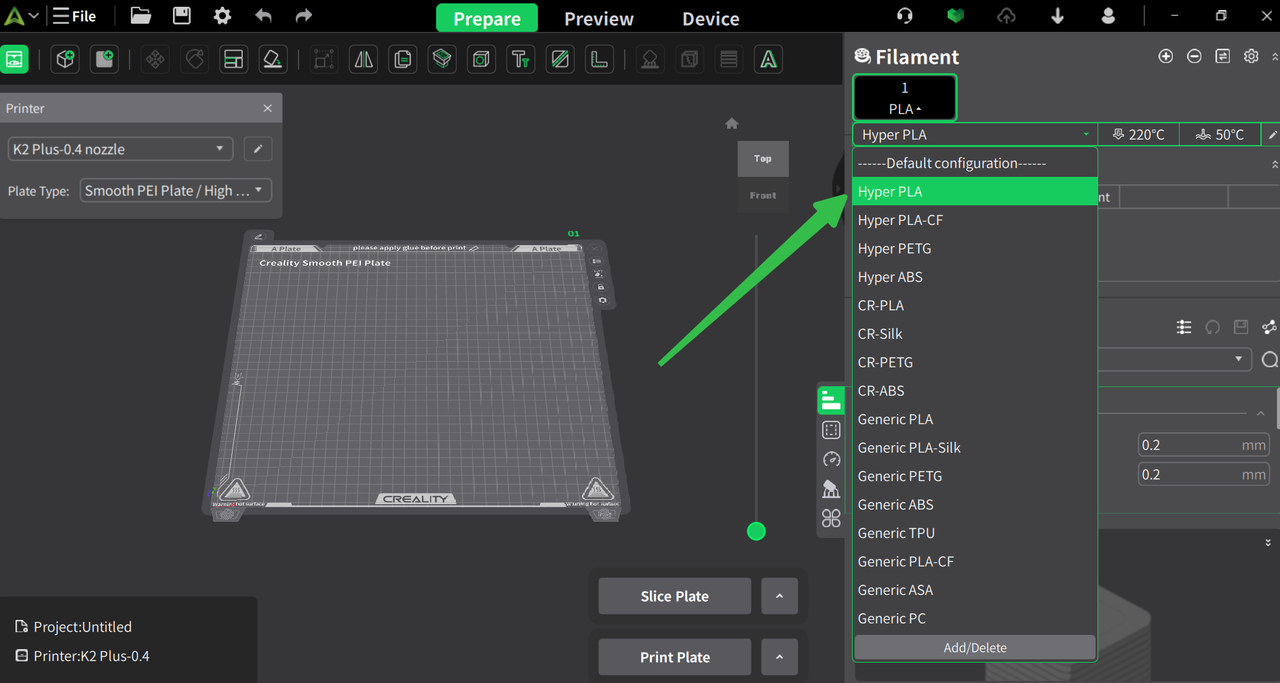
Utilize the built-in parameters in CrealityPrint for optimal performance. Over 40 filament types are pre-configured. If your filament isn't listed, select the closest match.
Parameter Scenarios:
Standard (0.20mm): Balances quality and efficiency, ideal for most prints.
Fine (0.08/0.12/0.16mm): Higher quality, longer print times, not recommended for large multi-color models.
Fast (0.24/0.28mm): Faster prints with lower quality and more noticeable layer lines.
For more Creality 3D Printer, you can click the related articles as follows:
Recent News

8 Halloween 3D Print Ideas to Make Before October 31

Ender Series 3D Printers Parameter Comparison

Creality Back-to-School Sale 2026: Save Up to 50% on 3D Printers and More
