


Ender 3 Neo Cura Profile Settings & Optimization Guide
The Ender 3 Neo is a revamped version of the highly successful original Ender 3, providing newcomers a straightforward entry into 3D printing with impressive print quality.Yet, getting the most out of this printer often depends on using the right settings in your slicer software.
In this article, we’ll explore the ideal Ender 3 Neo Cura profile settings , covering machine and print settings for popular filaments like PLA, ABS, TPU, and PETG.
Ender 3 Neo Cura Profile Settings
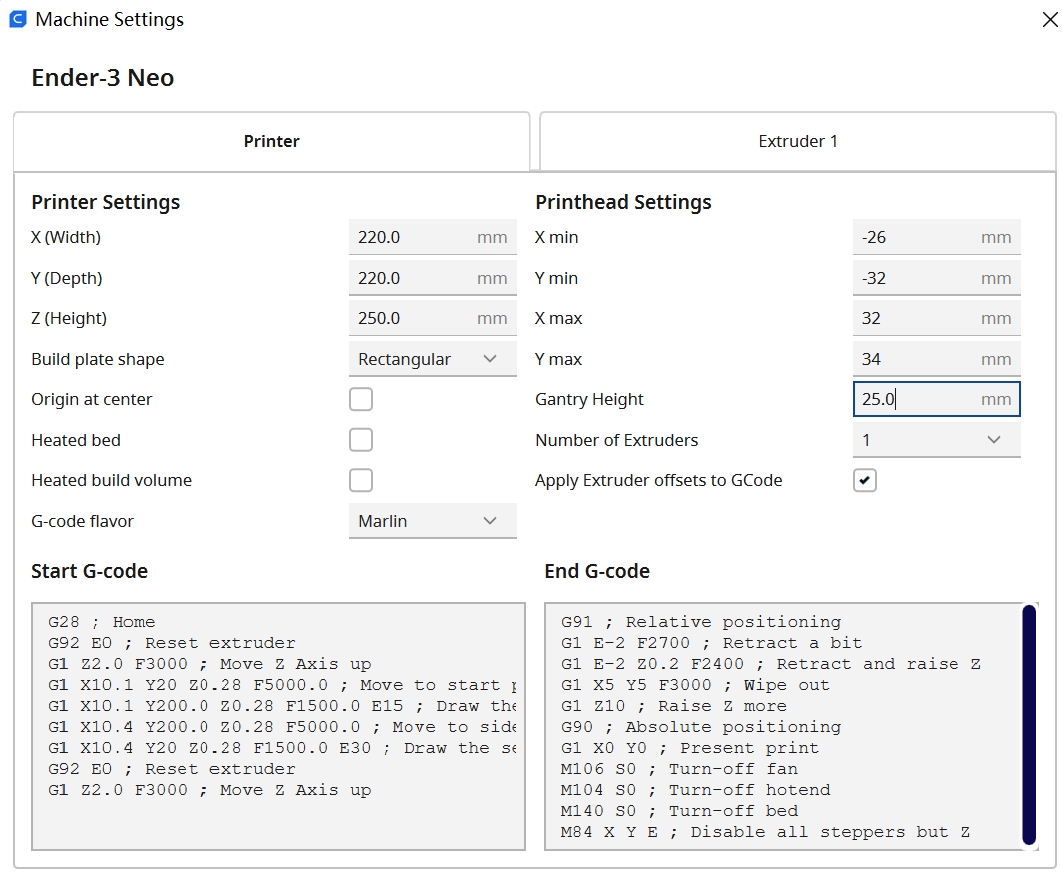
Before you can start printing with your Ender 3 Neo, you need to add it to Cura. Here's a step-by-step guide:
Machine Settings:
- Add Custom FFF Printer: Name it "Creality Ender 3 Neo".
- Print Volume: Define the print volume and head dimensions.
- G-Code Snippets: Use the below start and end G-code to ensure optimal performance.
Start G-Code:
G28 ; Home
G92 E0 ; Reset extruder
G1 Z2.0 F3000 ; Move Z Axis up
G1 X10.1 Y20 Z0.28 F5000.0 ; Move to start position
G1 X10.1 Y200.0 Z0.28 F1500.0 E15 ; Draw the first line
G1 X10.4 Y200.0 Z0.28 F5000.0 ; Move to side a little
G1 X10.4 Y20 Z0.28 F1500.0 E30 ; Draw the second line
G92 E0 ; Reset extruder
G1 Z2.0 F3000 ; Move Z Axis up
End G-Code:
G91 ; Relative positioning
G1 E-2 F2700 ; Retract a bit
G1 E-2 Z0.2 F2400 ; Retract and raise Z
G1 X5 Y5 F3000 ; Wipe out
G1 Z10 ; Raise Z more
G90 ; Absolute positioning
G1 X0 Y0 ; Present print
M106 S0 ; Turn-off fan
M104 S0 ; Turn-off hotend
M140 S0 ; Turn-off bed
M84 X Y E ; Disable all steppers but Z
Ender 3 Neo Cura Material specific Settings
PLA Settings:
- Print Temperature: 190-205 °C
- Print Bed Temperature: 60 °C
- Print Speed: 50 mm/s
- Retraction: 5 mm at 60 mm/s
- Cooling: 100%
ABS Settings:
- Print Temperature: 230-240 °C
- Print Bed Temperature: 90 °C
- Print Speed: 50 mm/s
- Retraction: 4.5-5.5 mm at 50-60 mm/s
- Cooling: 0% (use an enclosure)
TPU Settings:
- Print Temperature: 205-215 °C
- Print Bed Temperature: 65 °C
- Print Speed: 40-50 mm/s
- Retraction: 5-6 mm at 60-70 mm/s
- Cooling: 50-100%
PETG Settings:
- Print Temperature: 230-250 °C
- Print Bed Temperature: 65 °C
- Print Speed: 40-50 mm/s
- Retraction: 5-6 mm at 30-45 mm/s
- Cooling: 50-100%
Detailed Settings and Calibrations
Print Temperature:
Match the range provided for each filament. Use a temperature tower to calibrate for optimal results.
Print Bed Temperature:
Adjust the bed temperature to find the optimal adhesion without causing issues like an elephant's foot.
Print Speed:
Faster speeds are possible with lighter print heads. Adjust speeds conservatively to avoid vibrations that can cause surface defects.
Layer Height:
- Decorative objects: 0.1 mm
- Standard: 0.2 mm
- Rough, fast prints: 0.3 mm
- With a 0.4 mm nozzle, keep layer height between 25-50% of the nozzle diameter.
Flow Rate:
Start at default 100% and adjust for over-extrusion (90-99%) or under-extrusion (101-110%).
Retraction:
Calibrate retraction to prevent issues like stringing. Use retraction towers tailored to the filament type.
Infill Density:
- Decorative objects: 0-15%
- Standard objects: 15-50%
- High strength: 50-100%
First Layer:
- Height: 100-200% of normal layer height
- Print speed: 50% of the normal speed or 5-10 mm/s for better adhesion
For more Creality 3D Printer with Other Slicer, you can click the related articles as follows:
Related Articles:
Ender 3 V3 Ke with Cura: Settings & Guide >>
Final Thoughts
Perfecting your Ender 3 Neo Cura profile can turn a good 3D print into an exceptional one. So, invest time in experimenting and adjusting, and you'll see remarkable improvements in your final prints.
Read more:
Troubleshooting Ender 3 Extruder Skipping Issues
How to Achieve Perfect Bed Leveling on Your Ender 3
PETG Print Speed on the Ender 3
Recent News

8 Halloween 3D Print Ideas to Make Before October 31

Ender Series 3D Printers Parameter Comparison

Creality Back-to-School Sale 2026: Save Up to 50% on 3D Printers and More
