Home / Blog Center / Falcon2 Pro 60W New Arrival: An In-Depth Review
Falcon2 Pro 60W New Arrival: An In-Depth Review
all
2024-12-23 04:52:17
In recent years, desktop engraving machines have undergone significant innovation and improvement. They have evolved from open-frame designs to safe, aesthetically pleasing enclosed units. Performance capabilities have increased from small-scale cutting and engraving to more powerful operations. The machines now offer a wider range of functions and greater ease of use, making them suitable for a wider range of applications and significantly improving the practicality and user experience.
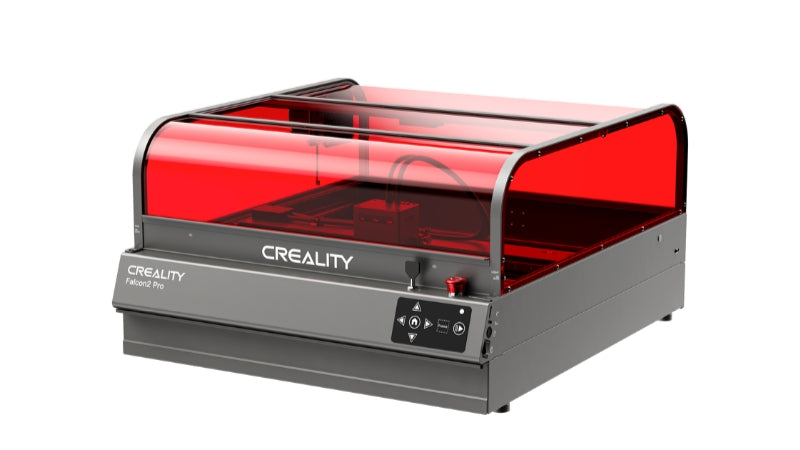
Riding the wave of innovation, Creality released the Falcon2 Pro enclosed engraver and cutter in 2024. This all-in-one machine features three adjustable modes and introduces a powerful 60W option to join the existing 22W and 40W models. Today we will introduce the Falcon2 Pro 60W, a precision machine designed for professionals and passionate DIY enthusiasts. It excels in a wide range of applications, from home decoration to commercial services.
Part 1: Creality Falcon2 Pro 60W Pre-Sale Details
⏰ The highly anticipated Creality Falcon2 Pro 60W will be available for pre-sale at 10:00 PM on May 23. Take advantage of early bird benefits with a 15% launch discount, and for the limited edition of 15 units during the first sale can enjoy 10% cashback on your order!
How to get it? After confirming receipt of your order, participate in product reviews to receive 10% cash back. The cash back will be sent to your order email in the form of a gift card.
Part 2: Creality Falcon2 Pro Enclosed Quick Look
The Creality Falcon2 Pro 60W laser engraver is designed for a variety of creative applications including home décor, personalized items and commercial services. It responds to market demands for integrated, high performance machines with safety and ease of use at the forefront. Ideal for both experienced and novice users, it offers robust cutting power and improved efficiency.
This makes the Falcon2 Pro 60W ideal for those transitioning from DIY projects to more profitable commercial ventures, ensuring fast job completion and operational safety.
Cardboard, wood, bamboo, rubber, leather, fabric, acrylic, plastic, etc.
Certifications
IEC60825, FDA, CE, ROHS, FCC, UKCA
Part 3: Innovations of Falcon2 Pro 60W Enclosed Laser Engraver & Cutter
Utilizing advanced FAC beam compression technology, the Falcon2 Pro combines 12 5.5W lasers into a 60W output for superior cutting power. This increase in power allows for faster production and greater enjoyment and commercial value for users. It can effortlessly cut through 0.3mm stainless steel and 30mm black acrylic in a single pass, tasks unattainable by other lower power devices.
1. Intelligent Adjustable Power Settings
User Pain Point
High-power lasers are like "broad swords" with large beam spots and high strength, suited for fast cutting but not for delicate engraving. Low-power lasers are like "scalpels," good for detailed patterns but not for bulk cutting. Thus, single-power lasers can't meet all needs.
Industry Status
These pain points stem from technical limitations unaddressed by the industry. Typically, power is indirectly reduced through software.
Product Highlight
Beyond software, beam size can be adjusted directly through the hardware, perfectly matching various user scenarios. We offer adjustable modes: 60W, 40W, and 22W. For anniversaries and initial sales, a 1.6W laser module is gifted, enhancing detail and refinement in engravings. Our product uniquely combines the best of cutting and engraving capabilities in the industry.
60W True Laser Power
Leveraging advanced FAC spot compression technology, 12 5.5W lasers unite to form a potent 60W beam, drastically enhancing cutting efficiency.
The Mightiest Cutting Ability
The 60W laser of the Creality Falcon2 Pro effortlessly slices through materials in a single pass:
Cuts 0.2mm stainless steel sheet
Cuts 20mm wood
Cuts 30mm black acrylic
Exceptional Efficiency
The Creality Falcon2 Pro 60W significantly accelerates the cutting process of common materials, boosting the productivity of your projects or small business to unprecedented levels.
2. Built-in Camera for Smart Positioning
User Pain Point
Most systems lack automatic/assistive positioning, forcing users to rely on manual preview, which is not always accurate and can lead to failures.
Industry Status
Typically, separate accessories like external cameras are used for scanning and interfaced with computer software.
Product Highlight
A camera integrated into the protective cover captures the full creation process. New tutorial content for camera operation is included on the accompanying TF card. When connected by USB, the positioning function is activated through software, ensuring efficient, accurate previews and significantly improving success rates. For batch creations, distances between different items can be adjusted automatically through software.
3. Class 1 Certification, Maximum Safety Performance
User Pain Point
Lasers pose inherent risks, and the accompanying smoke and dust can be harmful to health. As the market evolves, the demand for safety in laser crafting grows, becoming a top concern for buyers.
Industry Status
Typical solutions include protective covers made of fire-resistant material with transparent plastic windows for enjoying the process while protecting the eyes—a cost-effective approach but bulky and limiting interaction.
Product Highlight
Our design has evolved into a completely sealed unit with a stylish metal frame and a distinctive gun-metal grey chassis accented by a red cover, enhancing the industrial and technological appeal of the product.
Laser Filtering, Uncompromised Eye Safety
The fully enclosed cover not only filters out harmful particles but also eliminates the need for protective eyewear, as it shields against hazardous radiation effectively.
Enhanced Blue Light Absorption for Greater Eye Protection
The deep red, highly transparent cover significantly reduces blue light exposure, which is known to be harmful due to its high energy. This cover effectively absorbs blue light, preventing it from causing retinal damage.
Built-in LED Lighting for Clarity and Brightness
An LED light strip is integrated within the unit to ensure the work area is well-lit, providing a clear and bright view of ongoing projects.
Additionally, an upper sliding curved window improves access to materials and ongoing projects, enriching user interaction without compromising safety. The enclosed design also minimizes noise and contains dust, with side exhaust fans that can be connected to an optional air purifier or vented outside. The safety of the device is further enhanced by indicators that confirm the enclosure is securely sealed, automatically halting operation if it becomes unsealed.
4. Thoughtful Design, Enhanced User Experience
User Pain Point
Users desire seamless service, such as easy cleanup of debris and simplified interactions without needing extra space.
Industry Status
While most products fulfill the basic functions of a laser engraver, there's less focus on polishing user experience.
Product Highlight
A drawer at the base collects debris during use, easily emptied after creation. This not only simplifies cleaning but drastically reduces the frequency, easing the creative process. A slide-to-open design doesn't require additional space, allowing flexible placement on shelves or in small rooms/studios.
Part 4: FAQs about Creality Falcon2 Pro
1. Why does the carved work fail to achieve the expected effect compared with the original image?
There are recommended parameters for engraving and cutting on the official website or TF card.
At the same time, please check whether the device screws are tightened and whether the belt is appropriately tight to eliminate hardware problems.
Notes:
When the laser module is under the action of gravity, it can slide slowly on the X-axis profile perpendicular to the desktop.
When there is no idle slip on any pulley in the laser head assembly.
The belt tightness is appropriate. Otherwise, please adjust the belt tightness manually.
2. Can I engrave on reflective/transparent materials such as ceramics/glass?
Yes, but before engraving, you need to apply anti-reflective material on the surface of the material to ensure the engraving effect and prevent reflected light from damaging the laser module.
3. What should I do if the software does not respond or cannot connect when engraving online?
Make sure the data cable has communication function and the end of the data cable connected to the computer is a USB-A interface. If the computer does not have a USB-A interface, there is an A to C adapter to convert it, or use a hub with a USB-A port.
Make sure you have successfully imported the Creality Falcon2.lbdev file according to the LightBurn software tutorial in the TF card.
Make sure that the COM port corresponding to the engraving device is not occupied.
If it still can't be connect, please record a short video of the connection operation, and feed back the relevant system information and software version number to the after-sales team to troubleshoot the problem more quickly.
The Creality Falcon2 Pro 60W is a flagship model that redefines the standard for engraving and cutting machines, offering a strong return on investment for those dedicated to producing high-quality, precise laser engravings and cuts. Combining aesthetics, performance and superior handling, this machine is an unrivaled choice in today's marketplace. Designed to meet the demanding needs of both creative projects and business output, it offers new levels of speed, precision and safety.