


Top 10 Budget-Friendly Laser Engravers and Cutters for Under $400
So, you want to get into laser engraving without spending a fortune? That's perfectly understandable. A laser cutter or engraver can be a great addition to any creative studio. It enables you to create unique items for clients, prototype your ideas in a physical format, produce interesting promotional materials, or cut bespoke items for your crafting projects.
If you're looking for affordable yet reliable laser engravers, you're in the right place. Here are the top 10 laser engravers that won't break the bank but will let you start exploring this craft.
1. 5W CR-Laser Falcon Engraver - $189.00

Key Features:
- Engraving Area: 400 x 415 mm
- Speed: 10,000 mm/min
- Supports multiple file formats including JPG, PNG, BMP, and SVG
- Multi-material compatibility
Product Descriptions:
The 5W CR-Laser Falcon is a great starting point for beginners due to its affordability and versatility. Capable of engraving on a wide variety of materials such as wood, PVC, bamboo, stainless steel, and acrylic, it offers high precision with a compressed spot size of 0.12 x 0.06 mm. This laser operates at high speeds of up to 10,000 mm/min and boasts a large working area of 400 x 415 mm. It supports popular software like Laser GRBL and LightBurn, making it compatible with both Windows and Mac OS.
2. CR-Laser Falcon 7.5W Laser Engraver & Cutter - $259.00

Key Features:
- Work Area: 400 x 415 mm
- Modular design for easy assembly
- Quick focusing and multiple material support
Product Descriptions:
This machine is perfect for users seeking enhanced power and precision. With a 6-lens convergence and modular design, the 7.5W CR-Laser Falcon excels at quick focusing and offers an engraving area of 400 x 415 mm. Its user-friendly operation and built-in leveler meet FDA safety standards, making it ideal for both personal and professional use.
3. 10W Creality Laser Falcon Engraver - $319.00

Key Features:
- One-pass cutting for up to 12mm basswood
- High engraving precision with 0.06 x 0.06 mm spot focus
- Easy-to-use with support for LightBurn and LaserGRBL software
Product Descriptions:
For those seeking more power, the 10W Creality Laser Falcon offers incredible cutting efficiency, able to cut 12mm of basswood in one pass. With 0.06mm high precision, it's ideal for engraving detailed designs on materials like wood, leather, plastic, and even metal. This machine also features a user-friendly one-button operation and quick assembly, making it a reliable option for more demanding tasks.
4. Creality Falcon Pro 10W Engraver - $379.15
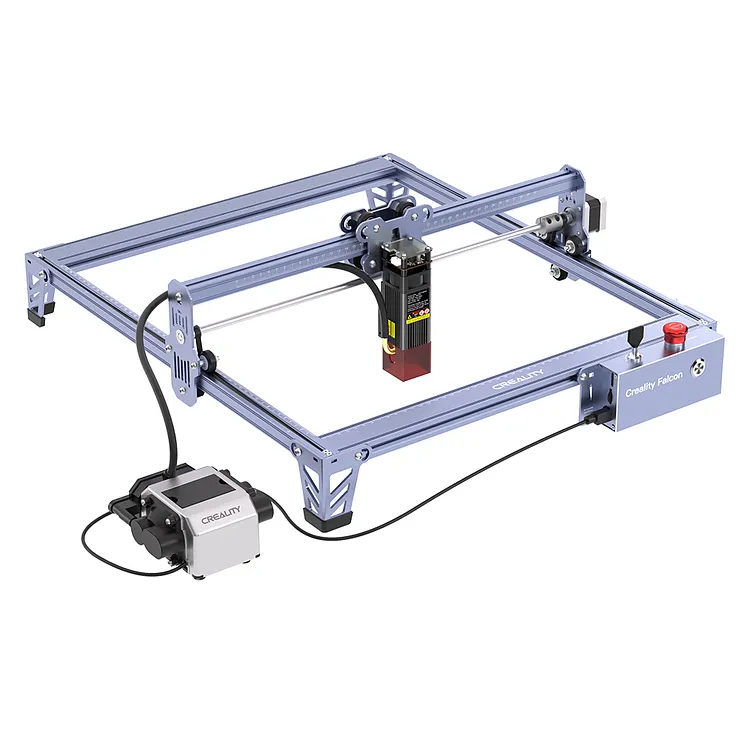
Key Features:
- Offline engraving with one-button operation
- Built-in air-assist system for cleaner engravings
- 400 x 415 mm engraving area
Product Descriptions:
The Creality Falcon Pro offers a built-in air-assist system, which keeps your workspace clean and allows for smoother cuts. With its one-button operation for offline use, it's perfect for on-the-go projects. It also boasts a 0.06mm laser focus for highly detailed engravings and is compatible with a wide range of materials.
5. Longer RAY5 10W Laser Engraver - $299.99

Key Features:
- 10-12W output power
- 0.06 x 0.06 mm laser focus for fine engraving
- Compatible with popular software like LaserGRBL and LightBurn
Product Descriptions:
With a 10-12W output power, the Longer RAY5 is a powerful tool capable of handling tougher materials. Its ultra-fine 0.06mm laser focus ensures accuracy, while the 10000 mm/min engraving speed makes it one of the faster options on the market. This machine supports various engraving formats, making it ideal for both hobbyists and professionals.
6. AlgoLaser DIY KIT MK2 Diode Laser Engraver - $300 USD

Key Features:
- One-tap batch engraving
- Supports up to 400 x 880 mm engraving area with extension kit
- Quick origin point setting for efficient workflows
Product Descriptions:
The AlgoLaser DIY KIT MK2 stands out with its one-tap precision and batch engraving capabilities, making it perfect for small businesses or mass production. The machine features easy-to-use drag-and-drop positioning and supports large engraving areas up to 400 x 880 mm with an extension kit.
7. Two Trees TTS 55 Pro 5.5W Laser Engraver - $202.12

Key Features:
- 300 x 300 mm engraving area
- Offline engraving with app connection
- 30,000 mm/min engraving speed
Product Descriptions:
This machine offers excellent speed and precision with its compressed-spot technology and high-speed motherboard. The 5.5W laser module can cut 8mm thick wood, and the working area of 300 x 300 mm is sufficient for most personal projects. With offline engraving and Wi-Fi connectivity, it’s a convenient option for those looking for flexibility.
8. Acmer P1 S Pro 6W Laser Engraver - $199.00

Key Features:
- 380 x 370 mm working area
- High-speed engraving at 10,000 mm/min
- Wi-Fi connectivity for remote control
Product Descriptions:
With a large working area of 380 x 370 mm, the Acmer P1 S Pro is designed for precision and speed. The 0.06mm ultra-thin engraving line ensures crisp and clear designs, while the high-performance ESP32 MCU allows for faster operations. Its user-friendly Wi-Fi connection makes it a popular choice for those seeking both power and convenience.
9. NEJE 3 Laser Engraver and Cutter - $199.00

Key Features:
- Simple assembly with 4 screws
- MEMS sensing protection for safety
- Wide module compatibility
Product Descriptions:
The NEJE 3 is perfect for DIY enthusiasts. It features an updated CNC structure for enhanced precision, and its simple assembly process makes it accessible to beginners. Equipped with MEMS sensing protection, it’s also one of the safer options available. The NEJE 3 supports a wide range of engraving modules for versatile applications.
10. Jinsoku LC-40 Laser Engraver - $379.00

Key Features:
- 400 x 400 mm work area
- Passive air assist design
- Supports iOS, Android, Windows, and macOS
Product Descriptions:
The Jinsoku LC-40 features compressed spot technology and passive air assist for faster and cleaner engravings. With a large work area of 400 x 400 mm and a high-strength aluminum alloy frame, it is built for durability and precision. It supports both mobile and desktop software, making it a versatile option for any workspace.
Hot FAQs about Laser Engravers and Cutters Under $400
1. Are these laser engravers easy to set up and use for beginners?
Yes, many of the recommended models, such as the CR-Laser Falcon Engraver and 10W Creality Falcon Pro, are designed with user-friendly features and simple assembly processes, making them suitable for beginners.
2. Which software is compatible with these laser engravers under $400?
Most of these laser engravers are compatible with popular software such as Laser GRBL and LightBurn and Craftseek, making them accessible for both Windows and Mac OS users.
3. What are the key features to look for in a budget laser engraver?
Key features to consider include the engraving area size, speed, laser focus precision, material compatibility, and additional functionalities such as offline engraving and Wi-Fi connectivity.
People Also Read:
Top 8 Laser Engravers for Metal >>
Laser Cutting Wood for Laser Engraver Machines >>
10 Best Budget Laser Engravers for 2024 >>
Conclusion
If you’re looking to invest in a laser engraver and cutter under $400, there are plenty of high-quality options available. Whether you're a beginner looking for simplicity or a professional seeking advanced features, these budget-friendly laser engravers provide excellent value for their price points. Consider the size, power, and material compatibility that best suits your needs, and start creating!
Recent News

8 Halloween 3D Print Ideas to Make Before October 31

Ender Series 3D Printers Parameter Comparison

Creality Back-to-School Sale 2026: Save Up to 50% on 3D Printers and More
