


Battle of the Laser Tools: LightBurn vs LaserGRBL Comparison
When selecting software for laser engraving and cutting, the choice can significantly impact the efficiency and quality of your work. This comparison aims to provide a detailed analysis of LightBurn and LaserGRBL, two popular laser control software options, to help users make an informed decision.
LightBurn and LaserGRBL cater to different user needs and preferences. LightBurn is known for its robust design capabilities and user-friendly interface, while LaserGRBL is praised for its simplicity and compatibility with GRBL-based lasers. Understanding their differences is crucial for maximizing the potential of your laser projects.
What is LightBurn
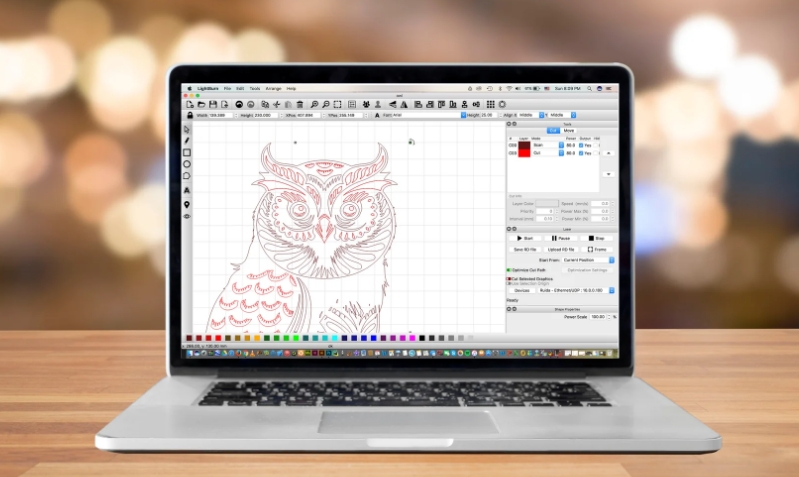
LightBurn is a comprehensive software solution designed for laser engraving and cutting. It provides a rich set of tools for creating, editing, and managing laser projects, making it a favorite among both hobbyists and professionals. LightBurn supports a wide range of laser machines, offering users flexibility and convenience.
LightBurn Key Features
1. Compatibility with Various Lasers
LightBurn is compatible with many laser controllers, including Ruida, Trocen, and GCode-based controllers. This broad compatibility ensures that users can utilize LightBurn with most laser machines on the market.
2. Design Tools
LightBurn offers a robust suite of design tools, including vector drawing, text editing, and image tracing. Users can create intricate designs directly within the software or import designs from other programs.
3. User Interface
The user interface of LightBurn is intuitive and user-friendly, designed to streamline the workflow. It includes features like drag-and-drop functionality, customizable toolbars, and an integrated preview window to see the results before engraving or cutting.
4. File Support
LightBurn supports a wide variety of file formats, including AI, SVG, DXF, PDF, and more. This versatility allows users to import designs from other software and ensures smooth integration into existing workflows.
LightBurn Pros and Cons
Advantages
- Extensive Compatibility: Works with a wide range of laser controllers.
- Powerful Design Tools: Comprehensive suite of design features.
- User-Friendly Interface: Intuitive and easy to navigate.
- Versatile File Support: Supports numerous file formats.
Disadvantages
- Cost: LightBurn is a paid software, which might be a drawback for some users.
- Learning Curve: Despite its user-friendly interface, the extensive features may require some time to master fully.
- System Requirements: Requires a relatively modern computer to run smoothly, which might be an issue for users with older systems.
What is LaserGRBL Software

LaserGRBL is a free, open-source software specifically designed for controlling GRBL-based laser engravers. Known for its simplicity and efficiency, it is a popular choice among hobbyists and those new to laser engraving. LaserGRBL provides the essential tools needed to manage laser projects without the complexity of more advanced software.
LaserGRBL Key Features
1. Compatibility with GRBL-Based Lasers
LaserGRBL is optimized for GRBL-based laser engravers, ensuring seamless communication and control. This makes it an ideal choice for users with GRBL-compatible machines.
2. Design Tools
While LaserGRBL offers basic design tools, its primary strength lies in its ability to convert images into G-code for laser engraving. Users can import images and use LaserGRBL to process and optimize them for engraving.
3. User Interface
The user interface of LaserGRBL is straightforward and minimalistic, making it easy for beginners to navigate. It includes essential features like image import, G-code visualization, and laser control settings.
4. File Support
LaserGRBL supports common image file formats such as JPEG, PNG, and BMP. It can convert these images into G-code, ready for laser engraving. However, it lacks support for vector file formats, which may limit design complexity.
LaserGRBL Pros and Cons
Advantages
- Free and Open-Source: LaserGRBL is completely free, making it accessible to everyone.
- Ease of Use: Its simple and intuitive interface is ideal for beginners.
- Efficient Image Processing: Great for converting and optimizing images for laser engraving.
- Low System Requirements: Can run on older or less powerful computers.
Disadvantages
- Limited Design Tools: Basic design capabilities may not meet the needs of advanced users.
- Compatibility: Only works with GRBL-based lasers, limiting its use with other types of laser controllers.
- File Format Support: Limited to image files, lacks support for vector formats like SVG or DXF.
- Lack of Advanced Features: Missing some advanced features and customization options found in other software.
LightBurn vs LaserGRBL: A Side-by-side Comparison

1. Feature Comparison
| Features | LightBurn | LaserGRBL |
| Ease of Use | Intuitive, user-friendly interface with customizable toolbars and drag-and-drop functionality. May require some learning to master advanced features. | Simple, minimalistic interface ideal for beginners. Easy to navigate with a straightforward design. |
| Design Capabilities | Comprehensive design tools including vector drawing, text editing, and image tracing. Suitable for creating intricate designs within the software. | Basic design tools focused on image processing and conversion to G-code. Limited to simpler designs. |
| Laser Machine Capabilities | Compatible with a wide range of laser controllers such as Ruida, Trocen, and GCode-based controllers. | Exclusively supports GRBL-based laser engravers, limiting its use to specific machines. |
| File Format Support |
Supports numerous file formats including AI, SVG, DXF, PDF, and more, allowing for extensive design import and export options. | Supports common image formats like JPEG, PNG, and BMP. Lacks support for vector file formats such as SVG or DXF. |
| Price and Licensing |
Paid software with a one-time purchase cost. Offers a 30-day free trial for evaluation. | Free and open-source, providing an accessible option without any cost. |
| Community and Support | Strong community support with active forums, tutorials, and regular updates from the developers. | Good community support with a dedicated user base. Being open-source, it has community-driven updates and support. |
2. Performance Comparison
| Performance Aspect | LightBurn | LaserGRBL |
| Speed and Efficiency | Generally fast and efficient, especially with more powerful laser controllers. Offers advanced optimization features for faster processing. | Efficient for its scope, though may be slower with large or complex projects due to its simpler design and processing capabilities. |
| Accuracy and Precision | High accuracy and precision, suitable for professional-grade projects. Advanced features help ensure detailed and accurate engravings and cuts. | Adequate accuracy for hobbyist projects, though, may not match the precision required for more intricate or professional work. |
| Reliability and Stability | Generally reliable and stable with regular updates and bug fixes. Users report a stable performance across different setups. | Exclusively supports GRBL-based laser engravers, limiting its use to specific machines. |
3. Use Case Scenarios
- Hobbyists vs. Professionals
LightBurn: Professional users benefit from its advanced design tools and compatibility with various laser controllers, making it suitable for commercial and intricate projects. Hobbyists also find it useful due to its user-friendly interface and robust features.
LaserGRBL: Ideal for hobbyists due to its simplicity and cost-free nature. While professionals may find it limiting, it serves as a practical tool for beginners or those working on less complex projects.
- Small Projects vs. Large Projects
LightBurn: Handles both small and large projects efficiently. Its advanced features and optimization tools make it capable of managing extensive and complex tasks.
LaserGRBL: Best suited for small to medium-sized projects. While it can manage larger projects, its simpler design and limited capabilities may not support extensive tasks as efficiently as LightBurn.
- Specific Applications (e.g., Engraving, Cutting)
LightBurn: Excels in both engraving and cutting applications due to its precision, advanced design tools, and compatibility with a range of laser controllers. Suitable for detailed engraving and various cutting tasks.
LaserGRBL: Primarily used for engraving due to its strong image processing capabilities. While it can handle cutting, its performance may not match the precision and efficiency required for more complex cutting tasks.
4. User Feedback
LightBurn: Users often praise its comprehensive features, user-friendly interface, and strong community support. Many professionals appreciate its precision and efficiency, while hobbyists find the learning curve manageable with available resources.
LaserGRBL: Users value its simplicity, ease of use, and free availability. Hobbyists and beginners particularly appreciate its straightforward approach to laser engraving. However, some users note its limitations in design capabilities and compatibility.
5. Reviews
LightBurn:
- Praise: Advanced features, robust design tools, wide compatibility, strong community support.
- Criticisms: Cost, learning curve for advanced features, requires modern computer systems.
LaserGRBL:
- Praise: Free and open-source, easy to use, efficient image processing, low system requirements.
- Criticisms: Limited design tools, restricted to GRBL-based lasers, lacks support for vector file formats, fewer advanced features.
More feedback and reviews about LightBurn and LaserGRBL, You can visit Reddit Laser Engraver Group.
LightBurn vs. LaserGRBL: Which Laser Software Reigns Supreme
If you already have a basic understanding of engraving and cutting and need to handle large and complex projects, LightBurn is an excellent choice. It is recommended for its advanced features and wide compatibility.
If you are a beginner just getting started with laser engraving and looking for a free solution, LaserGRBL is a practical option.
Ultimately, the best laser software is the one that fits your needs.
Final Thoughts
Choosing between LightBurn and LaserGRBL depends on the user's specific needs, project complexity, and budget. LightBurn provides a robust and versatile solution for various applications, while LaserGRBL offers a straightforward and accessible option for those with GRBL-based lasers. Understanding these differences can help users make an informed decision and optimize their laser engraving and cutting projects.

Recent News

8 Halloween 3D Print Ideas to Make Before October 31

Ender Series 3D Printers Parameter Comparison

Creality Back-to-School Sale 2026: Save Up to 50% on 3D Printers and More
