



Sermoon D3: Stable & Reliable Productivity Tool
【Industrial Grade Stability】
【Precision-made to Minimize Mechanic Errors】
【Reliable Extrusion at 300℃ Temperature】
【14 Filaments at Choice】
【Scale It Up with Multi-printers Control】
【Up to 5 Times of Printing Speed】
Sermoon D3 vs Sermoon D3 Pro
all
2024-12-23 04:59:08
Creality launched the Sermoon D3 Fully Enclosed Printer on September 22, designed specifically for industrial applications. It's perfect for manufacturing parts, fixtures, education, scientific research, and small-scale production. Offering cost-effective 3D printing, it helps small businesses boost efficiency and profitability.
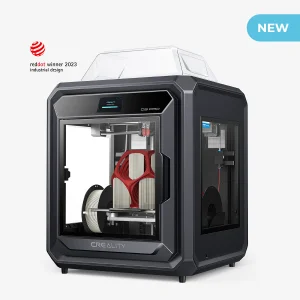
In July 2023, Creality unveiled the upgraded Sermoon D3 Pro, which improves both printing speed and industrial capabilities. This model features two hotends that share one extruder, enabling dual-filament printing and streamlining the machine's design. Automatic nozzle calibration further simplifies setup and increases maximum print speed to 300 mm/s and acceleration to 5000 mm/s², a significant leap in performance.
In this article, we will delve into a detailed comparison between Sermoon D3 and D3 Pro, help users know more about these 2 machines, and then offer a printing parameter setting to solve printing problems and make users' works more vibrant and perfect.
Sermoon D3 3D Printer
Sermoon D3 Pro 3D Printer

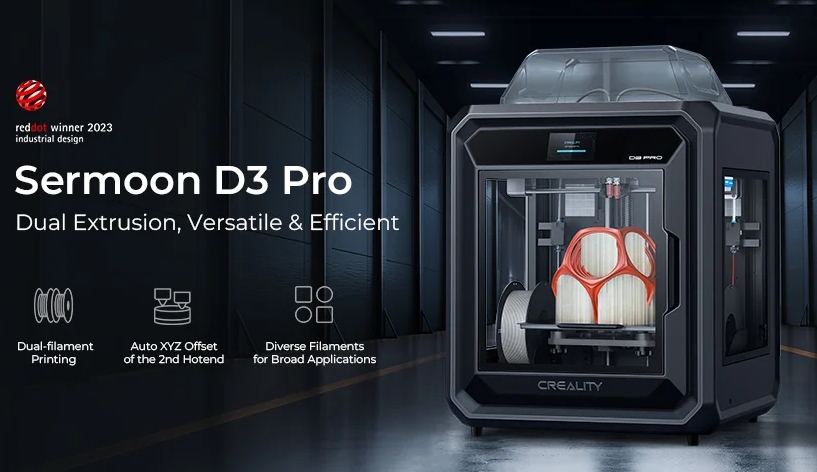
Sermoon D3 Pro: Dual Extrusion, Versatile & Efficient
【Dual-filament Printing: Reliable Dual Extrusion with High Flow】
【Auto XYZ Offset of the 2nd Hotend】
【300mm/s* Speed, Quick to Fulfill Orders】
【Diverse Filaments for Broad Applications】
【Stay Auto-leveled for a Long Time】
【Thermostatic Chamber to Forge Robust Print】
【Dual-filament Printing: Reliable Dual Extrusion with High Flow】
【Auto XYZ Offset of the 2nd Hotend】
【300mm/s* Speed, Quick to Fulfill Orders】
【Diverse Filaments for Broad Applications】
【Stay Auto-leveled for a Long Time】
【Thermostatic Chamber to Forge Robust Print】
Sermoon D3 & D3 Pro Tech Specs at A Glance
| Type | Model | Sermoon D3 | Sermoon D3 Pro |
|
Device Information |
Pic | 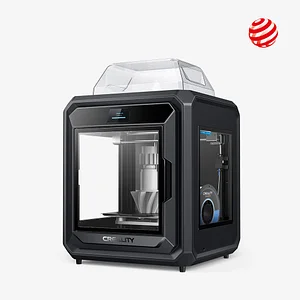 |
 |
| Release Date | 2022.9 | 2023.7 | |
|
Product Dimensions (mm) |
553*576*656 | 553*578*656 | |
|
Package Dimensions (mm) |
695*670*700 | 695*670*700 | |
| Net Weight (kg) | 45kg | 43kg | |
| Gross Weight (kg) | 50kg | 52kg | |
| Display Screen | 4.3" Touch Screen | 4.3" Touch Screen | |
| Electronic | Rated Input Voltage | 100-240V ~, 50/60Hz | 100-240V~, 50/60Hz |
| Rated Power | 500W | 1300W | |
|
Printing Parameters |
Printing Technology | FDM | FDM |
| Build Volume (mm) | 300*250*300 | 290*220*300 | |
| Printing Accuracy | ±0.1mm | ±0.1mm | |
| Layer Height | 0.1-0.4mm | 0.1-0.35mm | |
|
Filament Support & Printing Speed |
Filament Diameter | 1.75mm | 1.75 mm |
| Supported Filaments | PLA, PLA-Wood, PETG, PET, ABS, PA66, ASA, PC, PC-ABS, TPU95A, TPC, PLA-CF, PA66-CF, PET-CF |
PLA, PETG, PET, TPU, PVA, BVOH, HIPS, PA, ABS, ASA, PC, PC-ABS, PLA-CF, PA-CF, PET-CF, Metal |
|
| Printing Speed | PLA≤150mm/s, ABS≤250mm/s |
Single nozzle:200mm/s Dual spray nozzles:150mm/s |
|
| Max. Printing Speed | PLA 150mm/s, ABS 250mm/s | 300mm/s,5000mm/s² | |
| Printing Platform | Build Surface | PC & PEI Spring Steel Sheets + Magnetic Base |
Flexible build plate |
| Heatbed Temperature | 110℃ | 120°C | |
| Nozzle Components |
Extruder Count | 1 | 2 |
| Extruder | Direct Drive Extruder | Direct Drive Extruder | |
| Nozzle Temperature | 300℃ | 300°C | |
| Nozzle Diameter | Standard 0.4mm | 0.4 mm | |
| Machine Features | Silent Mainboard | √ | √ |
| Power Loss Recovery | √ | √ | |
| Filament Runout Sensor | √ | √ | |
| Leveling Mode | Auto Leveling | Auto Leveling | |
| Remote Printing | √ (webcam built-in) | √ (webcam built-in) | |
| Enclosure | Yes | Yes |
Sermoon D3 vs D3 Pro Differences Comparison
1. Build Volume
The Sermoon D3 boasts a build volume of 300 x 250 x 300 mm, slightly surpassing that of the D3 Pro, whose build volume measures 290 x 220 x 300 mm..
2. Rated Power & Mainboard
The Sermoon D3 Pro features a robust 1300W rating, significantly higher than the 500W of the D3. This higher power capacity allows users to easily upgrade and draw power from the motherboard. Compared to the D3, the D3 Pro achieves a fast-heating, with its hotend reaching 200℃ in just 40 seconds and its heatbed hitting 100℃ within 180 seconds. This power capacity allows add-ons to be powered directly from the D3 Pro motherboard, supporting the dual-filament printing system.
3. Filament Support
The Sermoon D3 features the "Sprite" Dual-gear Direct Extruder, combined with a bimetal heat break (made of copper alloy and titanium alloy), an inner-polished copper alloy nozzle, and a 5015 cooling fan. This configuration ensures reliable extrusion at temperatures up to 300℃ and supports 14 different types of filaments to cater to various printing needs. For everyday use, it handles regular filaments like PLA, PLA-Wood, PETG, and PET. For projects requiring stronger materials, it's compatible with high-strength filaments such as ABS, PA66, ASA, PC, and PC-ABS. It also prints flexible filaments like TPU95A and TPC, as well as wear-resistant filaments including PLA-CF, PA66-CF, and PET-CF, making it versatile for a wide range of applications.
The D3 Pro is fully compatible with all filaments that the D3 can use, but takes it a step further with its print head design. Featuring two hotends that share a single extruder, the D3 Pro is engineered for dual-filament printing, enhancing its versatility and efficiency. A another notable upgrade is its capability to print with metal material, setting it apart from the D3 and broadening the range of projects it can tackle.
4. Printing Speed
The D3 offers printing speeds up to 150mm/s for PLA and up to 250mm/s for ABS, showcasing its reliable performance. In contrast, the D3 Pro elevates the printing experience with a remarkable speed of 300mm/s and an acceleration of 5000mm/s², making it significantly faster and more efficient for a wide range of materials.
More read: Sermoon D3 in-depth review
Sermoon D3 Printing Parameter Settings
Note: * Indicates printing layout recommendations

| Sermoon D3 Recommended Filament Printing Parameter Settings (1) | |||||||||
| Filament | Nozzle Diameter |
Layer Height |
Line Width |
Wall Thickness |
Top/Bottom Thickness |
Infill Sparse Density |
Support Density |
PEI Plate | PC Plate |
| CR-PLA | 0.4 | 0.2mm | 0.44mm | 1.32mm | 0.8mm | 10% | 10% | ***** | ***** |
| CR-ABS | 0.4 | 0.2 | 0.44mm | 1.32mm | 0.8mm | 20% | 10% | **** | *** |
| HP ULTRA ABS | 0.4 | 0.2 | 0.44mm | 1.32mm | 0.8mm | 20% | 10% | **** | *** |
| CR-Silk | 0.4 | 0.2 | 0.44mm | 1.32mm | 0.8mm | 10% | 10% | ***** | ***** |
| CR-Wood | 0.4 | 0.2 | 0.44mm | 1.32mm | 0.8mm | 10% | 10% | ***** | ***** |
| CR-PETG | 0.4 | 0.2 | 0.44mm | 1.32mm | 0.8mm | 10% | 10% | **** | **** |
| TPC | 0.4 | 0.2 | 0.44mm | 1.32mm | 0.8mm | 20% | 20% | ***** | ***** |
| CR-TPU | 0.4 | 0.2 | 0.44mm | 1.32mm | 0.8mm | 20% | 20% | ***** | ***** |
| CR-Nylon | 0.4 | 0.2 | 0.44mm | 1.32mm | 0.8mm | 20% | 15% | ** | *** |
| CR-PA Carbon | 0.4 | 0.2 | 0.44mm | 1.32mm | 0.8mm | 20% | 10% | *** | *** |
| CR-PA Carbon | 0.6 | 0.2 | 0.6mm | 1.32mm | 0.8mm | 20% | 10% | *** | *** |
| CR-PLA Carbon | 0.4 | 0.2 | 0.44mm | 1.32mm | 0.8mm | 20% | 10% | ***** | ***** |
| CR-PLA Carbon | 0.6 | 0.2 | 0.44mm | 1.32mm | 0.8mm | 20% | 10% | ***** | ***** |
| Sermoon D3 Recommended Filament Printing Parameter Settings (2) | ||||||||
| Filament |
Nozzle Temperature |
Heatbed Temperature |
Travel Speed |
Printing Speed |
Retract Distance |
Retract Speed |
Wall Flow | Cooling Fan Speed |
| CR-PLA | 205℃ | 60℃ | 120mm/s | 80mm/s | 0.8mm | 40mm/s | 100% | 100% |
| CR-ABS | 250℃ | 110℃ | 120mm/s | 80mm/s | 1mm | 40mm/s | 95% | 50% |
| HP ULTRA ABS | 240℃ | 100℃ | 120mm/s | 80mm/s | 1mm | 40mm/s | 95% | 50% |
| CR-Silk | 205℃ | 60℃ | 120mm/s | 80mm/s | 0.8mm | 40mm/s | 100% | 100% |
| CR-Wood | 205℃ | 60℃ | 120mm/s | 80mm/s | 0.8mm | 40mm/s | 100% | 100% |
| CR-PETG | 230℃ | 80℃ | 120mm/s | 80mm/s | 1mm | 25mm/s | 95% | 50% |
| TPC | 215℃ | 60℃ | 120mm/s | 60mm/s | 2mm | 30mm/s | 100% | 100% |
| CR-TPU | 215℃ | 70℃ | 100mm/s | 40mm/s | 2mm | 40mm/s | 100% | 100% |
| CR-Nylon | 250℃ | 50℃ | 120mm/s | 60mm/s | 1.5mm | 40mm/s | 95% | 50% |
| CR-PA Carbon | 255℃ | 110℃ | 120mm/s | 50mm/s | 0.8mm | 40mm/s | 95% | 0% |
| CR-PA Carbon | 255℃ | 110℃ | 120mm/s | 50mm/s | 0.8mm | 40mm/s | 95% | 0% |
| CR-PLA Carbon | 195℃ | 60℃ | 120mm/s | 80mm/s | 0.8mm | 40mm/s | 10% | 100% |
| CR-PLA Carbon | 195℃ | 60℃ | 120mm/s | 80mm/s | 0.8mm | 40mm/s | 10% | 100% |
Tips:
1. Mount the material on an external support when using flexible materials such as TPU & TPC;
2. It is recommended to replace the extruder module with a hardened steel nozzle when using fibrous materials;
3. please apply glue to the printing platform prior to printing.
Sermoon D3 Pro Printing Parameter Settings
1. Sermoon D3 Pro Dual Filament Compatibility
Note: √ is Yes, o is Ideal, x is Not Recommended
It is recommended to use the same brand of Filament for dual-nozzle printing.
| Sermoon D3 Pro Dual Filament Compatibility | |||||||||
| Brand | Filament |
Single Nozzle |
Double Nozzle |
Poly Dissolve™ S1 |
Creality HP-HiPS |
Ultrafuse® HiPS |
Ultrafuse® BVOH |
Poly Support™ |
Ultrafuse® SupportLayer |
| Creality | Hyper PLA | √ | √ | √ | x | x | √ | x | x |
| BASF | HP ULTRA PLA | √ | √ | √ | x | x | √ | x | x |
| Creality | CR-Silk | √ | √ | √ | x | x | √ | x | x |
| Creality | CR-PLA | √ | √ | √ | x | x | √ | x | x |
| Creality | CR-ABS | √ | √ | x | √ | √ | x | x | x |
| BASF | HP ULTRA ABS | √ | √ | x | √ | O | x | x | x |
| BASF | Ultrafuse® ABS Fusion+ | √ | O | x | √ | O | x | x | x |
| Creality | CR-Nylon | √ | x | x | x | x | x | x | x |
| Creality | CR-PETG | √ | √ | x | x | x | √ | x | x |
| BASF | Ultrafuse PETG | √ | O | x | √ | √ | √ | x | x |
| BASF | Ultrafuse® PET | √ | O | x | x | O | √ | x | x |
| Creality | CR-TPU | √ | x | x | x | x | x | x | x |
| Polymaker | PolyLite™ ASA | O | x | x | √ | √ | x | x | x |
| BASF | Ultrafuse® ASA | √ | x | x | x | √ | x | x | x |
| Polymaker | PC-ABS | O | x | x | √ | x | x | x | x |
| Polymaker | PolyLite™ PC | O | x | x | √ | x | x | x | x |
| BASF | Ultrafuse® PAHT CF15 | O | x | x | x | x | √ | √ | x |
| BASF | Ultrafuse® PET CF15 | √ | √ | √ | x | x | √ | x | x |
| Creality | CR-PLA Carbon | √ | x | √ | x | x | √ | x | x |
| Creality | CR-PA Carbon | √ | x | x | x | x | √ | √ | x |
| BASF | Ultrafuse® 316L | √ | x | x | x | x | x | x | √ |
2. Sermoon D3 Pro Official Suggested Filament Parameter Settings

| Filament |
Nozzle Temperature |
Heatbed Temperature |
Standby Temperature |
Printing Speed |
Retract Distance |
Nozzle Switch Retract Distance |
Wall Flow |
Cooling Fan Speed |
| Hyper PLA | 215℃ | 50℃ | 150℃ | 200mm/s | 0.8mm | 5mm | 100% | 100% |
| CR-PLA | 205℃ | 50℃ | 150℃ | 150mm/s | 0.8mm | 5mm | 100% | 100% |
| HP ULTRA ABS | 240℃ | 100℃ | 200℃ | 80mm/s | 1mm | 5mm | 95% | 50% |
| CR-ABS | 250℃ | 100℃ | 200℃ | 80mm/s | 1mm | 5mm | 95% | 30% |
| CR-Silk | 205℃ | 50℃ | 150℃ | 80mm/s | 0.8mm | 5mm | 100% | 100% |
| CR-PETG | 240℃ | 80℃ | 180℃ | 80mm/s | 1mm | 5mm | 95% | 50% |
| HP-TPU | 220℃ | 60℃ | 150℃ | 50mm/s | 2mm | 5mm | 110% | 100% |
| CR-Nylon | 260℃ | 50℃ | 180℃ | 60mm/s | 0.8mm | 5mm | 100% | 50% |
| CR-PA Carbon | 260℃ | 100℃ | 200℃ | 60mm/s | 1mm | 5mm | 100% | 0% |
| CR-PLA Carbon | 215℃ | 60℃ | 160℃ | 80mm/s | 0.8mm | 5mm | 100% | 100% |
| HP-HIPS | 240℃ | 100℃ | 190℃ | 60mm/s | 1mm | 5mm | 100% | 50% |
| Generic PLA | 215℃ | 50℃ | 140℃ | 150mm/s | 0.5mm | 5mm | 100% | 100% |
| Generic ABS | 250℃ | 100℃ | 200℃ | 100mm/s | 0.5mm | 5mm | 95% | 40% |
| Generic PETG | 240℃ | 80℃ | 180℃ | 100mm/s | 0.5mm | 5mm | 95% | 40% |
| Generic TPU | 220℃ | 50℃ | 150℃ | 60mm/s | 1mm | 5mm | 110% | 100% |
Notes:
1. Maximum print speed of filament is related to the material characteristics and should be based on the recommendations of the material manufacturer and official slicing software configuration.
2. It is recommended to evenly apply solid glue to the print bed before printing to improve first layer adhesion.
3. For moisture-sensitive materials like PA/PA-CF/TPU/PVA, it is recommended to dry them before printing or store them in a dry environment.
4. For non-official filament, please select generic filament parameters in the slicing software.
5. It is recommended to use official high-speed filament for better print quality.
6. It is recommended to use a drying box when printing water-soluble materials and engineering filament that easily absorb water. The humidity of the drying box is ≤20%.
7. When printing 316L materials, please use the B side of the printing plate and add metal printing glue (Magigoo Pro Metal).
 Related Guides:
Recent News

all
2026-10-13
8 Halloween 3D Print Ideas to Make Before October 31
Halloween is coming, and the candy stash has already suffered a few unexplained disappearances. W...

all
2026-09-18
Ender Series 3D Printers Parameter Comparison
The Creality Ender Series has evolved significantly since the original Ender-3. What began as an ...

all
2026-08-02
Creality Back-to-School Sale 2026: Save Up to 50% on 3D Printers and More
A new school year is a chance to start fresh projects, develop practical skills and turn digital ...

all
2026-05-26
Is PLA Recyclable?
PLA is a biodegradable plastic derived from renewable resources such as corn starch or sugarcane....