


Fusion 360: A Comprehensive Introduction
Aimed at bridging the gap between design and machining, Fusion 360 is cloud-based software that encompasses CAD, CAM, CAE, and PCB in a single platform.
Whether you're a hobbyist, entrepreneur, or professional in engineering, architecture, or industrial design, understanding the capabilities and applications of Fusion 360 can have significant impact on your projects.
What is Fusion 360?
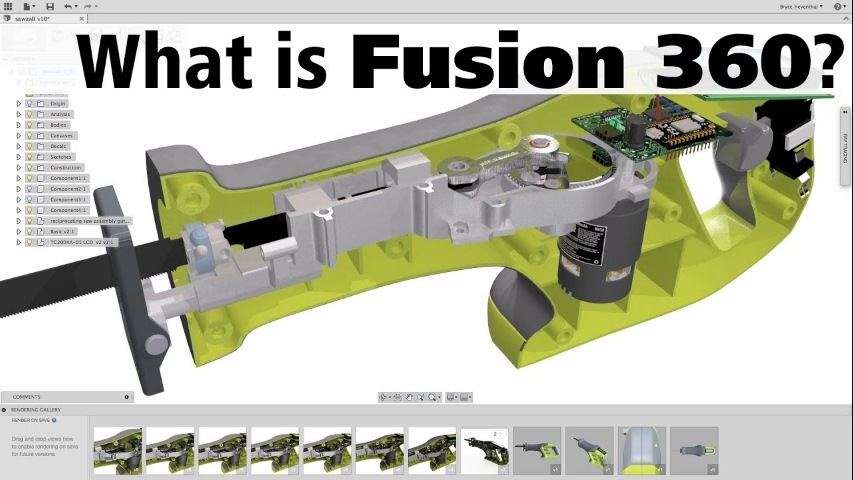
Fusion 360, developed by Autodesk, is a multifunctional 3D software launched in 2013. Its integrated platform enables users to perform a variety of design activities, including 3D modeling, generative design, and simulation among others, all within a single program. Fusion 360 has become particularly popular for its affordability, flexibility, and comprehensive set of tools.
Key Features of Fusion 360
Each workspace in Fusion 360 addresses a specific aspect of the design process:
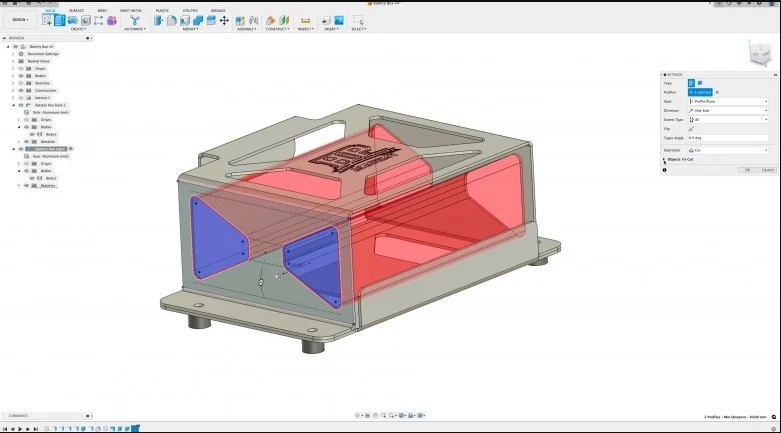
- CAD Design: Users can create complex 3D models with an advanced suite of tools including T-spline technology for freeform modeling, parametric tools for design changes, and mesh modeling tools.
- Simulation: Before physical prototypes, Fusion 360 offers tools to predict the behavior of components under real-world conditions. This includes stress analysis, thermal simulation, and more.
- Data Management: Being cloud-based, it automatically saves all versions and changes. Access and retrieval of data are straightforward, and user permissions can be managed efficiently.
- Collaboration: The platform supports collaboration allowing team members to view, share, and comment directly on projects within the software.
- CAM and 3D Printing: Fusion 360 integrates CAD with CAM, making it easier to send designs directly to production machinery. Its 3D printing setup is user-friendly, providing support to handle various print settings and materials.
- PCB Design Integration: Designing PCBs is streamlined with tools for layout and circuit design, enabling seamless integration with mechanical functionalities.
Fusion 360 Pricing and Licensing
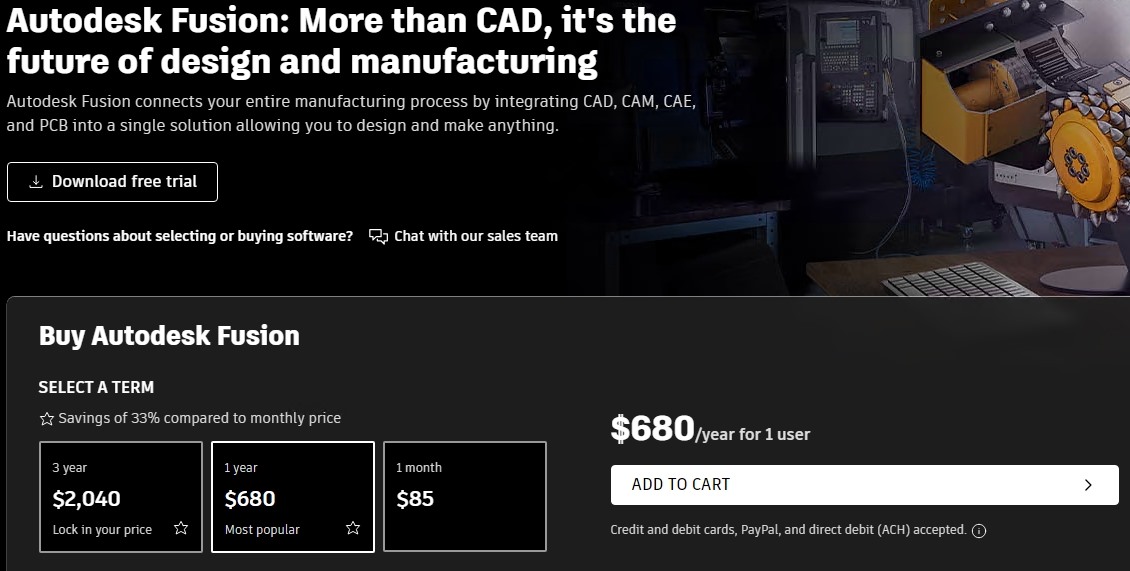
Fusion 360 offers several subscription plans:
- Monthly: $85
- Annual: $680 (about $56/month)
- Triennial: $2040 (about $56/month)
Additionally, Autodesk provides a 30-day free trial, and students can access a fully functional version by proving their enrollment status.
For enthusiasts and personal users, a free, limited version is available focusing only on CAD, CAM, and PCB design. Startups can acquire a special license costing $150 per user for three years, under certain conditions like being venture backed or bootstrapped but excluding service providers and nonprofits.
Fusion 360 System Requirements
Operating System: Windows 10, 11; MacOS 12 Monterey, 13 Ventura
CPU: 64-bit processor with at least 4 cores, 1.7 GHz or more
RAM: Minimum 4 GB
Graphics: At least 1 GB VRAM for dedicated GPUs, 6 GB RAM for integrated graphics
Storage: 8.5 GB available space
Display: 1366 x 768 resolution, 1920 x 1080 preferred
Internet: Minimum 5 Mbps download, 500 Kbps upload
Devices like a three-button mouse or a Wacom tablet can enhance the user experience significantly.
Fusion 360 Feature Specific Highlights
User Interface and Layout
Fusion 360 organizes its numerous tools into different workspaces such as Design, Manufacture, and Simulation, each tailored to specific types of tasks. This organization helps streamline workflows and keep the interface uncluttered. Essential tools are accessible from the Main Toolbar which adapts dynamically as you switch between workspaces.
Extensions and Upgrades
Fusion 360 also offers extensions for users needing advanced capabilities, available via additional subscriptions. These include tools for complex tasks like volumetric lattice generation or feature-based automation.
Performance and User Experience
While Fusion 360 is stable once operational, it can have slow startup and file-loading times. Regular performance updates from Autodesk aim to speed up response times and improve workflow smoothness.
Community and Support
Autodesk maintains a robust support ecosystem for Fusion 360, including a detailed help center, user forums, and a wealth of learning resources and tutorials. These tools are invaluable for both beginners and experienced users looking to deepen their knowledge or resolve specific issues.
Use Cases and Applications
Industrial Design: Automotive parts, furniture, and sports equipment designs.
Mechanical Engineering: Prototyping tools and machinery.
Architecture and Construction: Structural plans that can undergo rigorous testing.
Education: Schools use it to teach students about design and engineering principles.
Fusion 360 Alternatives
If Fusion 360 doesn’t meet specific needs, alternatives include:
- Inventor: A more powerful software suitable for complex industrial design.
- SolidWorks: A well-established option in the industry known for its advanced features and steep learning curve.
- FreeCAD: An open-source program that provides a decent but less stable alternative free of cost.
FAQs about Fusion 360
1. How much does Fusion 360 cost?
Detailed pricing can always be found on Autodesk's official website.Fusion 360 offers several subscription options to fit different needs and budgets. There are monthly subscriptions available at $85 per month, annual subscriptions for $680 (around $56 per month), and triennial subscriptions for $2040 (also about $56 per month).
2. Is Fusion 360 easy to learn for beginners?
While being a sophisticated tool, there are numerous tutorials and online community resources to help beginners learn the basics of Fusion 360.
3. Can Fusion 360 be used offline?
While primarily cloud-based, Fusion 360 does offer limited offline functionalities. However, internet is required for the initial software setup and occasional syncing of your project files.
Conclusion
In conclusion, Fusion 360 offers a powerful suite of tools designed to accommodate a wide range of design and manufacturing tasks. Its flexibility, combined with competitive pricing and strong community support, makes it an attractive option for professionals across various industries.

Recent News

8 Halloween 3D Print Ideas to Make Before October 31

Ender Series 3D Printers Parameter Comparison

Creality Back-to-School Sale 2026: Save Up to 50% on 3D Printers and More
