


Ender 3 Thermal Runaway: Causes, Fixes & Preventive Measures
The Ender 3 3D printer, though a highly efficient and reliable device, periodically throws some challenges at the users. One such problem that often bothers the Ender 3 owners is the "Thermal Runaway" error.
This article delves into the issue of Ender 3 Thermal Runaway, understanding its causes, fixing the problems, and ways to prevent it. If you're an Ender 3 user, this guide will help you troubleshoot and maintain the device more effectively.
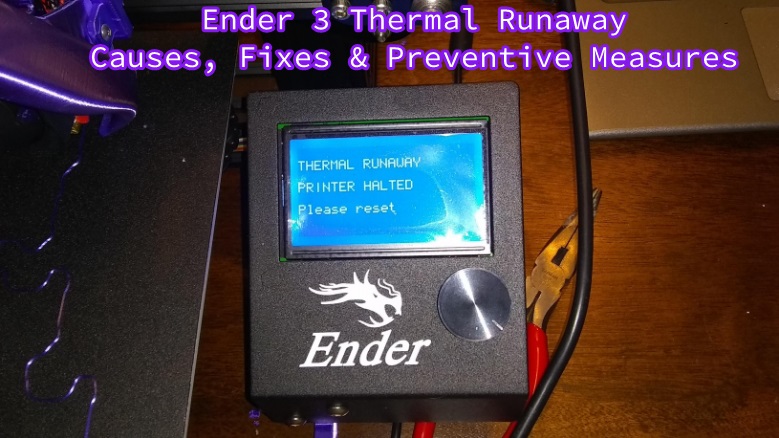
What is Thermal Runaway in 3D Printing?
Thermal runaway is a scenario where the heating element of the 3D printer cannot regulate temperature accurately.
This means the hot-end or the heat bed continues to warm up uncontrollably, which can potentially cause a fire. The term 'runaway' denotes the persistent and uncontrollable rise in temperature.
Why Ender 3 Thermal Runaway?
The Ender 3 printer, like any electronic device, can have mechanical failures that lead to irregularities in performance.
In terms of thermal runaway, the causes can range from an incorrectly set power supply or a malfunctioning thermistor to issues with the hotend itself. Any of these could disrupt the printer's balance, leading to an unregulated increase in temperature.
How to Fix Ender 3's Thermal Runaway with 4 Simple Ways?
Fixing a thermal runaway problem in Ender 3 3D printer might seem daunting, but there are four simple ways to address it:
1. Check the Power Supply
The power supply's compatibility with your country's voltage standards is critical. Double-check the position of the supply's voltage switch to ensure it is correctly set.
2. Inspect the Thermistor
The thermistor, a small component acting as a temperature sensor, might be a source of the issue. If it is loose, tighten its screw. If it seems damaged or malfunctioning, consider replacing it with a new one.
3. Perform PID Autotune
PID Autotune is a technique that helps to achieve more consistent temperatures in the hotend. If you've recently made changes to your hotend or noticed erratic temperature variations, running a PID Autotune can help recalibrate your system and solve the error.
4. Replace the Hotend
If the previous steps don't resolve the issue, the problem might lie in the hotend itself. Replacing the hotend could effectively solve the thermal runaway problem. Remember to conduct a PID Autotune after replacing the hotend to ensure proper temperature regulation.
Preventive Measures Against Thermal Runaway
Prevention often holds the key in averting thermal runaway scenarios. Here are a few precautions to prevent thermal runaway:
- Activate the thermal runaway protection feature in your printer's firmware.
- Always have a fire extinguisher and smoke detector within reach of your 3D printer setup.
- Consider the use of a flame-resistant enclosure to provide an added layer of safety.
- Make it a point to keep any combustible materials at a safe distance from your printer.
- Position the printer in a cool area, avoiding spaces prone to intense heat.
FAQs about Ender 3 Thermal Runaway
1. What is Ender 3's Thermal Runaway?
Ender 3's Thermal Runaway is a safety feature designed to prevent the printer's heating element from overheating. The system triggers this mechanism when the temperature sensor is unable to control the rise in heat within a stipulated time, potentially leading to hazardous conditions.
2. What are the common causes for Ender 3's Thermal Runaway?
Common causes of Ender 3's Thermal Runaway include an incorrectly set power supply, a loose or malfunctioning thermistor (the temperature sensor in the printer), or a defective hotend. Any of these issues can disrupt the printer's ability to regulate temperature, leading to the thermal runaway condition.
3. How do I fix Ender 3's Thermal Runaway error?
To fix the Ender 3's Thermal Runaway error, ensure your power supply's voltage matches your country's standards, inspect the thermistor for any loose connections or malfunctions, and consider running a PID Autotune to recalibrate your printer's temperature control. If all these fail, you might need to replace your hotend. Always remember to maintain suitable safety precautions, including keeping the printer in a flame-resistant enclosure and within reach of a fire extinguisher.
Conclusion
The Ender 3 thermal runaway is a serious concern, but understanding its causes and fixes helps prevent potential hazards. Regular upkeep and prompt troubleshooting can go a long way in ensuring your 3D printing sessions are both effective and safe.
People also read:
Recent News

8 Halloween 3D Print Ideas to Make Before October 31

Ender Series 3D Printers Parameter Comparison

Creality Back-to-School Sale 2026: Save Up to 50% on 3D Printers and More
