


Ender-3 3D Printer: Comprehensive Overview and User Guide
The Ender 3 3D printer is a popular choice among enthusiasts for its balance of affordability, functionality, and ease of use. This article delves into its essential parameters, operational guidelines, troubleshooting methods, and slicing software insights.
Despite being an earlier release, the Ender-3 printer can still improve your printing efficiency and success rate through upgraded accessories. Read this "Ender 3 upgrade" to learn more.
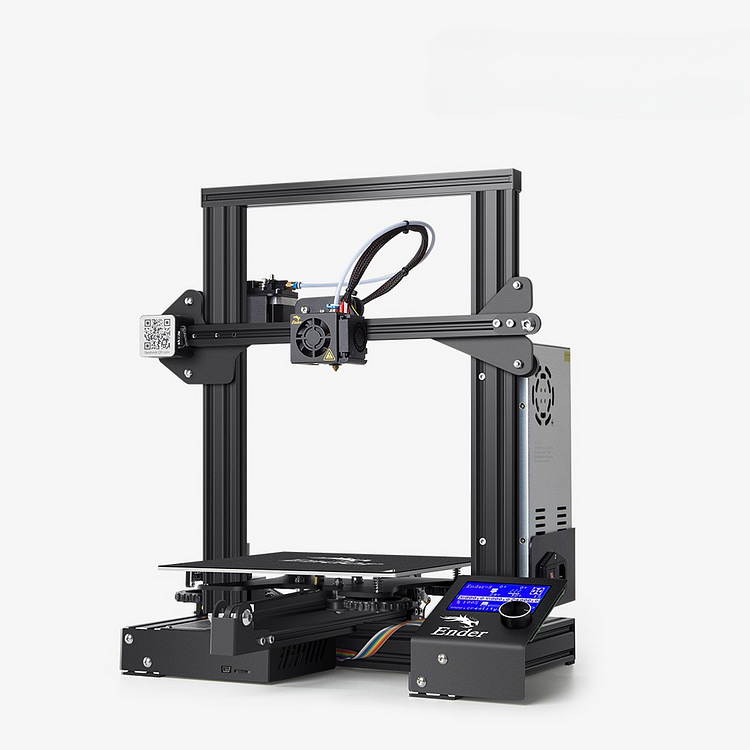
【DIY Assembly】
【Integrated Structure】
【High Precision Print】
【Stable Power Supply】
【Build Volume 220*220*250mm】

【250mm/s max printing speed & 2500mm/s² acceleration】
【Features CR Touch and strain sensors for auto leveling】
【 "Sprite" Direct Extruder】
【Stable dual Z-axis 】
【Build Volume 220*220*250mm】
Faqs about Ender 3 Basic Parameters
1. What's the machine's print size?
The build volume is 220x220x250mm.
2. Does this machine support two-color printing?
No, it uses a single nozzle and does not support two-color printing.
3. What's the printing accuracy of the machine?
It features a 0.4mm nozzle with an accuracy range of 0.1-0.4mm.
4. Does the machine support 3mm filament?
No, it only supports 1.75mm diameter filaments.
5. Which filaments can be used with this machine?
It supports PLA, TPU, carbon fiber, and other linear filaments.
6. Can the machine connect to a computer for printing?
Yes, it supports both online and offline printing, but offline printing is recommended.
7. Does the machine support 110V local voltage?
Yes, it has adjustable settings for 115V and 230V, with DC: 24V.
8. What is the machine's power consumption?
The rated power is 270W, designed to be energy-efficient.
9. What's the highest nozzle temperature?
The maximum temperature is 250°C.
10. What's the maximum temperature of the hot bed?
The hot bed can reach up to 110°C.
11. Does the machine have a power-off resume function?
Yes, it resumes printing after power restoration.
12. Does the machine have material breakage detection?
No, it does not have this feature.
13. Does the machine have a double Z-axis screw?
No, it features a single Z-axis screw.
14. Can the machine switch between Chinese and English firmware?
You need to flash the corresponding firmware for language changes.
15. Are there any requirements for the computer system?
It is compatible with Windows XP/Vista/7/10, MAC, and Linux.
16. What's the machine's optimal printing speed?
The best printing speed is 50-60mm/s.
Faqs about Ender-3 3D Printer Operation
1. How do I turn on the machine?
After powering it on, press the "boat" button to start.
2. Should I turn off the machine after printing?
Yes, turn off the machine when you are done printing.
3. How do I level the machine?
Follow our leveling tutorial:
4. How do I load filament into the machine?
Heat the nozzle to 200°C, cut the filament at a 45-degree angle, open the extrusion clamp, and feed the filament into the extruder until it flows out.
5. How do I replace the filament?
Heat the nozzle to 200°C, pinch the extrusion clamp, push the old filament forward, and pull it out. Insert the new filament quickly.
6. Can the machine print continuously if the model is large?
Yes, it can print continuously for up to 200 hours.
7. What should I do if the power goes out while printing?
The machine can resume printing when the power is restored.
8. Are there any environmental requirements for the machine?
Normal room temperature is sufficient. Increase the hot bed temperature to 60°C if below 10°C.
9. Is the machine noisy during operation?
The machine operates with minimal noise.
10. Can I print with ABS filament?
ABS requires a constant high-temperature environment; it is generally not recommended for direct printing on this machine.
11. Is the machine safe for children and the elderly?
Children and the elderly should use the machine under supervision to avoid burns.
12. How do I adjust the belt tension?
Move the X/Y axis back and forth or feel the belt tension manually.
13. Can the machine switch languages in the firmware?
No, you need to flash the corresponding firmware for language changes.
14. Where is the Ender-3 filament rack installed?
The filament rack is fixed above the gantry rack. Place it vertically and secure with screws.
15. Can the nozzle be moved manually?
Yes, turn off the stepper motor to manually move the nozzle.
16. What is the nozzle diameter?
The default is 0.4mm, but 0.2mm, 0.6mm, and 0.8mm nozzles are optional.
17. Can this machine achieve automatic leveling?
Yes, but you need to purchase BLtouch accessories separately. Refer to the video tutorial:
FAQs about Ender 3 Slicing Software
1. How do I install the software?
Click on the installation package and follow the prompts, similar to installing apps like WeChat.
2. Are there other slicing software options available?
Yes, you can use Cura and Silplify.
3. What do the 5 icons in the upper-right corner do?
Click on the installation package and follow the prompts, similar to installing apps like WeChat.
- Normal Mode: Display STL files and change parameters.
- Hanging, Transparent, Perspective Modes: Rarely used.
- Slicing Preview Mode: Preview the entire print process.
4. What file formats are supported for models?
STL, OBJ, and AMF format models.
5. What format should the print file be?
Print files should be in Gcode format.
6. Where can I download the slicing software?
Download it from the software's data column on the official website.
7. What are the common slicing parameters for printing?
- Layer Height: 0.15mm
- Wall Thickness: 1.2mm
- Top/Bottom Layer Thickness: 1.2mm
- Infill: 15-25%
- Printing Speed: 50-60mm/s
- Nozzle Temp: 200-210°C
- Hot Bed Temp: 45-55°C
- Supports: All supports
- Platform Adhesion: Bottom grid
- Retraction Speed: 80mm/s
- Retraction Length: 6-8mm
8. What's the difference between partial and full support?
- Partial Support: Adds support only to the model base.
- Full Support: Generally recommended for complete model support.
9. How do I add a new model if it's not in the software?
Open the software, select "Custom" in the additional model/printer section, and enter the machine size. Ensure the nozzle aperture matches the actual size.
10. How do I import a model into the slicing software?
Use the "open/import model" function or drag the model into the software.
11. Can this software modify the model size?
Select the model, use the resize icon in the lower left or side of the interface, and unlock for single direction adjustment. Lock for proportional scaling.
12. How do I adjust the model angle?
Select the model and use the rotation icon in the lower left or side of the interface to adjust the axis angle.
13. How can I zoom and drag the view to see model details?
Use the mouse wheel to zoom and hold the wheel to drag the view.
14. How do I rotate the view for a multi-angle model view?
Press and hold the right mouse button.
15. How do I set the wall thickness?
Set based on nozzle multiples, e.g., 0.8mm/1.2mm for a 0.4mm nozzle.
16. What's the recommended printing temperature for PLA filament?
Nozzle: 200-210°C; Hot Bed: 45-55°C.
17. What if the nozzle scrapes the model after it’s printed high?
Enable the Z-axis lift height during retraction and set it to 0.2mm.
18. Why is there a gap at the top part of the model?
- Increase top solid layer to 1.2mm.
- Increase infill rate to 20-30%.
- Adjust infill degree to 15-25%.
- Check for modeling errors and repair the model if necessary.
19. How do I prevent issues like drawing or dropping during printing?
- Adjust retraction speed to 50-80mm/s and retraction length to 6-8mm.
- Ensure the printing temperature is within the appropriate range.
20. Why does the bottom support stick and fall off easily?
The support has a small contact area. Adding a base to the model can help.
21. How do I switch from quick mode to full mode?
Go to the tool options in the menu bar to switch modes.
22. Can the default parameters print the model directly?
Yes, the default parameters can be used for direct printing.
23. How do I save the sliced file?
Use "Save Gcode file" in the file menu or click the save icon in the upper left corner of the interface.
Basic Other Problems about Ender 3 3D Printer
1. How do I handle warping during printing?
Set the hot bed temperature to 50-60°C, re-level the bed so the nozzle and bed gap is the thickness of A4 paper, and apply solid glue to the printing area.
2. How do I obtain 3D models?
Available through a 3D scanner, your own modeling, or website downloads such as Thingiverse and MyMiniFactory.
3. What should I do if the filament runs out during printing?
Replace the filament as soon as you notice it's running low to complete the print successfully.
4. How do I maintain the printer?
Regularly clean the fan blades, apply lubricant (grease) to the lead screw, and clean the throat every 3-6 months.
5. What is the after-sales warranty period?
The machine has a one-year warranty, and the nozzle kit has a three-month warranty.
6. How do I deal with platform and nozzle shaking?
Tighten the eccentric nut and adjust the hot bed platform nut.
7. What should I do if the knob operation fails?
Gently pull the rotating button out by 2mm. If that doesn't work, replace the button or screen.
8. How do I remove a stuck model from the bed?
Heat the hot bed to 60-70°C, then use a spatula to gently pry the model from the edge.
9. Why is the machine printing without any filament extruding?
Check if the extrusion gear on the motor is loose and tighten the top screw if needed. Ensure the filament is not knotted or stuck. If the nozzle is blocked, clean the throat.
10. How do I deal with the nozzle not extruding filament?
Make sure the filament is properly loaded. If the nozzle is too close to the platform, re-level it. If there’s a blockage, clean the throat. More information is available in the video tutorial:
Common Faults of the Ender 3
1. How do I handle nozzle leakage?
- Heat the nozzle to 230°C, remove the nozzle kit while maintaining this temperature, then detach the heating block and throat separately. Once removed, lower the temperature.
- Apply red glue (available from Taobao) to the threads of the throat, let it sit for 1 minute, then reassemble the throat and heating block, and reinstall the nozzle kit.
- If the issue persists, contact after-sales customer service.
2. What should I do if there's no reaction when heating the hot bed?
- If the screen doesn’t show normal room temperature when not heating, it could be a thermal problem; replace the thermistor.
- If the hot bed port on the motherboard doesn't output 24V when heating, replace the motherboard.
3. What should I do if the nozzle doesn’t heat up?
- If the screen doesn’t display the normal room temperature when not heating, replace the thermistor.
- If the nozzle port on the motherboard doesn’t output 24V when heating, replace the motherboard. Otherwise, replace the heating tube.
4. How do I handle a blue screen and unresponsive buttons?
- Ensure the screen cable is plugged into the EXP3 interface on the back of the screen.
- If the screen shows obvious damage, replace it.
- Restart the button and listen for a beep. If there’s no sound, replace the motherboard; otherwise, replace the screen.
- Contact after-sales customer service if the issue persists.
5. Why does the printer stop automatically during printing?
- If slicing is unsuccessful or not completely exported, re-slice or wait for the export buffer to complete.
- If file transfer interrupts during SD card printing, replace or format the SD card.
- Contact after-sales customer service if the issue persists.
6. What should I do if the fan doesn’t rotate or makes noise?
- Clean the fan and check for debris.
- Check and tighten screws and the fan cover if loose.
- If the fan blade is damaged, replace the fan.
7. How do I handle X/Y/Z limit switch failures?
- Check if the limit wiring has fallen off; if so, reattach it.
- If the limit switch is damaged, replace it.
- Contact after-sales customer service if the issue persists.
8. How do I deal with incomplete displays, garbled characters, or missing pixels?
This is usually a screen quality problem; replace the screen.
9. What should I do if the card slot doesn’t respond to card reading?
- Format the SD card.
- Check for a loose card slot.
- Clean the card slot with alcohol to remove oxidation.
- Replace the card slot or motherboard.
10. What should I do if the power supply leaks, burns out, or has no voltage output?
Replace the power supply.
11. What should I do if the extruder base or extrusion clamp cracks?
Replace the extruder base or extrusion clamp.
12. What should I do if the nozzle and hot bed heat automatically when turning on the printer?
This indicates a motherboard problem; replace the motherboard.
Related Articles:
How to Edit & Repair STL Files with STL Editor Free? >>
Recent News

8 Halloween 3D Print Ideas to Make Before October 31

Ender Series 3D Printers Parameter Comparison

Creality Back-to-School Sale 2026: Save Up to 50% on 3D Printers and More
