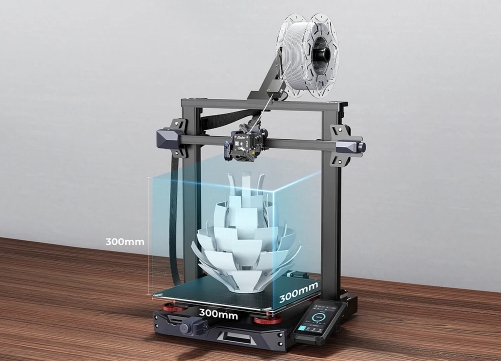
Ender-3 S1 Plus 3D Printer Larger Build Volume, More Creative Possibilities.
Here are some common problems for Ender-3 S1 Plus that we collected, such as installation, printing parameter settings, operational use and so on, which we hope will be helpful to you.
FAQs for Ender 3 S1 Plus Installation
1. How long does it take to assemble the machine?
The printer is 96% preinstalled. Therefore, the assembly takes only 5 to 20 minutes.
2. Where is the filaments rack should be installed?
It is stuck on the gantry.
3. What should I do if the nozzle kit shakes after the machine is installed?
Tighten the eccentric nut located on the back panel of the nozzle kit. Once you have completed debugging, the nozzle kit should slide left and right with ease.
4. Why does the platform shake slightly after the machine has been installed?
Adjust the eccentric nut located at the V wheel of the hot bed.
5. What should I do if the X-axis movement is stuck after the machine is assembled or left for a period of time?
Check whether the V-wheel is stuck, and debug V wheel to smooth state.
6. Does the Z-axis limit switch need to be installed?
No installation is required by default. When the auto-leveling CR-Touch fails, the Z-axis limit switch needs to be installed, and manual leveling is needed.
FAQs for Ender 3 S1 Plus Printing Parameter Settings
1. What is the print size of Ender 3 S1 Plus?
L*W*H: 300*300*300mm
2. Does the machine support two-color printing?
The printer has a single nozzle structure and cannot print in two colors.
3. What is the printing accuracy?
Standardized 0.4mm nozzle supports 0.1-0.35mm precision.
4. Can 3mm filaments be used?
Only 1.75mm diameter filaments are supported.
5. What types of filaments can the machine print?
PLA, TPU, PETG and other linear filaments. (ABS can be printed when the temperature of the inner cavity of the thermal insulation cover reaches 40 degrees)
6. Can Ender 3 S1 Plus connect to a computer for printing?
Offline and online printing are both supported, but offline printing is generally recommended.
7. Can the local voltage 110V be used?
The power supply has two gears for adjustment: one for 115V and another for 230V. It operates at a frequency of 50/60Hz and has a DC output of 24V.
8. How is the power consumption of the machine?
The overall rated power of the machine is 350W, and the power consumption is low.
9. What is the highest temperature of the nozzle and hot bed?
Nozzle 260 degrees. Hot bed 100 degrees.
10. Does it have the power-off printing resume function and broken material detection function?
Yes, Both
11. Is the machine equipped with a double Z-axis screw?
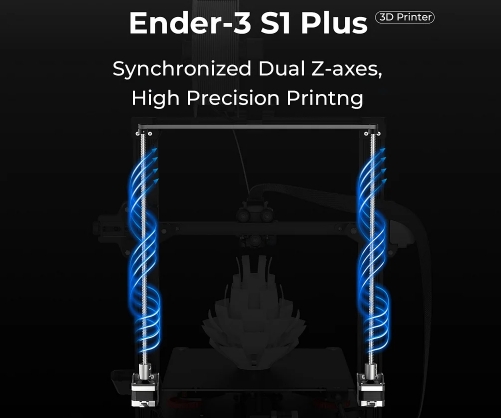
Yes. Ender 3 S1 Plus is upgraded to dual Z-axis screws and dual motors, which ensures stable movement and higher print quality.
12. Can the machine switch between Chinese and English?
Yes. Switching steps: Open the "Prepare" interface and select "Language".
13. Are there any requirements for the computer system?
Currently supports Windows XP/Vista/7/10/MAC/Linux
14. What is the print speed?
The fastest speed is 150mm/s, 50-100mm/s is the best.
FAQs for Ender 3 S1 Plus Operational Use
1. How to open the machine?
After plugging in the power, press the switch to turn it on.
2. Do I need to shut down after printing?
The nozzle and hot bed are automatically cooled after printing. If you don't need to continue printing the model, you can turn off the machine.
3. Will the hot bed cool down when pause printing?
No, the hot bed will not cool, but the nozzle will cool.
4. How to conduct leveling?
The machine supports auto-leveling. For specific steps, please refer to the auto leveling and auxiliary leveling in our unboxing video.
5. How to heat the nozzle/hotbed?
Select Print - PLA Preheat, or select Control - Temperature - Nozzle/Hotbed Temperature (Maximum 250 for Nozzle and 100 for Hotbed), and wait for the temperature to rise.
6. How to load filaments?
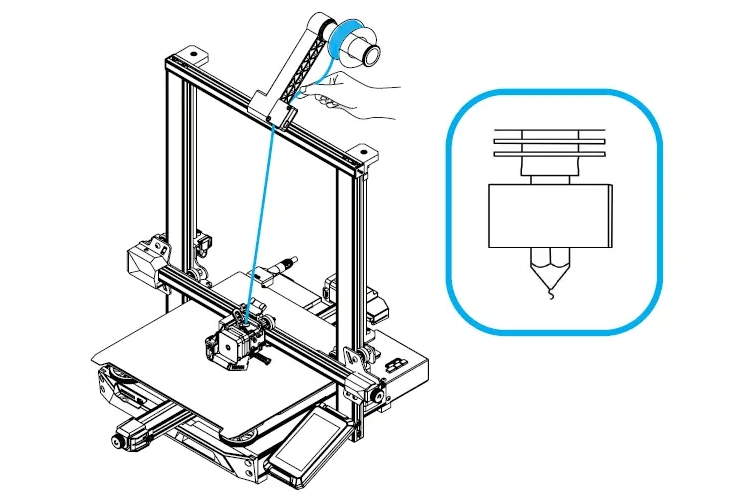
Start-control-temperature-Set the nozzle temperature to 200 degrees-Cut off the front end of the filament at a 45-degree angle-Straighten the front section of filament-Press and hold the extrusion clamp or through the manual feeding command-Move the filament along the extruder. The hole is fed into the Teflon tube until the filaments flow out from the nozzle.
7. How to change filaments?
Keep the nozzle at 200 degrees, pinch the extrusion clip, push the old consumables forward a little, then pull them out quickly, and then put the new good filaments in.
8. What should I do if there is a sudden power failure when the model is not finished printing?
There is a power-off resume function, so you can continue printing after reconnecting the power.
9. Are there any requirements for the environment when using?
Usually room temperature is fine, if the ambient temperature is below 10 degrees, the temperature of the hot bed needs to be raised to about 60 degrees for printing.
10. Does the machine work loudly?
Using a 32-bit mute motherboard and fan, when the machine is working as a whole, the volume generated within 0.5 meters is about 55 decibels or fewer, which is relatively quiet.
11. Is the machine compatible with various apertures of the nozzles?
The default is 0.4mm, and 0.2mm, 0.6mm, and 0.8mm nozzles can also be replaced. At the same time, the layer height and wall thickness of the slicing software also need to be set synchronously.
12. Can ABS be printed?
ABS has a high demand for ambient temperature. It needs to be matched with a thermal insulation cover to keep in a constant temperature environment when printing. It is not recommended to print directly.
13. Is the machine suitable for children and the elderly?
Children and the elderly need to use it under the other's guidance to avoid burns because the nozzle is in a high-temperature state after heating.
14. Does the machine work continuously when the size of the printed model is large?
The machine can print continuously for up to 200 hrs, you can print with confidence.
15. How to move the X/Y/Z/E-axis individually?
Click "Prepare" on the UI interface, select "Axis Movement" to control each axis individually, and you can also select the distance of each movement (0.1mm/1mm/10mm).
16. Can the nozzle be moved manually?
Click "Prepare" on the UI interface, and select "Turn off the motor" to manually move the nozzle.
Ender 3 S1 Plus Quick Start Guide
 People Also Read:
Ender-3 S1: 50 common printer problems and how to solve?
Comparative Analysis: Creality Ender 3 Pro, Ender 3 V2, Ender 3 S1, Ender 3